ENGLISH
5
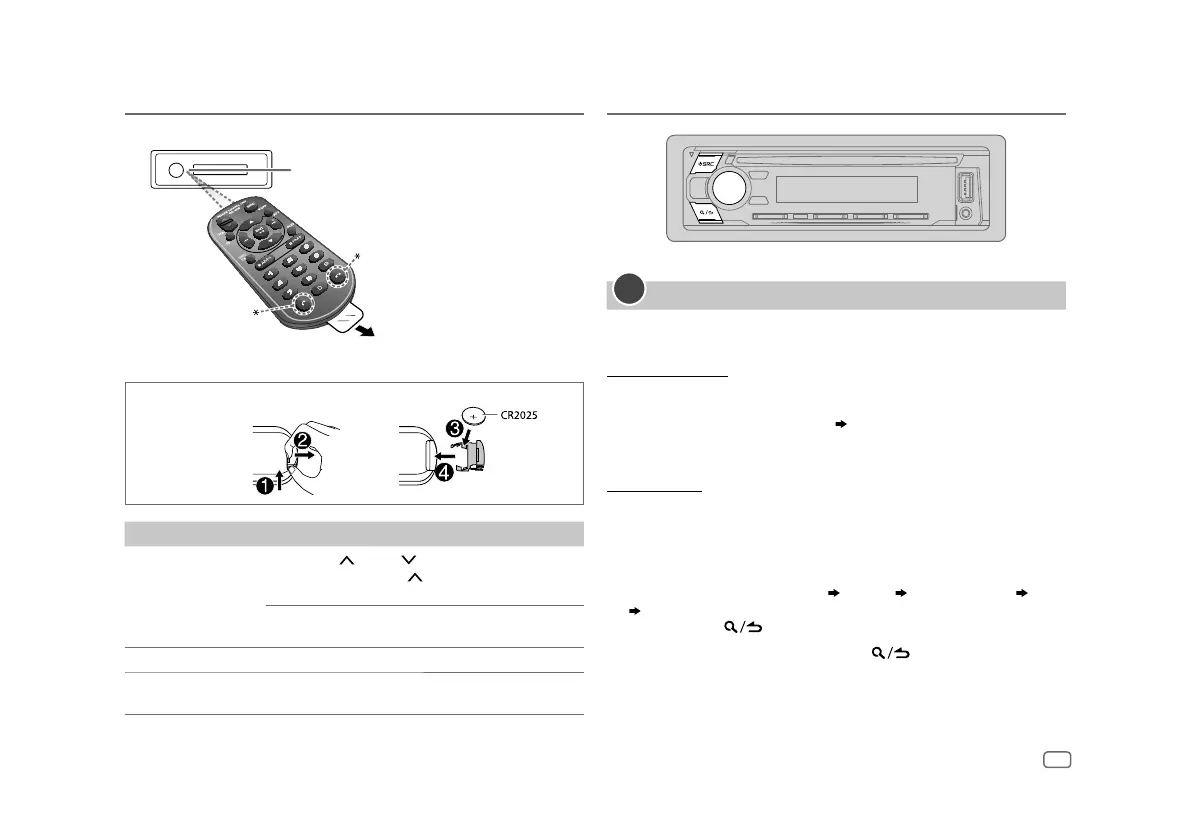
Remote control (RC-406)
Remote sensor (Do not expose to bright
sunlight.)
Pull out the insulation sheet
when using for the first time.
* Not used.
Basics Getting Started
1
Set the clock and date
1
Press the volume knob to enter
[FUNCTION]
.
2 Turn the volume knob to select
[CLOCK]
, then press the knob.
To adjust the clock
3 Turn the volume knob to select
[CLOCKADJUST]
, then press the knob.
4 Turn the volume knob to make the settings, then press the knob.
Set the time in the order of “Hour” “Minute”.
5 Turn the volume knob to select
[CLOCK FORMAT]
, then press the knob.
6 Turn the volume knob to select
[12H]
or
[24H]
, then press the knob.
To set the date
7 Turn the volume knob to select
[DATEFORMAT]
, then press the knob.
8 Turn the volume knob to select
[DD/MM/YY]
or
[MM/DD/YY]
, then press
the knob.
9 Turn the volume knob to select
[DATESET]
, then press the knob.
10 Turn the volume knob to make the settings, then press the knob.
Set the date in the order of “Day” “Month” “Year” or “Month” “Day”
“Year”.
11 Press and hold to exit.
To return to the previous setting item, press
.
How to replace the battery
To On the remote control
Adjust the volume Press VOL or VOL .
• Press and hold VOL
to continuously increase
the volume to 15.
Press ATT during playback to attenuate the sound.
• Press again to cancel.
Select a source Press SRC repeatedly.
Turn off the power Press and hold SRC to turn off the power.
( Pressing SRC does not turn on the power. )


 To Next Page