12
ENGLISH
Audio Settings
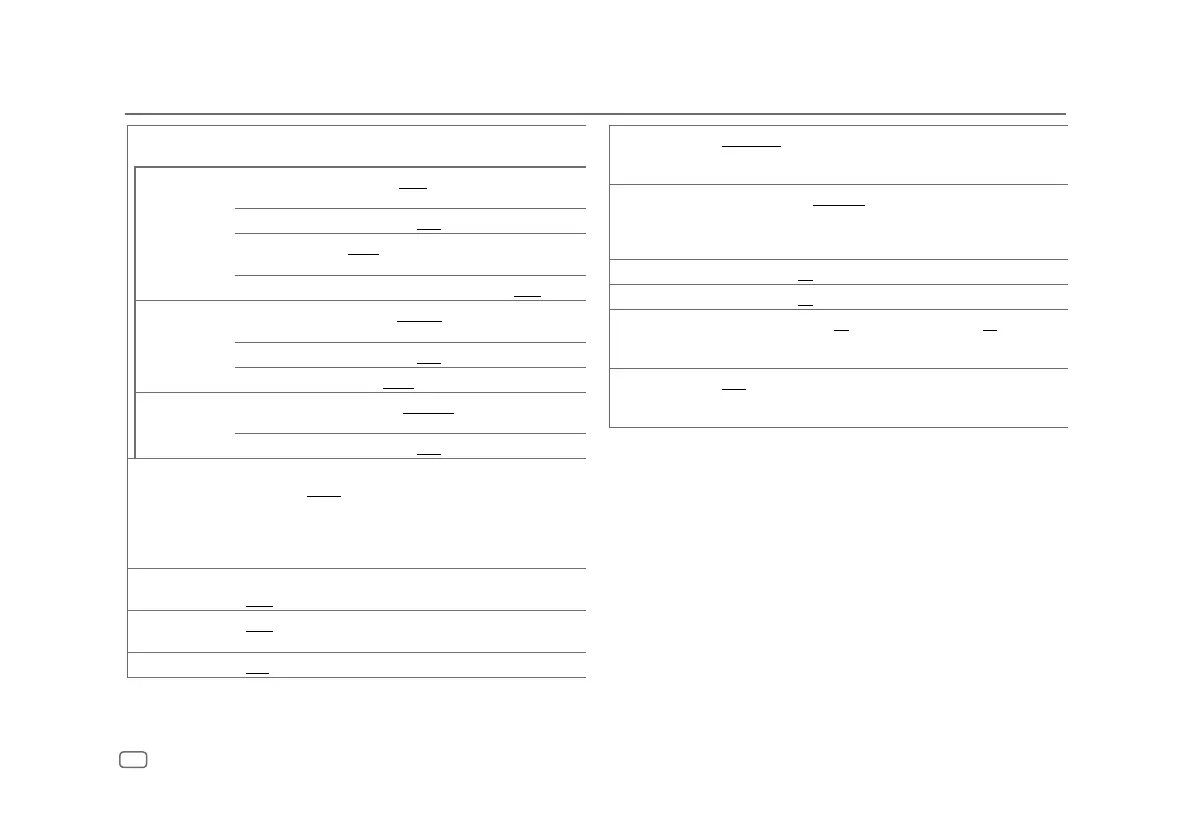
[EQ PRO] Adjusts your own sound settings for each source.
• The settings are stored to [USER] in [PRESET EQ].
[BASS ADJUST] [BASS CTR FRQ]
[60]/[80]/[100]/[200]: Selects the center
frequency.
[BASS LEVEL]
[–8] to [+8] ([+2]): Adjusts the level.
[BASS Q FACTOR]
[1.00]/[1.25]/[1.50]/[2.00]: Adjusts the quality
factor.
[BASS EXTEND]
[ON]: Turns on the extended bass. ; [OFF]: Cancels.
[MID ADJUST] [MID CTR FRQ]
[0.5KHZ]/[1.0KHZ]/[1.5KHZ]/[2.5KHZ]: Selects
the center frequency.
[MID LEVEL]
[–8] to [+8] ([+1]): Adjusts the level.
[MID Q FACTOR]
[0.75]/[1.00]/[1.25]: Adjusts the quality factor.
[TRE ADJUST] [TRE CTR FRQ]
[10.0KHZ]/[12.5KHZ]/[15.0KHZ]/[17.5KHZ]:
Selects the center frequency.
[TRE LEVEL]
[–8] to [+8] ([+1]): Adjusts the level.
[PRESET EQ]
[DRIVE EQ]/[TOP40]/[POWERFUL]/[ROCK]/[POPS]/[EASY]/[JAZZ]/
[NATURAL]/[USER]: Selects a preset equalizer suitable to the music
genre.
• Select [USER] to use the settings made in [EQ PRO].
• [DRIVE EQ] is a preset equalizer that reduces noise outside the car or
running noise of the tyres.
[BASS BOOST]
[LV1]/[LV2]/[LV3]: Selects your preferred bass boost level. ;
[OFF]: Cancels.
[LOUDNESS]
[LV1]/[LV2]: Selects your preferred low or high frequencies boost to
produce a well-balanced sound at low volume. ; [OFF]: Cancels.
[SUBWOOFER SET]
[ON]: Turns on the subwoofer output. ; [OFF]: Cancels.
[LPF SUBWOOFER] [THROUGH]: All signals are sent to the subwoofer. ; [85HZ]/[120HZ]/
[160HZ]: Audio signals with frequencies lower than 85 Hz/120 Hz/
160 Hz are sent to the subwoofer.
[SUB-W PHASE]
[REVERSE] (180°)/[NORMAL] (0°): Selects the phase of the subwoofer
output to be in line with the speaker output for optimum performance.
• Selectable only if a setting other than [THROUGH] is selected for
[LPFSUBWOOFER].
[FADER]
[R15] to [F15] ([0]): Adjusts the front and rear speaker output balance.
[BALANCE] [L15] to [R15] ([0]): Adjusts the left and right speaker output balance.
[VOLUME OFFSET] For AUX: [–8] to [+8] ([0]) ; For other sources: [–8] to [0]: Presets the
initial volume level of each source by comparing to the FM volume level.
(Before adjustment, select the source you want to adjust.)
[SOUND RECNSTR]
(Sound
reconstruction)
[ON]: Creates realistic sound by compensating the high-frequency
components and restoring the rise-time of the waveform that are lost in
audio data compression. ; [OFF]: Cancels.
•
[SUB-W LEVEL]
/
[SUBWOOFER SET]
/
[LPF SUBWOOFER]
/
[SUB-W PHASE]
is selectable
only if
[SWITCH PREOUT]
is set to
[SUB-W]
. (Page 6)
•
[SUB-W LEVEL]
/
[LPF SUBWOOFER]
/
[SUB-W PHASE]
is selectable only if
[SUBWOOFER
SET]
is set to
[ON].


 To Next Page