22
Remote Control, CDP
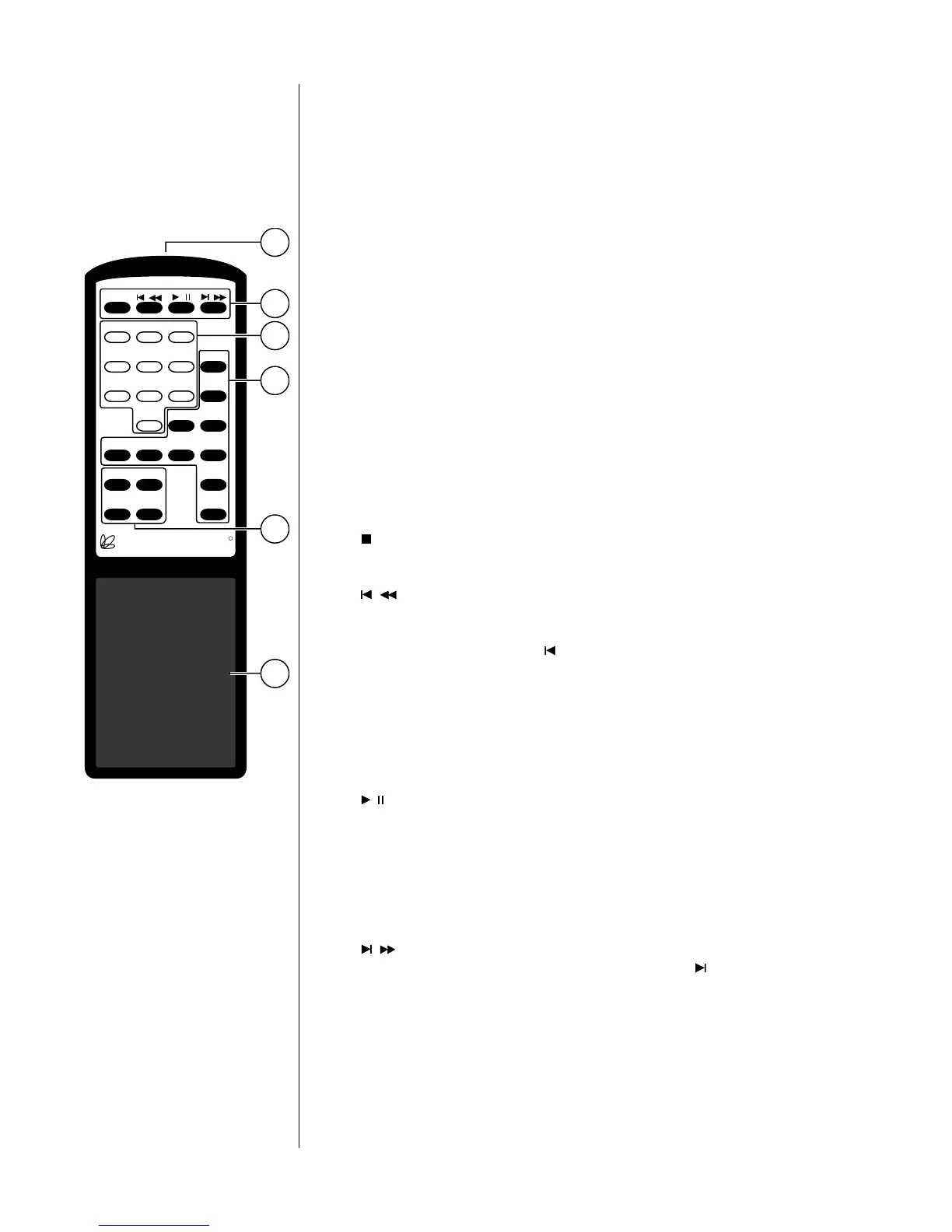
1 IR TRANSMITTER
The CDP’s Remote Control sends infrared (IR) commands through its pro-
jection lens, and the CDP receives IR commands through its Remote sensor
window. (See “Front Panel, CDP”). If either of these lenses is obstructed, no
IR commands can be received by the CDP. If you notice IR performance
deteriorating, you may want to clean these lenses with a soft cloth and
some glass cleaner. (Spray the cleaner on the cloth first, and then wipe the
lens with the moistened cloth. Do not spray the cleaner directly on
either lens, as this may allow moisture to migrate into the electronics be-
hind the lens assemblies.)
2 TRANSPORT BUTTONS
The buttons used for routine operation of transport functions on the CDP
are grouped at the top of the remote control. They include:
( /dwr) stop/dwr: Press to stop play. The same button will operate
the drawer if stopping the disc has no relevance (e.g., if it is al-
ready stopped, or if there is no disc inside the CDP).
( / ) previous/rewind: When pressed and released quickly, this
will take you to the beginning of the current track; when pressed
repeatedly, this button will step you backwards through the previ-
ous tracks, one at a time. ( is the international symbol for previ-
ous). When pressed and held, the CDP will enter a reverse au-
dible scanning mode similar to the familiar rewind function of
many cassette decks, allowing a precise location within a track to
be located. (Note that if you press prev/rew within two seconds
of the beginning of a track, the CDP will assume that you meant
to go further back and take you to the beginning of the previous
track rather than the current track.)
( / ) play/pause: Press to enter the play mode from either stop,
pause or standby. When in play mode, press to pause play in
the current location. If left in pause mode for more than two
minutes, the CDP will enter extended pause mode, shutting
down both the laser and the drive motors to enhance longevity
and reliability. Upon pressing pause or play a second time, the
disc will spin up and begin playing from the location where it
had been paused.
( / ) next/fast forward: When pressed and released quickly, this
will take you to the beginning of the next track. ( is the interna-
tional symbol for next). When pressed and held, the CDP will
enter a fast forward audible scanning mode similar to the familiar
fast forward function of many cassette decks, allowing a precise
location within a track to be located.
R
PR O C E E D
■/dwr / / /
123
4 5 6 prog+
7 8 9 prog–
0 time polarity
dispoff repeat rpt a/b rndm
source up display
mute down standby
2
3
4
1
5
6



 To Next Page