10 Press or to adjust the lower
current value. Press
SET
to retain the
value. The screen displays
U fol-
lowed by the current upper display
value limit,( i.e. 500°, 10 volt)
11 Use or to alter the upper
display value. Press
SET
to retain
the value. The display will then read
hexadecimal D555 or 20.0 mA.
12 Verify the value by observing
the value on your 4-20 mA calibra-
tor/tester or DMM.
13 Adjust the upper current output
value by pressing
or . Press
SET
to retain the value. The current
sensor input value then displays
and the 4-20 mA output will reflect
your new or confirmed settings.
14 Turn OFF all power.
15 Disconnect calibration equip-
ment.
16 Reconnect 4-20 mA lead and
sensor leads.
17 Reinstall rear cover.
Error Conditions
Sensor values that are out of range
will generate an error display. The
temperature range is as follows:
Celsius: <-40° C or >+538° C
Fahrenheit: <-40° F or >+1000° F
Calibration Error Messages
If calibration or setup information
stored in the memory becomes
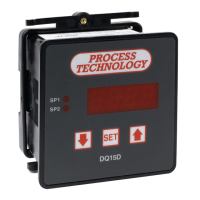
corrupt or erased, DQ15D
switches to its default calibration
and setup settings. A flashing letter
c displays on the left side when
DQ15D switches to default
settings. The size and position of
the letter c will define the exact
nature of the problem.
c A small c in the upper left-hand
corner indicates the control is
relying on default (factory set)
calibration values. This happens
when the control is new and has
not yet been calibrated (setup).
c A small c in the lower left hand
corner indicates the control is
relying on default configuration
values. This is a rare condition,
but may occur if the control has
been calibrated for use with a
two-wire RTD sensor but the
configuration parameters have
not been changed from their
default values. Changing any of
the configuration or Set Point
variables will turn off this
indication.
C A large C on the left side of the
display indicates default values
are being used for the
configuration and the calibration.
This can occur in a new control
that has never been calibrated or
configured, or if the memory has
been erased.


 To Next Page