Installation
DQ15D is for indoor use only.
1 Unpack and inspect DQ15D for
damage upon receipt. Shipping
damage claims must be made
through the freight carrier.
2 Remove rear cover and inspect
DQ15D for internal damage.
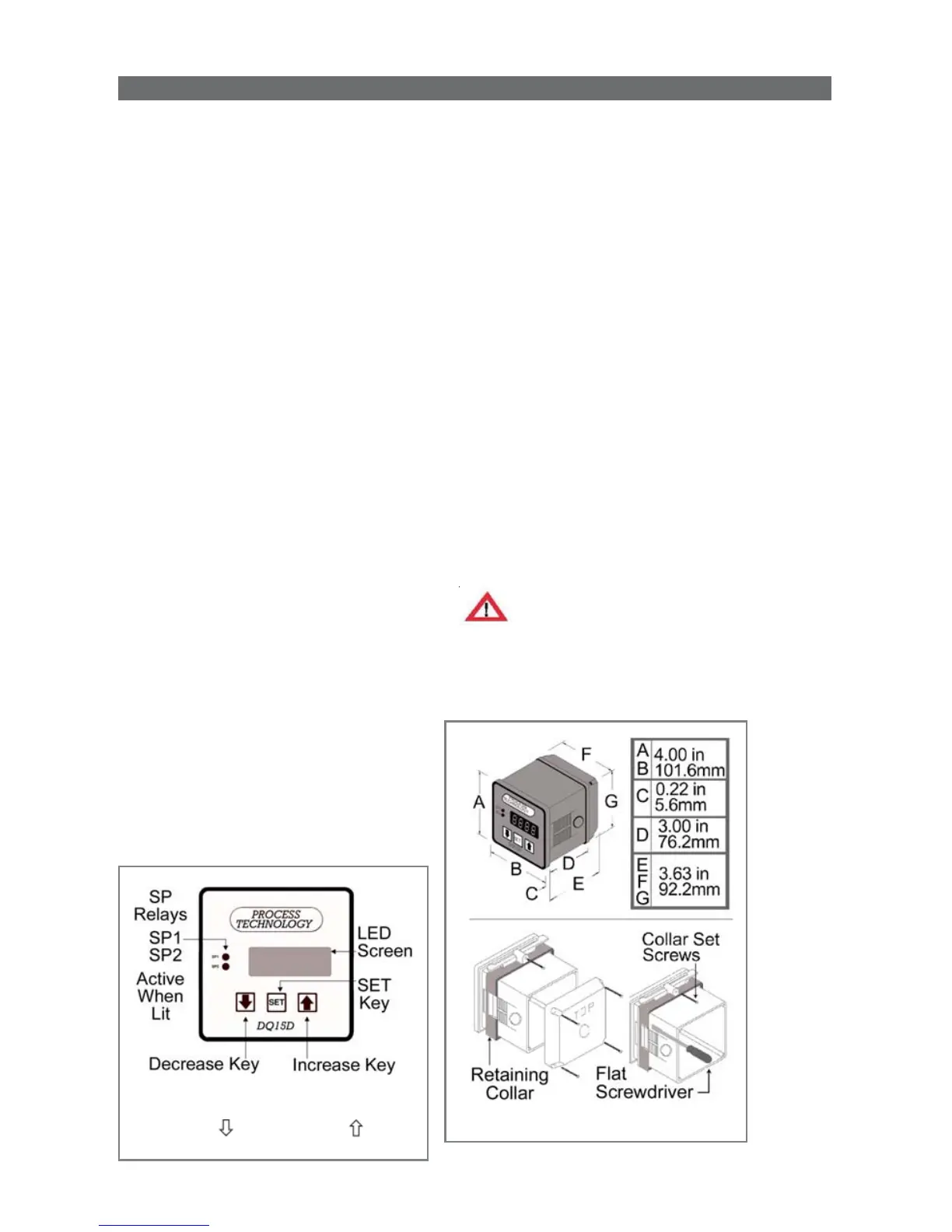
3 Remove the Retaining Collar.
Insert a flathead screwdriver under
the collar on alternating sides while
sliding the collar back.
4 Cut a
1
/4 DIN finished opening:
3.625" x 3.625" (92 mm x 92 mm) in
the desired mounting panel location.
5 Select one or more knock-outs
from the three (3) knockouts on the
rear cover or enclosure side panels
that offers the most convenient
routing for external wiring.
Caution
Avoid damaging DQ15D components.
Remove rear cover before removing
knockouts with a hammer/punch.
(Inst allation continued on p age 6)
General Description
The DQ15D digital temperature
control is a programmable and
microprocessor-based controller
designed to operate two relays for
temperature control.
Features
The temperature sensor (RTD or
thermocouple) sends a signal to the
DQ15D to compare to a value
preset by the user as a Set Point
(SP). Set Points LEDs are
SP1 and
SP2 on the front panel.
• In heating mode if the sensor
signal is lower than the
SP1
Set
Point value, DQ15D energizes the
SP1
relay and its isolated contacts
close.
• In cooling mode if the sensor
signal is higher than the
SP2
Set
Point value, DQ15D energizes
SP2
relay and its isolated contacts close.
• DQ15D has an optional Alarm
Condition feature. After you
activate this feature, when the
sensor signal exceeds the Alarm Set
Point, DQ15D goes into an alarm
condition. In an Alarm Condition,
both relays de-energize and the
screen displays a flashing
AAA.
• The power save, night setback
feature permits the use of a second
heating Set Point to conserve
energy when required.
General Description


 To Next Page