11
OPERATING HEATER
FOR YOUR SAFETY
READ BEFORE LIGHTING
A. This appliance is equipped with an
ignition device which automatically
lights the pilot. Do not try to light the
pilot by hand.
B. BEFORE LIGHTING smell all around
the appliance area for gas. Be sure to
smell next to the floor because some
gas is heavier than air and will settle
on the floor.
WHAT TO DO IF YOU SMELL GAS
Do not try to light any appliance.
Do not touch any electrical switch; do
not use any phone in your building.
Immediately call your gas supplier
from a neighbor’s phone. Follow the
gas supplier’s instructions.
If you cannot reach your gas supplier,
call the fire department.
REMOTE CONTROL
OPERATING INSTRUCTION
Note: If operating by remote control,
you must set the Control Knob on
ELECTRIC position. (See Figure 11)
Do not set the control knob between
locked position, otherwise there will
be no power to the heater.
1. STOP! Read the safety information
above.
2. Disconnect or turn off all electric
power to heater.
3. This appliance is equipped with an
ignition device which automatically
lights the pilot. Do not try to light the
pilot by hand.
4. Wait five (5) minutes to clear out
any gas. Then smell for gas around
heater including near floor. If you
smell gas, STOP! Follow “B” in the
safety information above. If you don’t
smell gas, go to the next step.
5. Plug into a properly grounded three-
prong receptacle, and install three
AAA batteries in remote. A high pitch
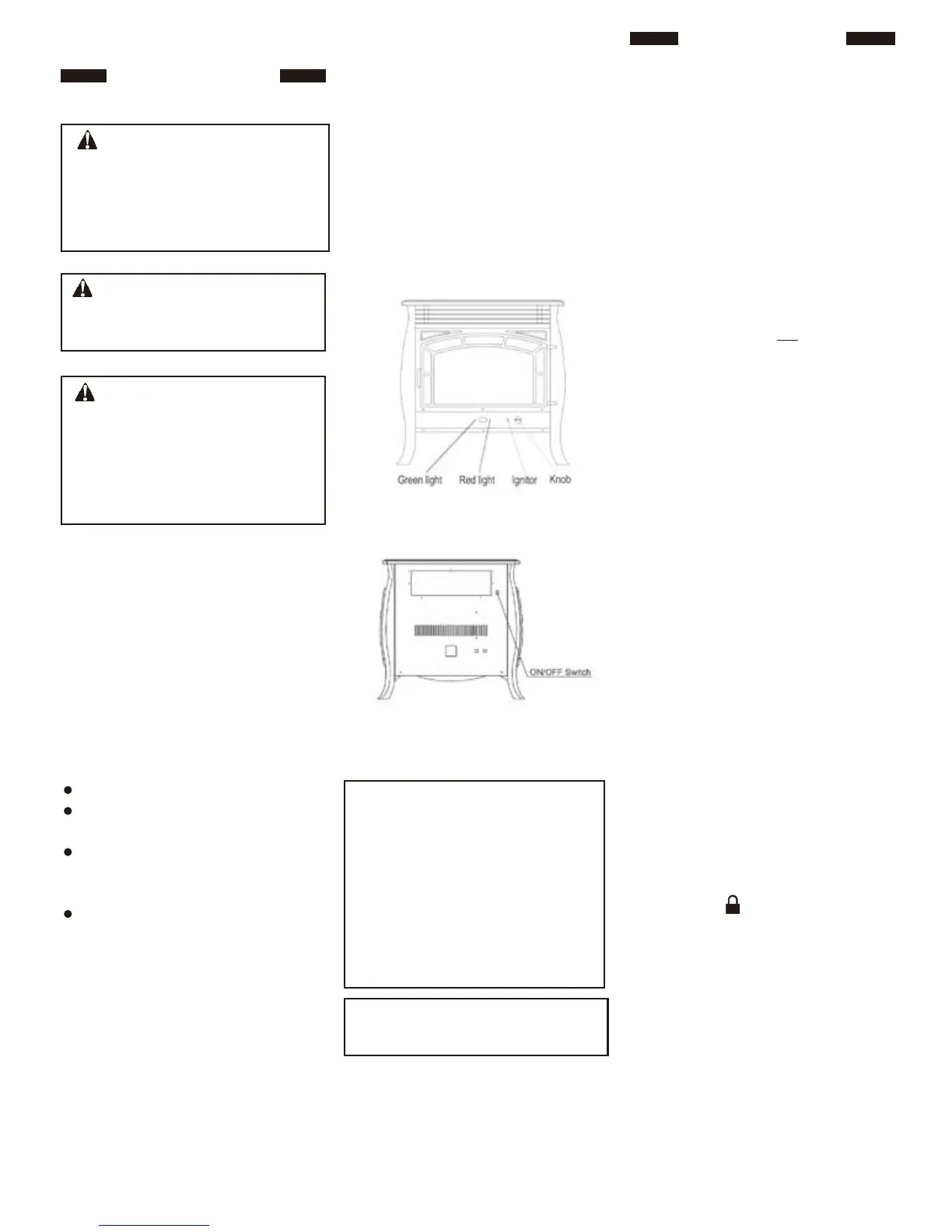
sound will occur and red power light
on front of heater will be lit.
6. Make sure Control Knob is in Electric
Position.
7. Point remote at bottom front of heater,
press IGN/OFF button, an electric
spark will ignite the pilot, and green
light on front of heater will be lit.
Note: When operating heater for the
first time, the ignition period may be
30 seconds or longer. This will allow
air to exit from the gas system.
Note: T he pilot is located on back of
front burner. If pilot does not stay lit,
contact a qualified service person or
gas supplier for repairs.
Note : If the appears on the control
board, press the lock button and hold
until lock image shows unlocked
Figure 11 - Manual Operation
Control Panel
(With access panel removed)
Figure 12 - On/Off Switch
Function of Manual ON/OFF Button
and Power ON/OFF Switch
Note: To operate your heater the ON/
OFF switch on back of heater must be
in the ON position. The RED light on
the front of heater indicates there is
electrical power to your heater when
the ON/OFF switch is in the ON posi -
tion. The GREEN light on the front of
heater indicates the pilot light is ON.
(See Figure 12)
Note: Please wait for one minute to
light again after shutting off heater.
WARNING: If you do not follow
these instructions exactly, a fire or
explosion may result causing prop -
erty damage, personal injury or loss
of life.
CAUTION: Do not try to adjust
heating levels by using the equipment
shutoff valve.
NOTICE: During initial operation
of new heater, logs will give off a
paper-burning smell. Orange flame
will also be present. Open a window
to vent smell. This will only last a
few hours.
C. Use only your hand to push control.
Never use tools. If the appliance does
not operate, don’t try to repair it, call
a qualified service technician or gas
supplier. Force or attempted repair
may result in a fire or explosion.
D. Do not use this appliance if any part
has been under water. Immediately
call a qualified service technician to
inspect the appliance and to replace
any part of the control system and
any gas control which has been
under water.



 To Next Page