3302F Mainframe Operation Manual 7
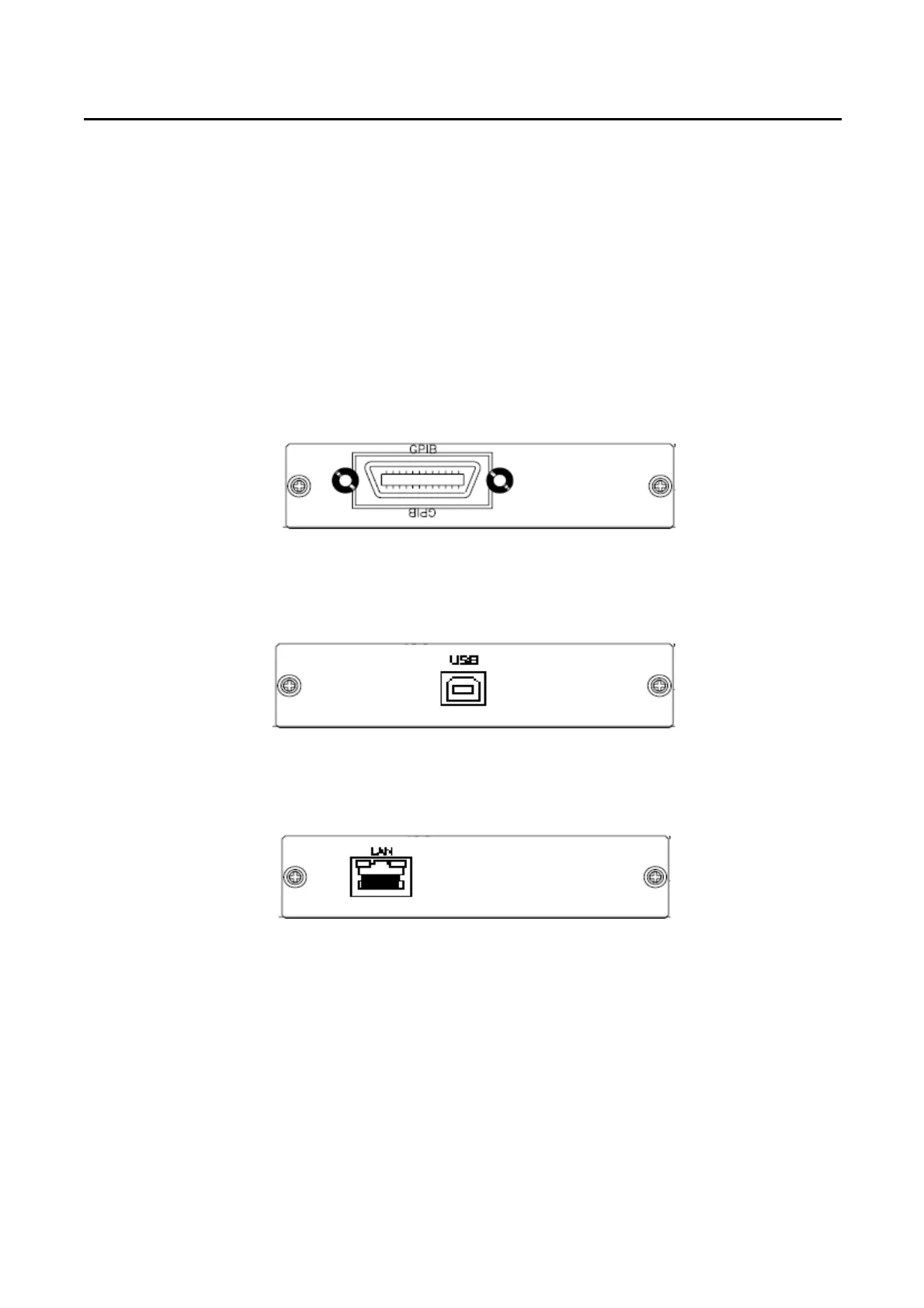
2.11 GPIB connection option
The GPIB connector is located on the rear panel. This socket allows the 3302F to be
connected to the controller and other GPIB devices. A GPIB system can be connected in any
configuration (star, linear, or both) as long as
• The maximum number of devices including the controller is ≤15.
• The maximum length of the GPIB cable is no more than 2 meters times.
• The total lead length of all devices connected together total <20 meters.
• Please make sure the lock screws are firmly hand-tightened, use a
Screwdriver only for the removal of screws. Fig 2-5 shows the rear
Panel of 3302F mainframe, The GPIB address of the 3302F mainframe is
Set on front panel.
Fig 2-5 3302F REAR PANEL
2.12 USB Connection Option
Fig 2-6 shows the USB connector in the rear panel of 3302F mainframe. Please refer
Appendix B.
Fig 2-6 3302F USB Connection
2.13 LAN Connection Option
Fig 2-7 shows the LAN connector in the rear panel of 3302F mainframe. Please refer
Appendix C.
Fig 2-7 3302F LAN Connection


 To Next Page