3302F Mainframe Operation Manual 68
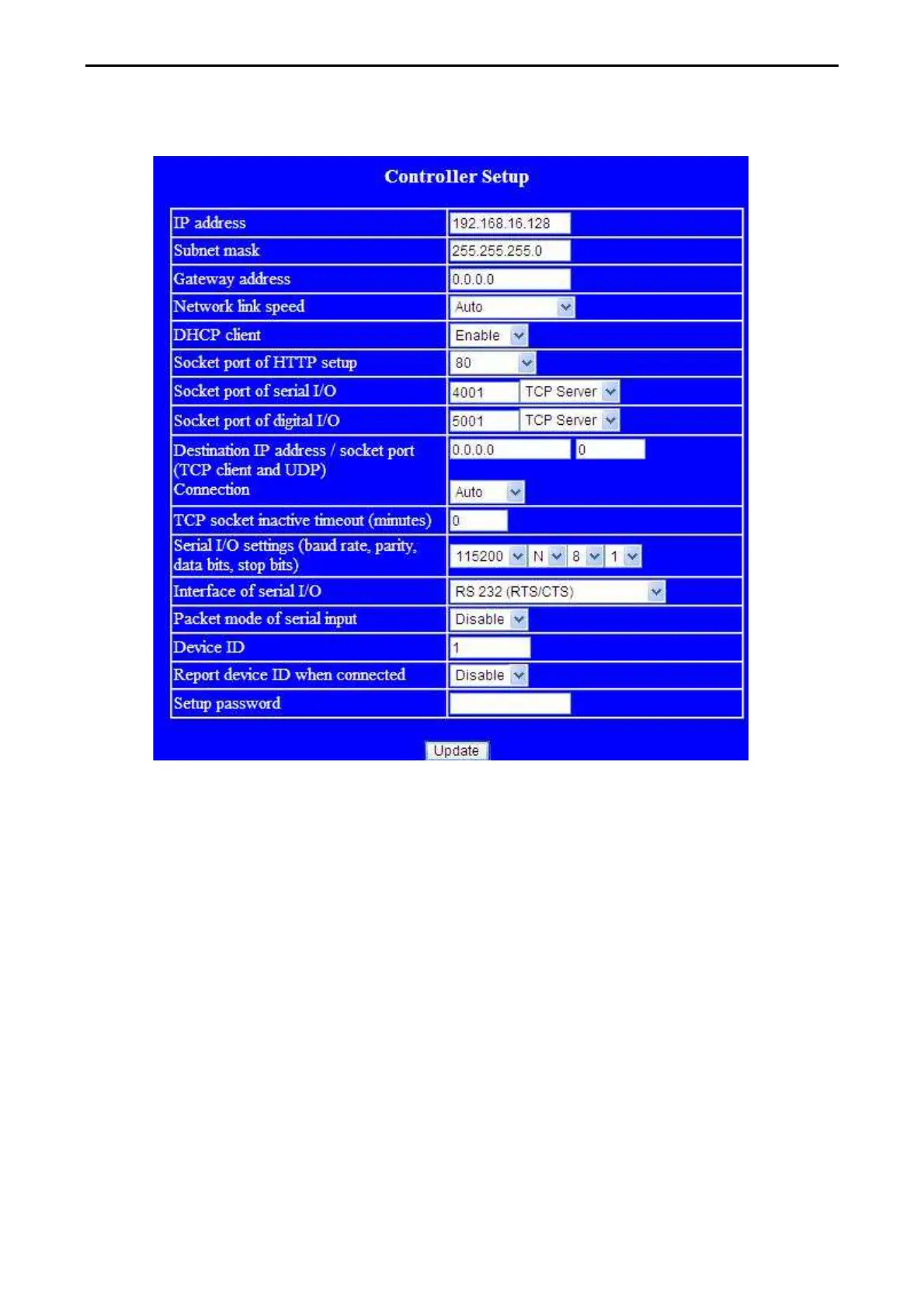
4. The Controller Setup page should be accessible, once everything is set correctly. This allows
greater control over the communications interface.
5. Insert the following into the controller set up screen:
a) IP Address: as recommended according to your network
b) Subnet Mask: as recommended according to your network
c) Gateway Address: as recommended according to your network
d) Network link speed: Auto
e) DHCP client: Enable
f) Socket port of HTTP setup: 80
g) Socket port of serial I/O: 4001
,TCP Server
h) Socket port of digital I/O: 5001
,TCP Server
i) Destination IP address / socket port (TCP client and UDP) Connection: Auto
j) Serial I/O settings (baud rate, parity, data, bits, stop bits): 115200, N, 8, 1
k) Interface of serial I/O: RS 232
(RTS/CTS)
l) Packet mode of serial input: Disable
m) Device ID : 5
n) Setup password: Not required
o) Access password : Not required


 To Next Page