Rev.20170601 V1.0E HPC INSTALLATION & OPERATION MANUAL 11
Section Ⅸ - Filter Replacement Instructions
System Notes:
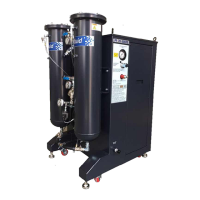
Filter replacement is required when the differential pressure across
the filter element reaches (0.8Bar(8-10psi).
⓵
Filter Inlet Gauge
⓶
Filter Select Valve
⓷
Coolant Inlet
⓸
Outlet Filter Gauge
⓹
Outlet Filter Select Valve
⓺
Filter Drain Valve(s)
⓻
Filter basket
⓼
Filter presser plate
⓽
Filter
(
(stainless steel mesh)
To replace the filter, the procedure is as follows:
Verify HPC System and coolant system is "OFF",
1. Open
Drain Valve
.
2. After pressure is relieved from filter housing
(Inlet Filter Gauge should read zero)
, remove lid.
3. Allow coolant to drain through filter element and back to machine sump. A filter canister holds 25liters(6.5
gallons).
Avoid spillage; check sump level prior draining canister(s).
4. Remove filter canister o-ring and filter hold down spring. Remove and discard dirty filter element. Verify metal
strainer basket is seated properly. Insert new element into basket. Be sure element seal ring is properly seated
evenly and firmly. A snug, light press fit prevents dirty coolant from leaking around the filter element seal ring.
Install filter canister o-ring, filter hold down and secure filter lid.
5. Close the
Filter Drain Valve
- handle vertical.
Note:
Pressure gauge pointers should be steady. A bouncing or fluctuating pointer may indicate an excessive
amount of air is entrained in the coolant supply to the HPC Pump.


 To Next Page