EasyManua.ls Logo

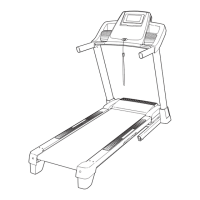
ProForm 400 Zlt Treadmill - User Manual

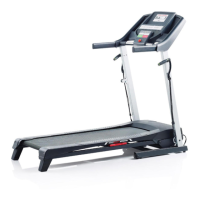
ProForm 400 Zlt Treadmill
28 pages
Print Icon
To Next Page IconTo Next Page
Loading...
Model No. PETL49910.0
Serial No.
Write the serial number in the space
above for future reference.
CAUTION
Read all precautions and instruc-
tions in this manual before using
this equipment. Save this manual
for future reference.
Serial Number
Decal
USER'S MANUAL
QUESTIONS?
If you have questions, or if there are
missing parts, please contact us:
UK
Call: 08457 089 009
From Ireland: 053 92 36102
Website: www.iconsupport.eu
E-mail: csuk@iconeurope.com
Write:
ICON Health & Fitness, Ltd.
c/o HI Group PLC, Express Way
Whitwood, West Yorkshire
WF10 5QJ
UK
AUSTRALIA
Call: 1-800-237-173
E-mail:
australiacc@iconfitness.com
www.iconeurope.com

Other manuals for ProForm 400 Zlt Treadmill

Question and Answer IconNeed help?

Do you have a question about the ProForm 400 Zlt Treadmill and is the answer not in the manual?

Summary

Important Precautions

Before You Begin

Familiarize Yourself with Treadmill Parts

Review the diagram and familiarize yourself with the labeled parts of the treadmill.

Assembly

Assemble Base, Uprights, and Wheels

Attach uprights to base, secure wheels and wire tie using specified hardware.

Attach Frame Spacers and Lift Frame

Connect frame spacers to uprights and lift frame using bolts and nuts.

Install Handrails and Console Wiring

Route upright wires, attach handrails, connect console base and ground wire.

Mount Console and Secure Treadmill Frame

Mount console, tighten uprights, secure frame, and attach storage latch.

Operation and Adjustment

Walking Belt Care and Power Connection

Understand walking belt lubrication and proper power cord connection procedures.

Console Overview and Key Features

Explore console features, including manual, preset, and information modes.

Starting and Manual Mode Operation

Learn to turn on the treadmill, start the belt, and adjust speed and incline manually.

Tracking Progress and Heart Rate Monitoring

Follow workout progress, interpret display feedback, and measure heart rate using the sensor.

Using Preset Workouts

Select and execute one of the six programmed preset workouts for guided exercise.

Information and Demo Mode Functions

Access information mode for usage data and manage the display demo mode.

Folding and Moving the Treadmill

Folding the Treadmill for Storage

Follow steps to safely fold the treadmill into its storage position.

Moving and Lowering the Treadmill

Learn the correct procedure for moving the folded treadmill and unfolding it.

Troubleshooting

Power and Console Display Issues

Resolve issues related to power not turning on, turning off, or console display malfunctions.

Incline and Belt Speed Problems

Troubleshoot problems with the incline system and the walking belt speed.

Belt Alignment and Slipping Solutions

Address common problems like the walking belt being off-center or slipping during use.

Exercise Guidelines

Exercise Intensity for Fitness Goals

Determine proper exercise intensity levels for fat burning and cardiovascular health.

Workout Structure and Frequency Advice

Follow guidelines for warming up, training zone duration, cooling down, and exercise frequency.

Part List

Exploded Drawings

Ordering Replacement Parts

Recycling Information

Summary

Important Precautions

Before You Begin

Familiarize Yourself with Treadmill Parts

Review the diagram and familiarize yourself with the labeled parts of the treadmill.

Assembly

Assemble Base, Uprights, and Wheels

Attach uprights to base, secure wheels and wire tie using specified hardware.

Attach Frame Spacers and Lift Frame

Connect frame spacers to uprights and lift frame using bolts and nuts.

Install Handrails and Console Wiring

Route upright wires, attach handrails, connect console base and ground wire.

Mount Console and Secure Treadmill Frame

Mount console, tighten uprights, secure frame, and attach storage latch.

Operation and Adjustment

Walking Belt Care and Power Connection

Understand walking belt lubrication and proper power cord connection procedures.

Console Overview and Key Features

Explore console features, including manual, preset, and information modes.

Starting and Manual Mode Operation

Learn to turn on the treadmill, start the belt, and adjust speed and incline manually.

Tracking Progress and Heart Rate Monitoring

Follow workout progress, interpret display feedback, and measure heart rate using the sensor.

Using Preset Workouts

Select and execute one of the six programmed preset workouts for guided exercise.

Information and Demo Mode Functions

Access information mode for usage data and manage the display demo mode.

Folding and Moving the Treadmill

Folding the Treadmill for Storage

Follow steps to safely fold the treadmill into its storage position.

Moving and Lowering the Treadmill

Learn the correct procedure for moving the folded treadmill and unfolding it.

Troubleshooting

Power and Console Display Issues

Resolve issues related to power not turning on, turning off, or console display malfunctions.

Incline and Belt Speed Problems

Troubleshoot problems with the incline system and the walking belt speed.

Belt Alignment and Slipping Solutions

Address common problems like the walking belt being off-center or slipping during use.

Exercise Guidelines

Exercise Intensity for Fitness Goals

Determine proper exercise intensity levels for fat burning and cardiovascular health.

Workout Structure and Frequency Advice

Follow guidelines for warming up, training zone duration, cooling down, and exercise frequency.

Part List

Exploded Drawings

Ordering Replacement Parts

Recycling Information

ProForm 400 Zlt Treadmill Specifications

General IconGeneral
FoldingYes
Running Area18" x 50"
Incline0-10%
Speed0-10 mph
DisplayLCD
Heart Rate MonitoringYes

Related product manuals