7
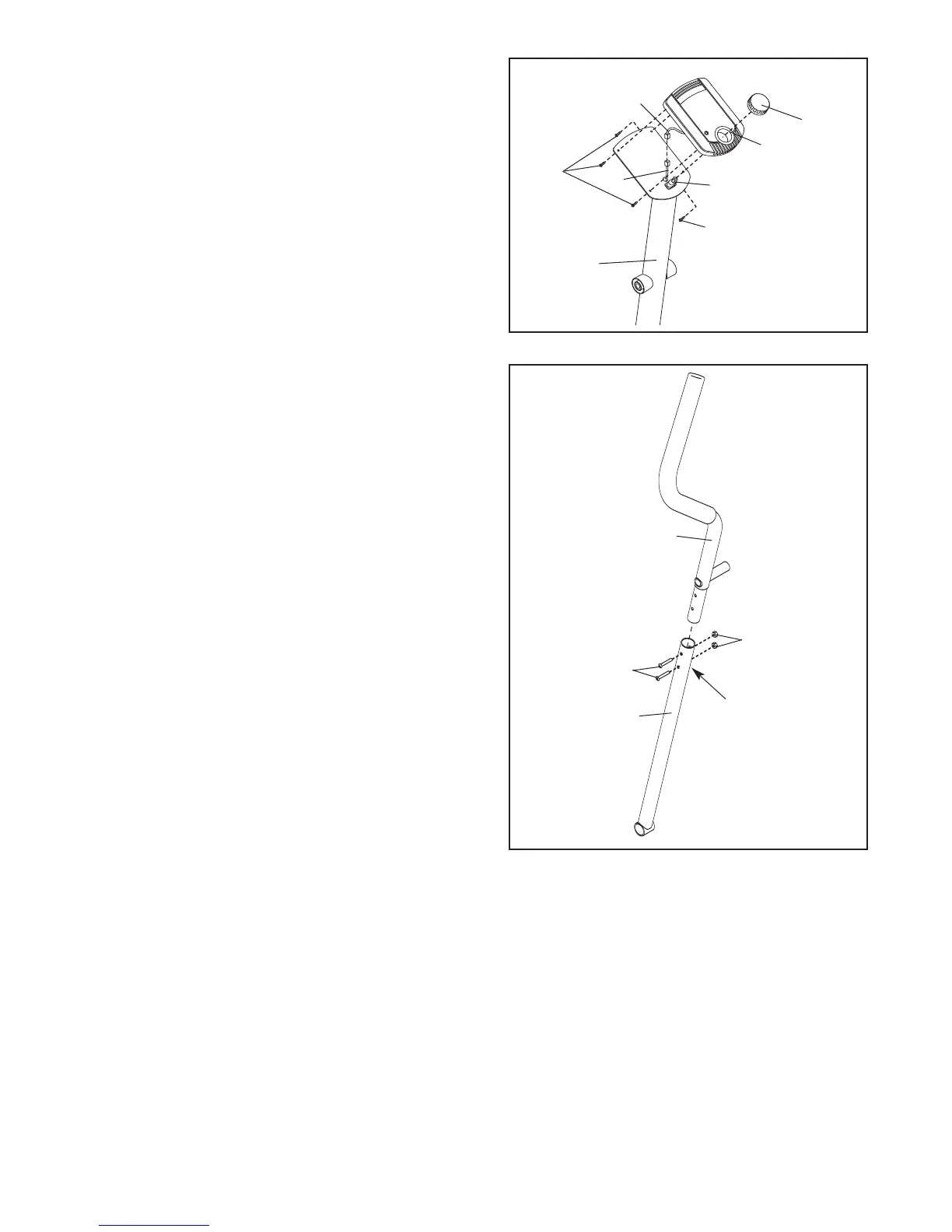
5. Identify the Left Handlebar (6), which is marked with
a sticker. Insert the Left Handlebar into one of the
Handlebar Arms (5); make sure that the Handlebar
Arm is turned so the hexagonal holes are on the
indicated side
. Attach the Left Handlebar to one of
the Handlebar Arms with two M8 x 45mm Button
Bolts (50) and two M8 Nylon Locknuts (38).
Make
sure that the Nylon Locknuts are inside of the
hexagonal holes. Do not fully tighten the Button
Bolts yet.
Attach the Right Handlebar to the other Handlebar
Arm (not shown) in the same way.
5
6
50
38
5
Hexagonal
Holes
4
4
2
44
45
Console
Wire
42
63
2
3
2
4. Connect the Upper Wire (44) to the wire on the
Console (23). Next, attach the Console to the Upright
(
2) with four M4 x 12mm Screws (42).
Press the Resistance Knob (63) onto the Resistance
Control (45).





 To Next Page