13
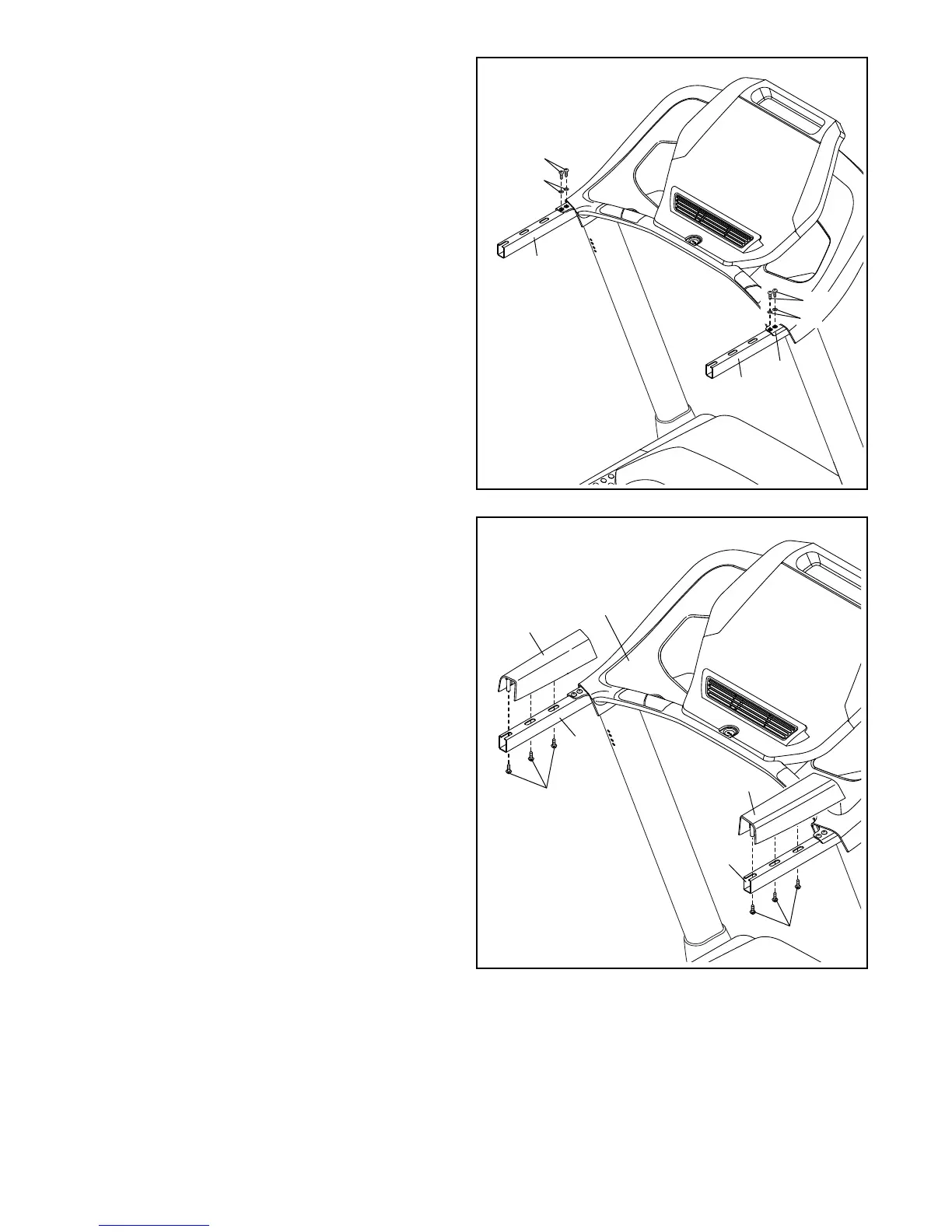
10. IMPORTANT: To avoid damaging the Pulse
Crossbar (5), do not use power tools and do
not overtighten the #10 x 3/4" Screws (9).
Tighten four #10 x 3/4" Screws (9) with four 1/4"
Star Washers (26) into the Pulse Crossbar (5)
and the Handrails (84); start all four Screws,
and then tighten them.
See step 9. Tighten the four 1/4" x 1/2"
Screws (2).
10
9
9
84
5
84
26
26
11. Identify the Left and Right Handrail Inserts (79,
31).
Set the Left Handrail Insert (79) on the left
Handrail (84), and slide the Left Handrail
Insert against the console assembly. Then,
attach the Left Handrail Insert with three #8 x
3/4" Screws (4).
Attach the Right Handrail Insert (31) in the
same way.
11
84
31
79
84
4
4
Console
Assembly




 To Next Page