PROBLEM: The walking belt slows when walked on
SOLUTION: a. Use onlya UL-listedsurge protector,rated at 15 amps, with a 14-gauge cord of five feet or lessin
length.
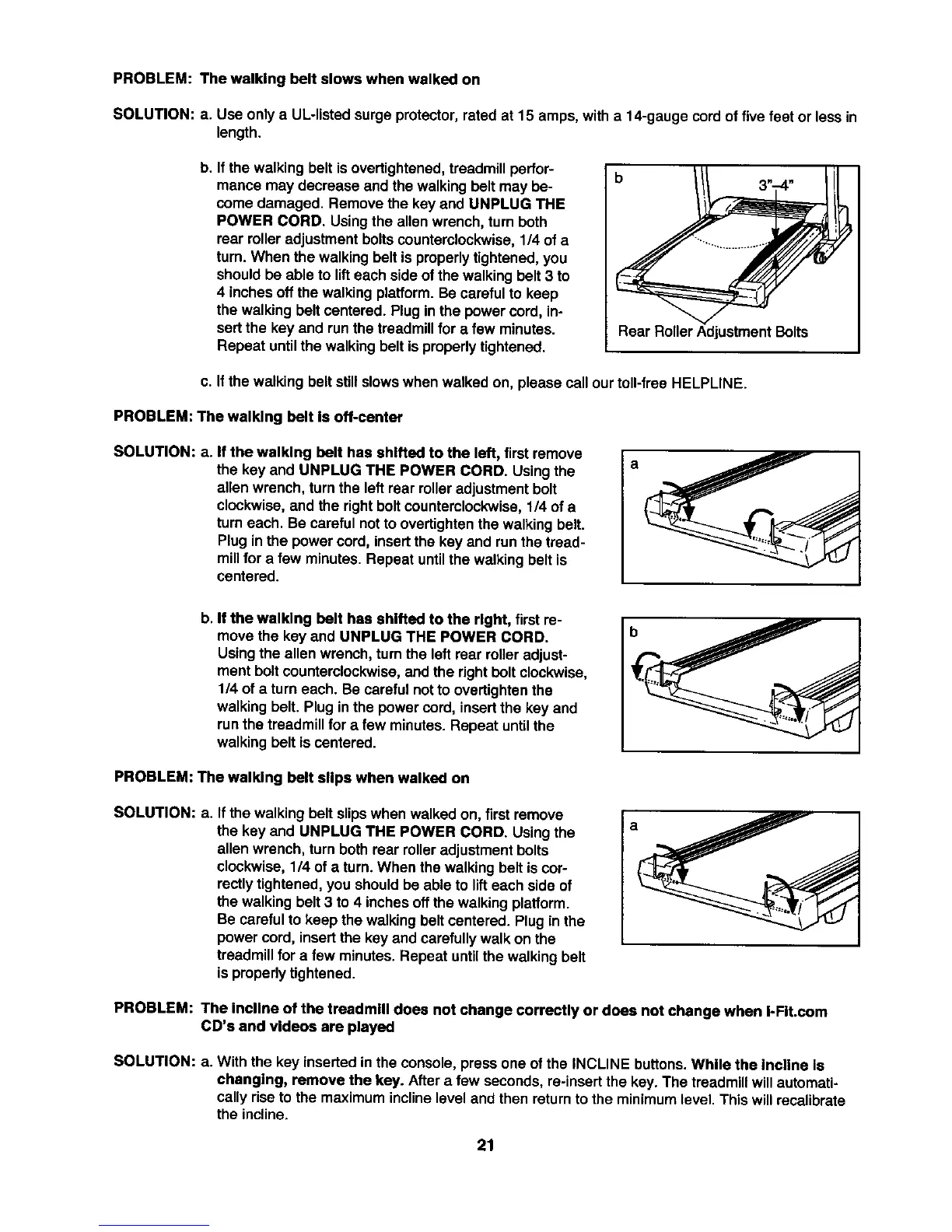
b. If the walking belt is overtightened,treadmill perfor-
mance may decrease and the walking belt may be-
come damaged. Remove the key and UNPLUG THE
POWER CORD. Using the allen wrench, turn both
rear roller adjustment bolts counterclockwise, 114of a
turn. When the walking belt is properly tightened, you
should be able to lift each side of the walking belt 3 to
4 inches off the walking platform. Be careful to keep
the walking belt centered. Plug in the power cord, in-
sertthe key and run the treadmill for a few minutes.
Repeat until the walking belt is properly tightened.
b
Rear Roller Adjustment Bolts
c. If the walking belt still slowswhen walked on, please call our toll-free HELPLINE.
PROBLEM: The walking belt Is off-center
SOLUTION: a. If the walking belt has shifted to the left, first remove
the key and UNPLUG THE POWER CORD. Usingthe
allenwrench, turnthe left rear rolleradjustmentbolt
clockwise,and the rightbolt counterclockwise,1/4 of a
turneach. Be careful not to overtightenthewalking belt.
Plug inthe power cord, insertthe key and run the tread-
millfor a few minutes. Repeat untilthe walking belt is
centered.
a
b. If the walking belt has shifted to the right, first re-
move the key and UNPLUG THE POWER CORD.
Usingthe allen wrench, turn the left rear rolleradjust-
ment boltcounterclockwise,and the rightboltclockwise,
1/4 ofa turn each. Becareful notto overtightenthe
walkingbelt. Plug inthe powercord, insertthe key and
runthe treadmillfor a few minutes.Repeat untilthe
walkingbelt is centered.
PROBLEM: The walking belt slips when walked on
SOLUTION: a. If thewalking belt slipswhen walked on, first remove
the key and UNPLUG THE POWER CORD. Usingthe
allenwrench, turnboth rear roller adjustmentbolts
clockwise,1/4 of a turn. When the walking belt is cor-
rectlytightened,you shouldbe able to lifteach side of
the walkingbelt 3 to 4 inchesoffthe walking platform.
Be carefulto keep the walkingbelt centered. Plug inthe
powercord, insertthe key and carefullywalk on the
treadmillfor a few minutes. Repeat untilthewalking belt
isproperlytightened.
a
PROBLEM: The incline of the treadmill does not change correctly or does not change when I-FIt.com
CD's and videos are played
SOLUTION: a. With the key insertedin the console, press one ofthe INCLINE buttons. While the Incline Is
changing, remove the key. After a few seconds,re-insertthe key. The treadmill willautomati-
cally riseto the maximumincline level and then returntothe minimumlevel.This willrecalibrate
the incline.
21







 To Next Page