21. When using I-FILcom CD'n and videos, an
eisctt_nic "chirping" sound wlH alert you
when the speed ar_for incline of the tmadmgl
Is about to change. Always listen for the
"chirp" and be prepared for speed and/or In-
cgne changes. In some Instances, the speed
end/or Incline may change before the per-
sonal tndner descdbes the change.
22. When using PRt.com CD'n and videos, you
can manually override the speed and Incline
settings at any time by pressing the speed
end Incline buttons. However, when the next
"chirp" Is heard, the speed amVor incline will
change to the next eeffings of the CD or video
program.
24. Inspect and Ughten all parts of the treadmill
regu_dy.
25. Neve_ Insert or drop any object Into any
opening.
2e.DANGER: Amy, th,pew,r
cord I_istely after use, before cleaning
the treadmill,and beforeperformingthe main-
tenanes and adjustment procedures de-
scdbed in this manual Never remove the
motor hood unises Instructed to do so by an
sut_riz_ se_lca _ Se_islng
other than theprocadures In this manual
should be pedonned by an authorized esrvica
repmsan_e oNy.
23. Always remove I-FItJ:om CD'e and videes 27.This treadmill is Intended for In-home use
from your CD player or VCR when you are not only. Do not use this treedmlll in any commeP
using them. cisl, rental, or lestflutional estUng.
I WARNING: _ beg_nlng this or any exercise Program, comer your physician. This
Is especially impoltant for persons over the age of 35 or persons wlthpre-uisgng health problmmL
Reed el! Instructions before using. SEARS semen no responsibility for pemonal Injury or property
damage sustained by or through the use of this product.
SAVE THESE INSTRUCTIONS
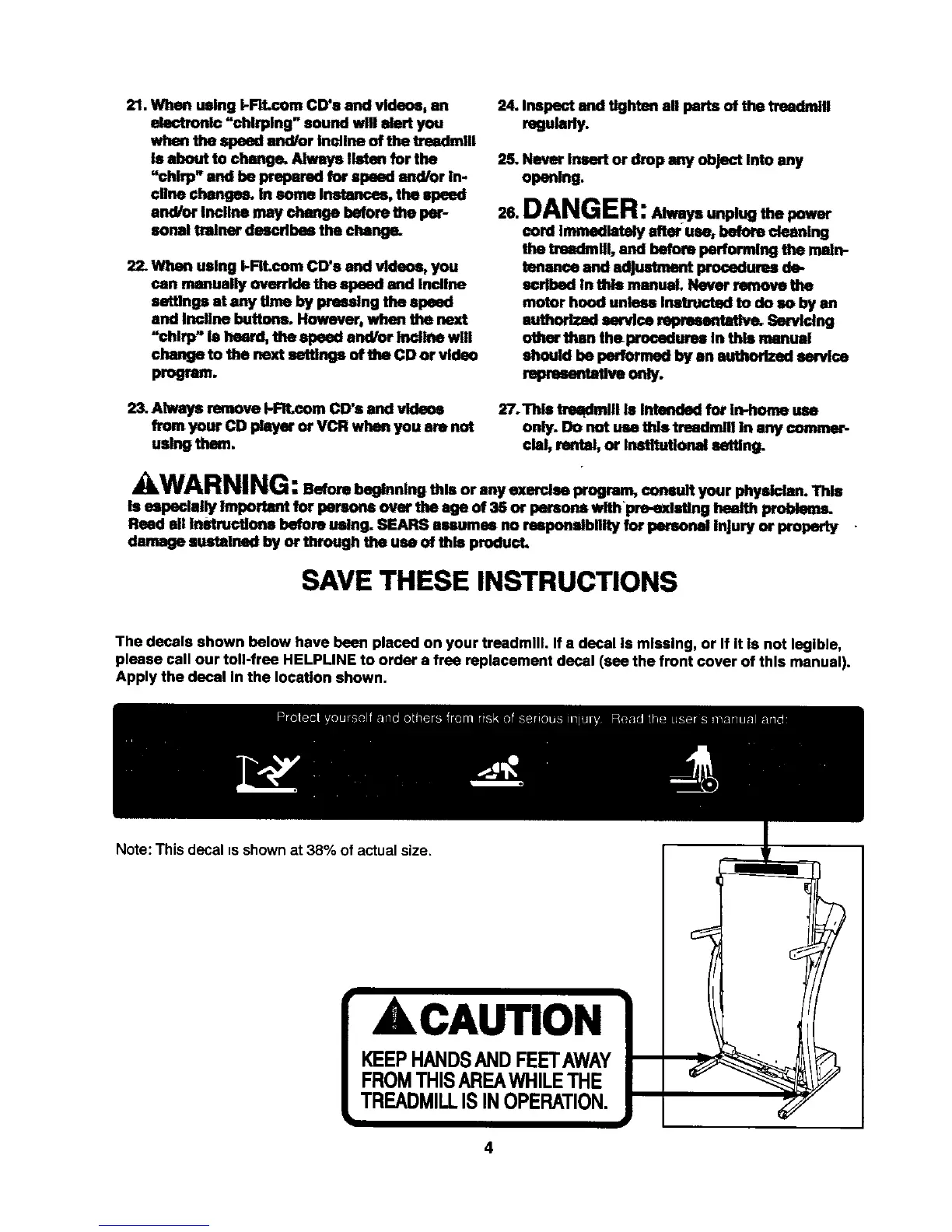
The decals shown below have been placed on your treadmill. If a decal Is missing, or If It Is not legible,
please call our toll-free HELPLINE to order a free replacement decal (see the front cover of this manual).
Apply the decal In the location shown.
Note: This decal is shown at 38% of actual size.
ACAUTION
4







 To Next Page