TELEVISION OPERATION
• Blackstripe Picture Tube 1.
• 181 cable ready channels (68 standard "IV channels
plus 113 cable channels)
• Full-featured on-screen display
• User-friendly menu-driven "IV controls
• Video and audio inputjacks
• Full-function 27-key infrared remote control
• Real time clock with 1 on-timer and I off-timer
• Sleep timer (10 to 120 minutes selectable) 2.
• Earphone jack
• LED power indicator
• Built-in closed caption decoder for hearing impaired
• Auto memory and auto search for'iV channel
• Automatically skips unavailable channels in your area
Note: If desired, the TV can be viewed without the
treadmill being used. Make sure that the on/off switch
located near the power cord is in the =on"position. (See
the drawing near the top of page 13.)
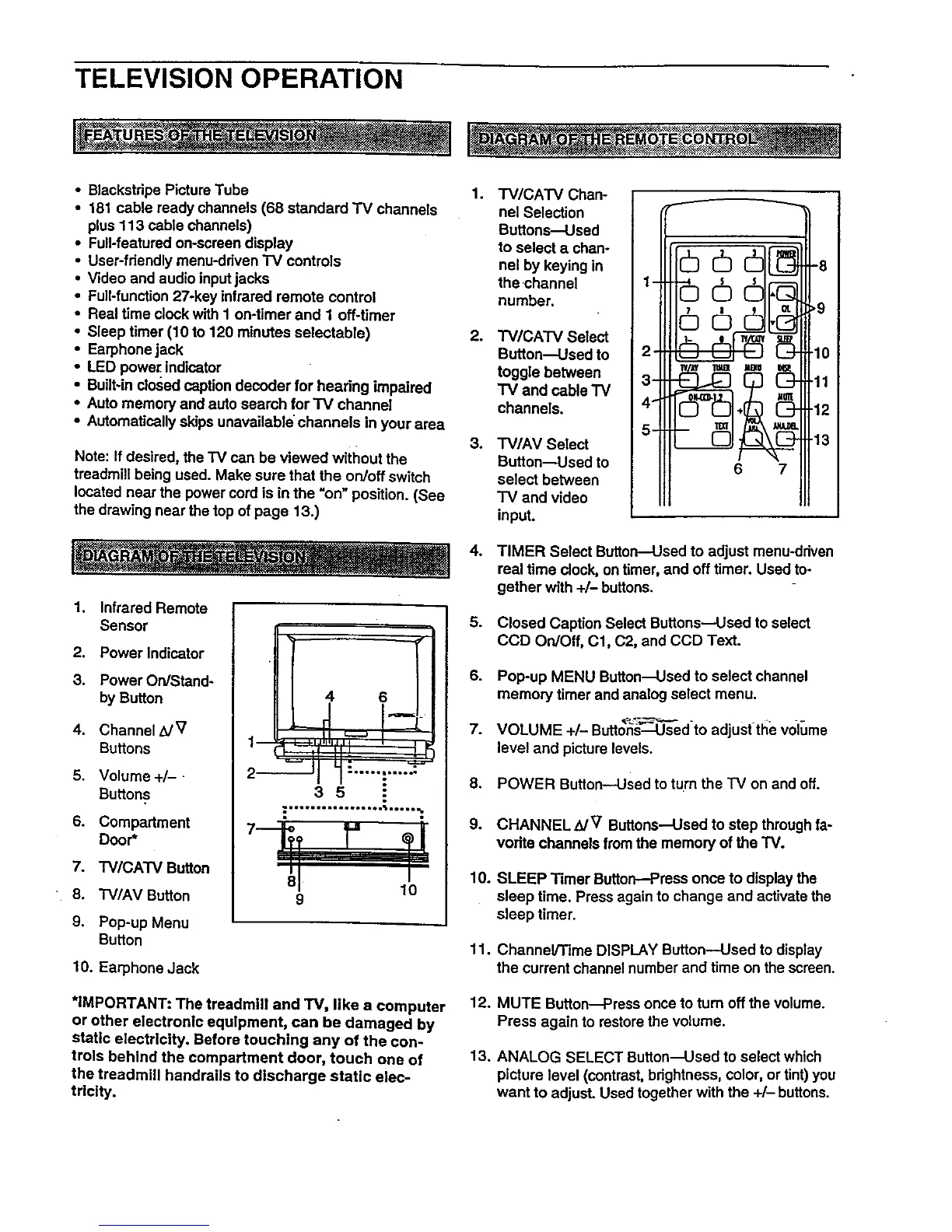
1. Infrared Remote
Sensor
2. Power Indicator
3. Power On/Stand-
by Button
4. Channel _/V
Buttons
5. Volume +/-
Buttons
6. Compartment
Door*
7. TV/CATV Button
8. "IV/AV Button
9. Pop-up Menu
Button
10. Earphone Jack
4 6
I, I [
!
2 1" .
m
_mli*g_lmlooQ
3 5
.................. ;.....
8 10
9
*IMPORTANT: The treadmill and TV, like a computer
or other electronic equipment, can be damaged by
static electricity. Before touching any of the con-
trols behind the compartment door, touch one of
the treadmill handrails to discharge static elec-
tricity.
.
.
.
6.
7.
8.
9.
10.
11.
12.
13.
TV/CA'I'V Chan-
net Selection
Buttons_sed
to select a chano
nel by keying in
the channel
number.
TV/CATV Select
Button--Used to
toggle between
"rv and cable TV
channels.
TV/AV Select
Button_sed to
select between
TV and video
input.
-
2
3-
4-1
5 =
W_t TClB _11 _}
6 7
-8
,9
10
11
12
13
TIMER Select Button--Used to adjust menu-driven
real time clock, on timer, and off timer. Used to-
gether with +/- buttons.
Closed Caption Select Buttons-Used to select
CCD On/Off, 01, C2, and CCD Text.
Pop-up MENU Button--Used to select channel
memory timer and analog select menu.
VOLUME +/- Buttons:Used to adjust tile vol_Jme
level and picture levels.
POWER Button--Used to turn the TV on and off.
CHANNELB/V Buttons--Used to step through fa-
vorite channels lrom the memory of the "IV.
SLEEP Timer Button--Press once to display the
sleep time. Press again to change and activate the
sleep timer.
Channel/Time DISPLAY Button--Used to display
the current channe1number and time on the screen.
MUTE Button_ress once to turn off the volume.
Press again to restore the volume.
ANALOG SELECT Button---Used to select which
picture level (contrast, brightness, color, or tint) you
want to adjust. Used together with the +/- buttons.










 To Next Page