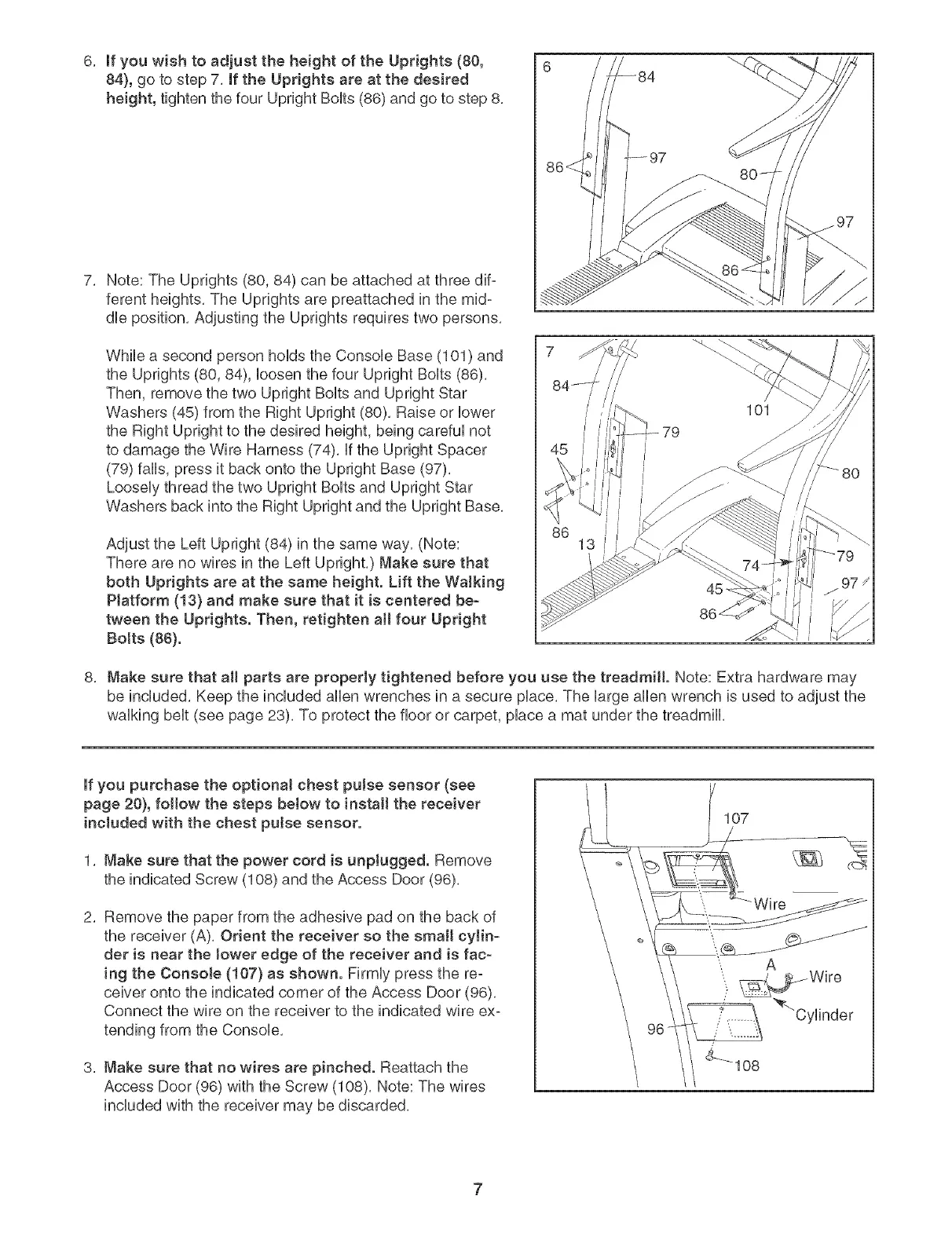
6. If you wish to adjust the height of the Uprights (80,
84}, go to step 7. If the Uprights are at the desired
height, tighten the four Upright BoUts(86) and go to step 8.
7. Note: The Uprights (80, 84) can be attached at three dif-
ferent heights. The Uprights are preattached in the mid-
due position. Adjusting the Uprights requires two persons.
While a second person hoNs the ConsoUe Base (101 ) and
the Uprights (80, 84), Uoosenthe four Upright BoUts(86).
Then, remove the two Upright BoUtsand Upright Star
Washers (45) from the Right Upright (80). Raise or Uower
the Right Upright to the desired height, being carefuUnot
to damage the Wire Harness (74). If the Upright Spacer
(79) falls, press it back onto the Upright Base (97).
Loosely thread the two Upright Bolts and Upright Star
Washers back into the Right Upright and the Upright Base.
Adjust the Left Upright (84) in the same way. (Note:
There are no wires in the Left Upright.) Make sure that
both Uprights are at the same height. Lift the Walking
Platform (13} and make sure that it is centered be-
tween the Uprights. Then, retighten aHfour Upright
Botts (86).
86
79
8. Make sure that aH parts are properly tightened before you use the treadmill. Note: Extra hardware may
be included. Keep the included allen wrenches in a secure place. The large allen wrench is used to adjust the
walking belt (see page 23). To protect the floor or carpet, place a mat under the treadmill.
if you purchase the optional chest pulse sensor (see
page 20}, foltow the steps below to instalt the receiver
included with the chest pulse sensor.
1. Make sure that the power cord is unplugged. Remove
the indicated Screw (108) and the Access Door (96).
2. Remove the paper from the adhesive pad on the back of
the receiver (A). Orient the receiver so the smalt cylin-
der is near the Jower edge of the receiver and is fac-
ing the ConsoJe (107} as shown. Firmly press the re°
ceiver onto the indicated corner of the Access Door (96).
Connect the wire on the receiver to the indicated wire ex-
tending from the Console.
3. Make sure that no wires are pinched. Reattach the
Access Door (96) with the Screw (108). Note: The wires
included with the receiver may be discarded.
107
7




 To Next Page