13
17. Make sure that all parts are properly tightened before you use the treadmill. If there are sheets of clear
plastic on the treadmill decals, remove the plastic. To protect the floor or carpet, place a mat under the tread-
mill. Note: Extra hardware may be included. Keep the included hex keys in a secure place; the large hex key
is used to adjust the walking belt (see pages 23 and 24).
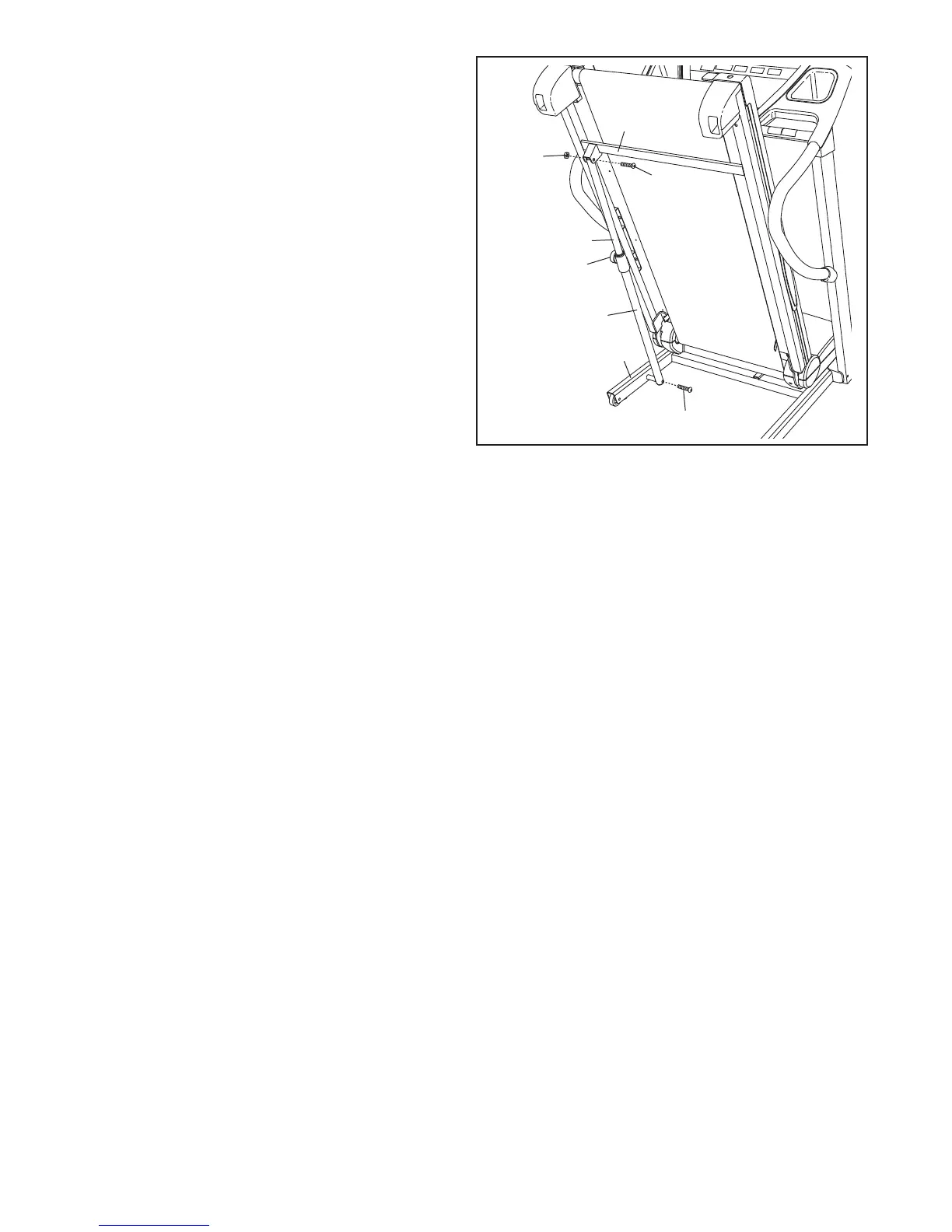
16. Raise the Frame (51) to the position shown.
Have a second person hold the Frame until
this step is completed.
O
rient the Storage Latch (48) so that the large
barrel and the Latch Knob (49) are oriented as
shown.
A
ttach the upper end of the Storage Latch (48)
to the bracket on the Frame (51) with a 3/8" x 2"
Bolt (7) and a 3/8" Nut (11).
Attach the lower end of the Storage Latch (48) to
the Base (87) with a 3/8" x 1 3/4" Bolt (8). Note:
It may be necessary to move the Frame (51)
back and forth to align the Storage Latch with
the Base.
Lower the Frame (51) (see HOW TO LOWER
THE TREADMILL FOR USE on page 21).
48
87
11
Large
Barrel
8
5
1
16
7
49




 To Next Page