14. Only Required with other brands of sim cards
15. If used in 4G this is required to let the charger know which sim server to connect to.
16. This is the login password for the or laptop on commissioning default is 12345678 and is
recommended to change this on commissioning.
17. RCD Calibration
18. Solar Modes
19. Enable Load Management / Solar Features
20. Property Main Fuse Size (kw)
21. Load Management Meter Model
22. Opt Out/ Opt In of the UK EVC regulations default charging hours plug + charge
23-27. UK EVC regulations 2021 charge allowed times
28. UK EVC regulations 2021 randomised delay to 600 seds and can be changed by end user
29. Save settings
30. Language
31. Charger Module
32. LAN Connection default gateway
33. Charger DNS server
34. Static hardmit output of the charger
35. Charging Mode: 1. APP/RFID mode; 2. RFID Mode; 3. Plug & Charge Mode
36. RFID Default Pin
37. WIFI Password
38. Default charging cost for records for multi tariffs set up in the app.
39. Daylight saving start + end date
40. Plug + charge allowed charge window
41. Heartbeat signal sent to the server (time in seconds)
42. Password required by some sim cards that are not Project EV.
43. Time out (in seconds) for starting charge without plugging in a vehicle
44. Required for testing purposes only
45. Minimum export power required before the vehicle charge will engage (1.76kw/6amp)
46. Load Management reading hardware - CT/Power Meter
47. Opt Out / Opt In of the UK EVC regulations default charging hours plug and charge
48. Power Meter Address
49-53. Limit your charger to the adjacent times. 0 is default setting 34.
EV Smart Charge
Points Regulations
How to opt out / adjust time delay
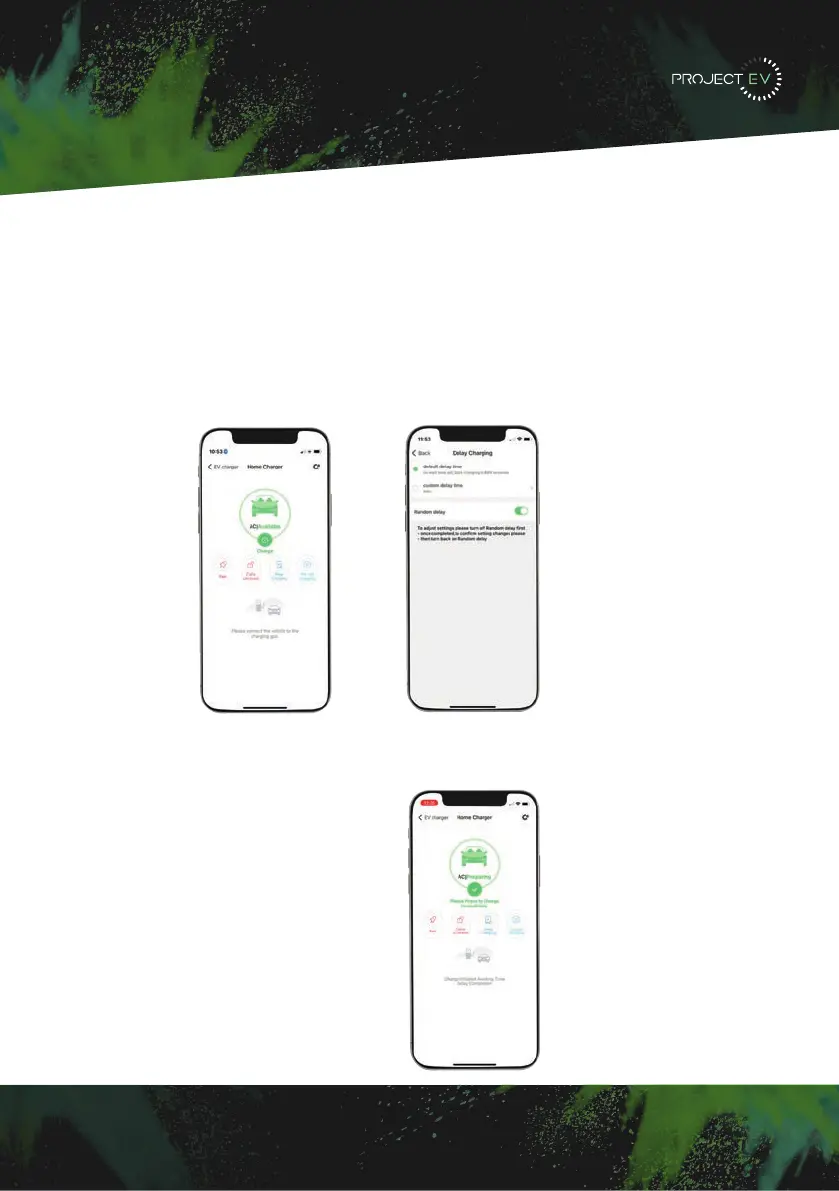
You can opt out/adjust the time delay on setting 28 when configuring with a laptop.
However, similar to the peak hours settings, this can also be done via the app.
Firstly, select delay charging on the home screen to access the settings. The slider to the left
will turn off all time delays. There are two options if you wish to keep the time delay - default
will operate and start the charge any time from 0-600 seconds whereas custom will start
the charge after the set period of 1-1800 depending on the desired range.
Should you start a charge with the time delay enabled you can start the charge immediately
by pressing the charge button again. Otherwise the charge will begin automatically once
the time delay has been passed.
29


 To Next Page