Safety Information
Safety Symbols and Denitions
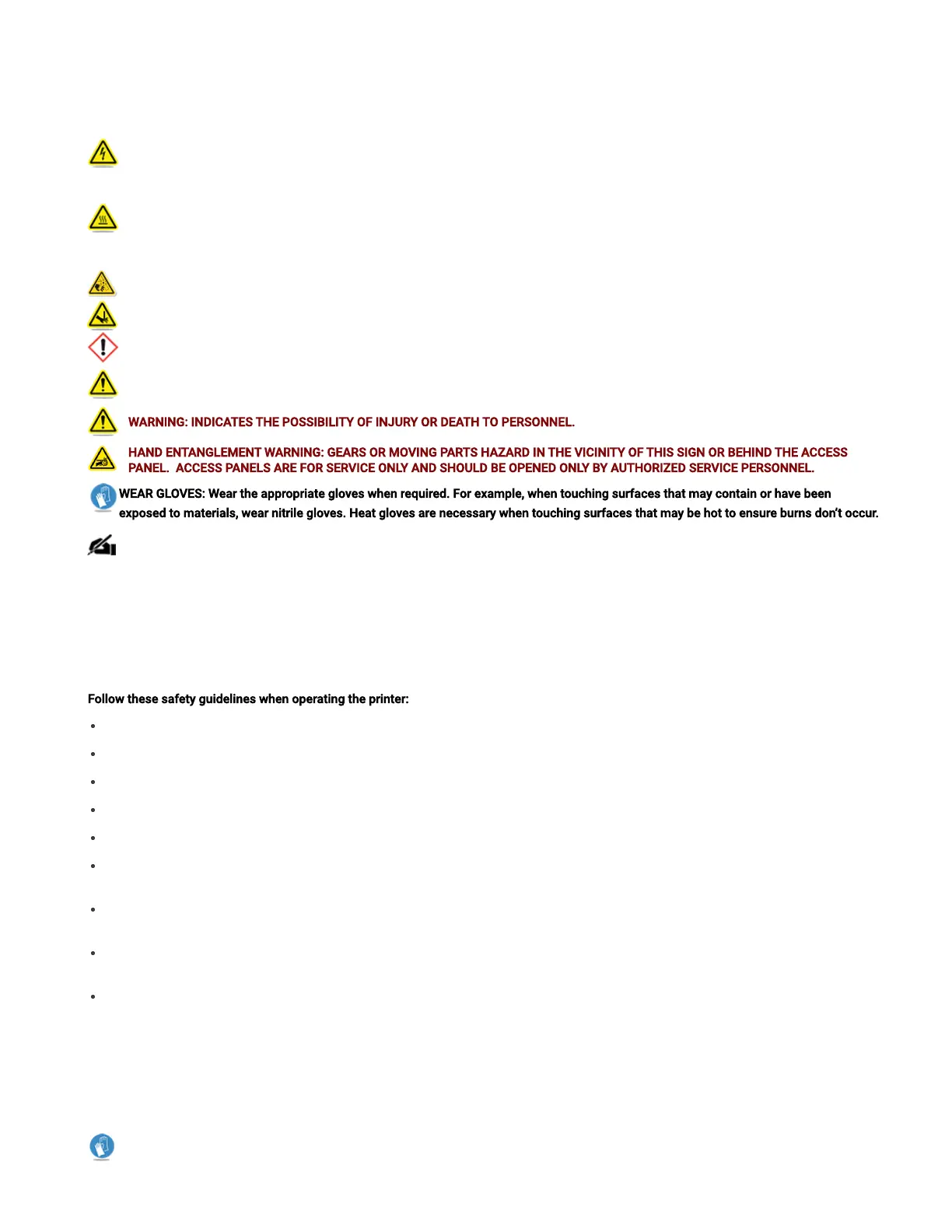
ELECTRICAL SHOCK HAZARD: High voltage electricity is accessible in the vicinity of this sign or behind the access panel. High voltage
can cause severe burns or death, as well as res. Access panels are for service only and should be opened only by certied service
personnel or trained maintenance personnel.
HOT SURFACE HAZARD: A hot surface is accessible in the vicinity of this sign or behind the access panel. Avoid contact. Hot surfaces
can cause burn injury or re. Allow surface to cool before touching. Access panels are for service only and should be opened only by
certied service personnel or trained maintenance personnel.
KEEP FINGERS AWAY FROM FAN: Putting ngers in way of moving fan can cause serious injury.
KEEP FINGERS AWAY FROM SHARP OBJECTS: Putting ngers in way of sharp objectscan cause serious injury.
HARMFUL IRRITANT WARNING: Indicates that skin or eye irritation could result while exposed to a chemical composition.
CAUTION: Indicates the possibility of loss of data or damage to equipment.
WARNING: INDICATES THE POSSIBILITY OF INJURY OR DEATH TO PERSONNEL.
HAND ENTANGLEMENT WARNING:GEARS OR MOVING PARTS HAZARD IN THE VICINITY OF THIS SIGN OR BEHIND THE ACCESS
PANEL. ACCESS PANELS ARE FOR SERVICE ONLY AND SHOULD BE OPENED ONLY BYAUTHORIZED SERVICEPERSONNEL.
WEAR GLOVES: Wear the appropriate gloves when required. For example, when touching surfaces that may contain or have been
exposed to materials, wear nitrile gloves. Heat gloves are necessary when touching surfaces that may be hot to ensure burns don’t occur.
NOTE: A note signies important information but not information of a critical content.
Safety Guidelines
General
The 3D printer system is designed with built in safety features, improper use can cause injury to personnel.
Follow these safety guidelines when operating the printer:
Read and follow all 3D printer system instructions. Printer should only be operated by trained personnel.
Follow all safety rules and heed all cautions and warnings in this guide.
Do not attempt to open top door while printing.
Do not use any material without reviewing the Global Harmonized Standards/Safety Data Sheet (GHS/SDS).
Dress power and communication cables behind printer to prevent tripping.
Do not attempt to access, service, or adjust printer components or perform procedures without reviewing the documentation for user
accessible maintenance routines unless specically trained to do so.
Only certied service personnel that have completed the 3D Systems service trainingmay perform tasks they are authorized and certied to
complete.
Do not ignore warning signs posted during 3D printer system service operations.If an error message appears on the 3D printer system’s User
Interfacerefer to “Troubleshooting Section” within this guidedepending on the error, before resuming operation.
To prevent potential skin irritation and sensitization due to contact with waste material or uncured Part Material, follow all guidelines in the
following sections.
Protective Equipment/First Aid
Follow recommendations for protective equipment and general rst aid procedures to minimize the risks from part material exposure. If
professional medical attention is necessary, take the Global Harmonized Standards/Safety Data Sheet (GHS/SDS) for the exact material
involved to the attending physician.
Always wear 100% nitrilegloves and lab coats when handling any part or waste material. Latex gloves are not chemical-resistant and
are not recommended.



 To Next Page
 Loading...
