ECL
12
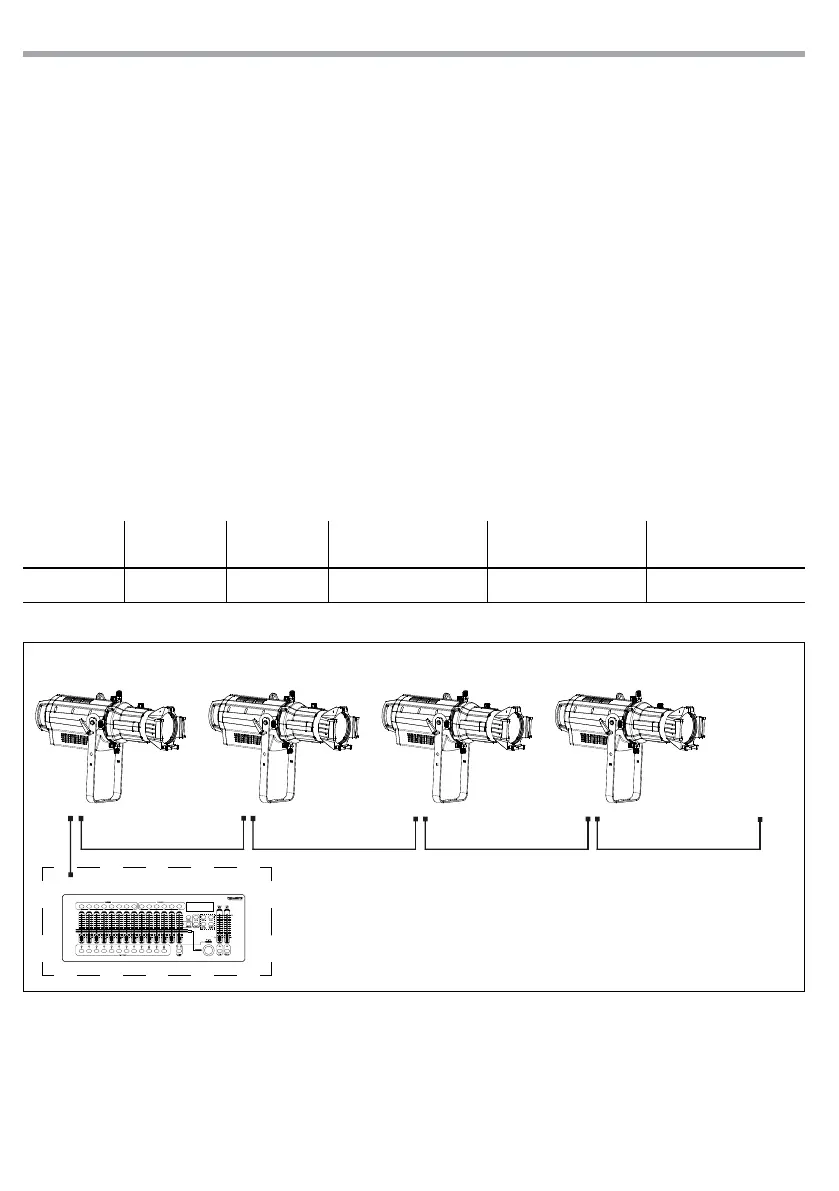
DMX Address: 48DMX Address: 38DMX Address: 33 DMX Address: 43
Fig.5 - Example 5 DMX channels conguration
DMX512 Controller
3.8 DMX CONFIGURATION
ECL is equipped with dierent DMX conguration.
• Press the button MENU so many times until shows DMX CHANNEL, and press the button ENTER to conrm.
• Select the desired DMX conguration (1CH - 2CH - 5CH) through the buttons UP/DOWN.
The tables on page 15 indicate the operating mode and DMX value. The ECL is equipped with 5-pole XLR
connections.
3.9 DMX MODE
• Press the button MENU so many times until the display shows DMX ADDRESS, and press the button ENTER
to conrm.
• Press UP/DOWN button to select the desired value (001-512). Press and hold to scroll quickly.
• Press ENTER button to store.
• Press the MENU button to go back or to meet the waiting time to exit the setup menu.
To able to operate the ECL with a light controller, adjust the DMX start address for the rst a DMX channel.
If e. g. address 33 on the controller is provided for controlling the function of the rst DMX channel,
adjust the start address 33 on the ECL. The other functions of the light eect panel are then automatically
assigned to the following addresses.
An example with the start address 33 is shown below:
Number of
DMX channels
Start address
(example)
DMX Address
occupied
Next possible start
address for unit No. 1
Next possible start
address for unit No. 2
Next possible start
address for unit No. 3
5 33 33-37 38 43 48
. . . . . . . . . . . .



 To Next Page