EN 24
3.12. SD-Card Settings
The IP Camera provides the recording of the video files into a standard Micro SD-Card. Since this recording is
directly to the SD-Card, there is no network packets loss problem when recording to remote device through
internet.
Notice
When the IP Camera is doing SD-Card recording, this is counted as one video user. Please refer to appendix B
about allowed maximum video users.
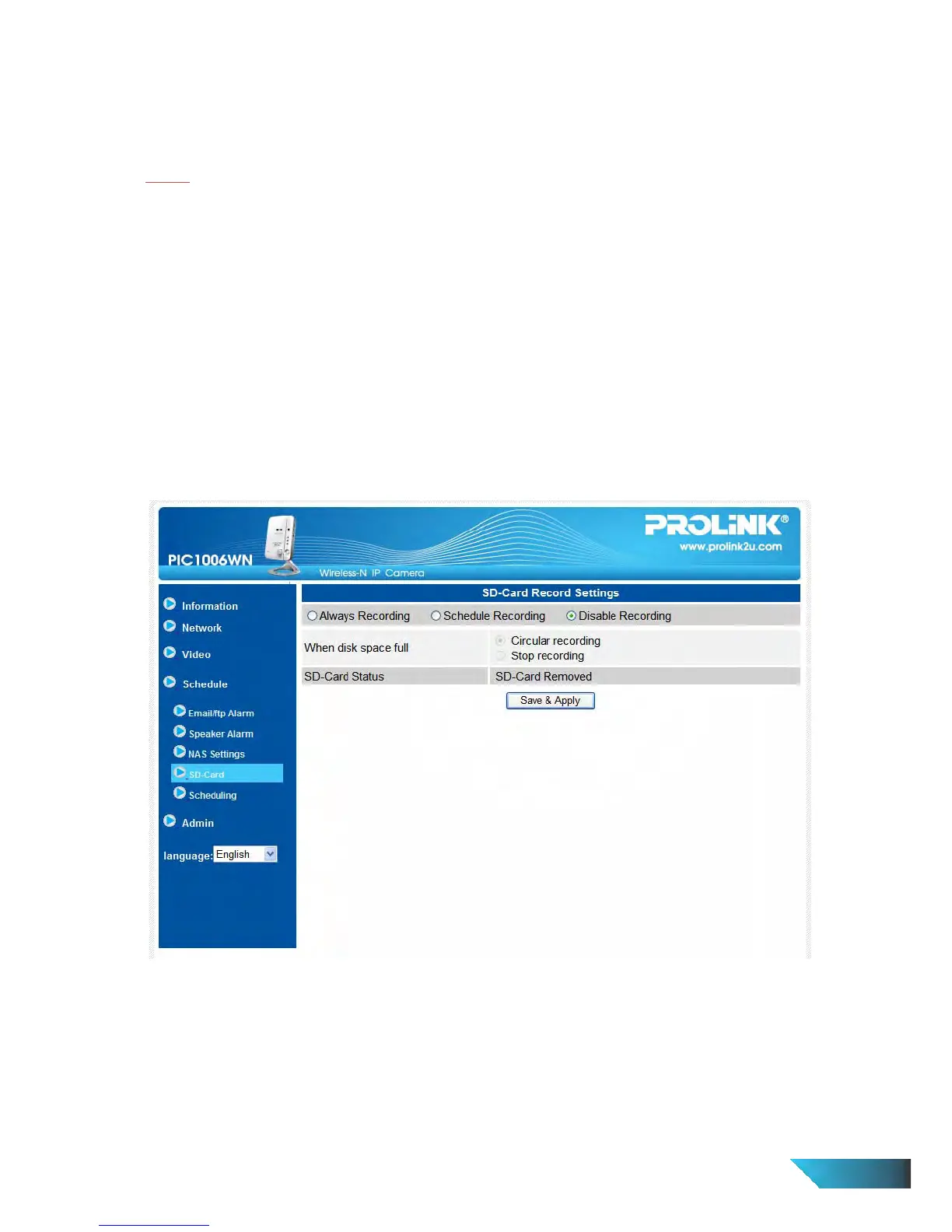
1. If the “Always Recording” is selected, the system will start to record to the SD-Card immediately and keep
recording always. If the “Schedule Recording” is selected, the system will do the SD-Card recording
according to the “scheduling” in section 3.12. “Disable Recording” will disable this SD-Card recording.
2. When doing the SD-Card recording, the system will check the free disk space of the SD-Card. If the disk
space is full (no free disk space), the system will do “Circular recording” (overwrite the oldest recorded files
in the SD-Card) or “Stop recording” as selected.
3. SD-Card status – the SD-Card inserted or removed status is displayed here.
4. SD-Card files – as shown in fig.3-14, all the recorded video files with information including file name and
recorded time are listed in this page under the directory of each date. The recorded file could be
separately downloaded or deleted on this page.
Figure 3-16: SD-Card Settings page


 To Next Page