EN 27
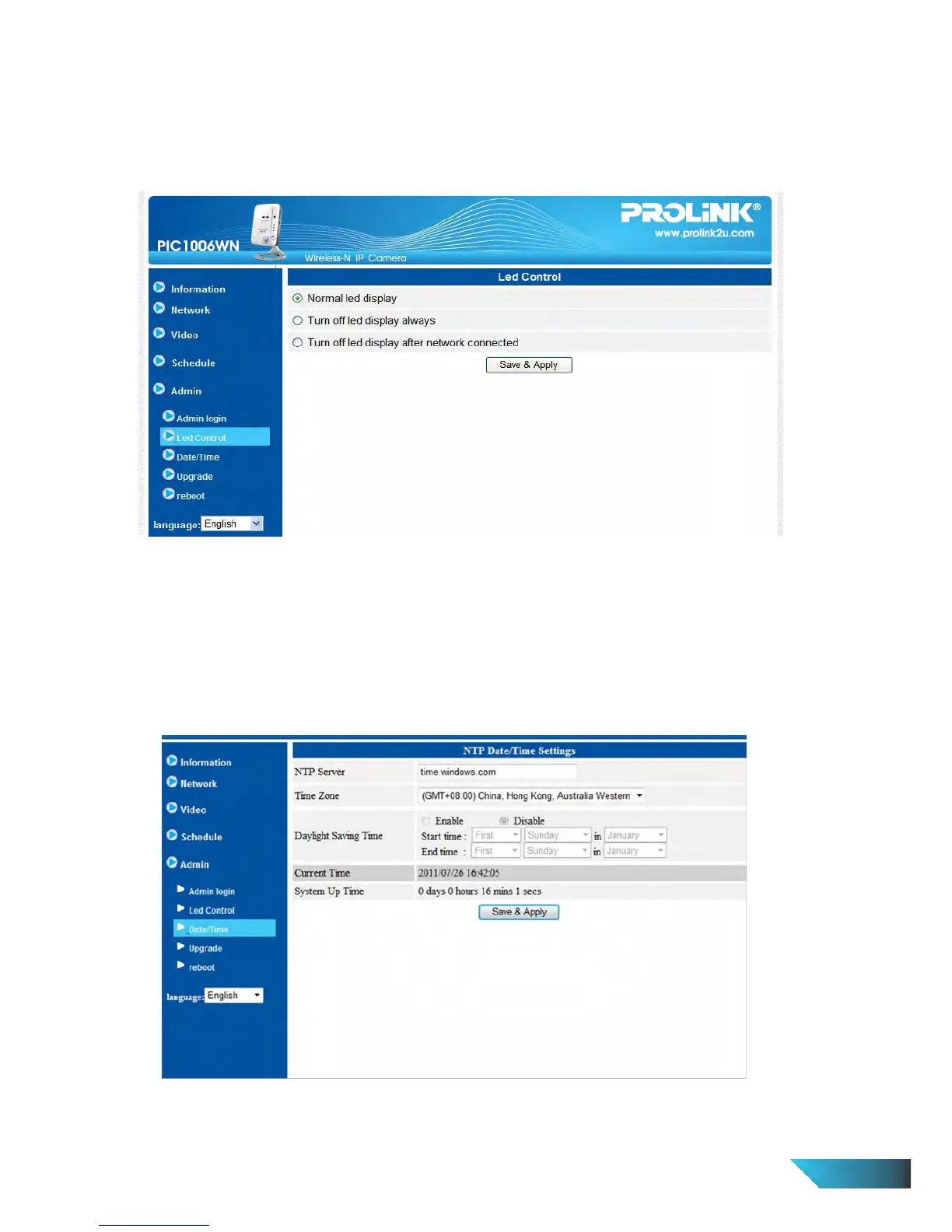
3.14. LED Control
The IP CAM provides the Led Display Control function, you can enable or disable the led display/indication on the
front panel of the IP cam device. The related settings are explained below:
1. 1. Normal led display – select this to enable the status led and Ethernet led display.
2. Turn off led display always – select this to disable the status led and Ethernet led display.
3. Turn off led display after network connected – select this then the led will display when the Internet
connection has some problem, the led display will be off when the Internet connection is successful.
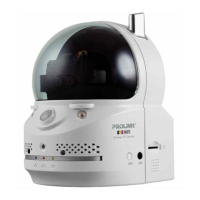
3.15. Date/Time
The IP Camera can synchronize the date/time with the universally available time server (for example
stdtime.gov.tw) through NTP protocol. The date/time will then be corrected with the time server anytime when
the Internet is connected.
Users can choose the different Time Zone of their areas to display the correct time. For some Time Zone areas,
the “Daylight Saving Time” could be enabled or disabled. When the “Daylight Saving Time” is enabled, the
start and stop time of the Daylight Saving Time could be edited.
Figure 3-20: System date/time settings page
3.16. Admin


 To Next Page