Section Description Min Max Default Units
7.1) SP Mode Sets the digital output in heating or cooling
mode.
- - HEAT -
7.2) Setpoint The desired setpoint for the digital output.
Cannot be zero.
5 95 50 %
7.3)Ctrl Mode Sets the digital output in proportional or
differential mode.
-- DIFF-
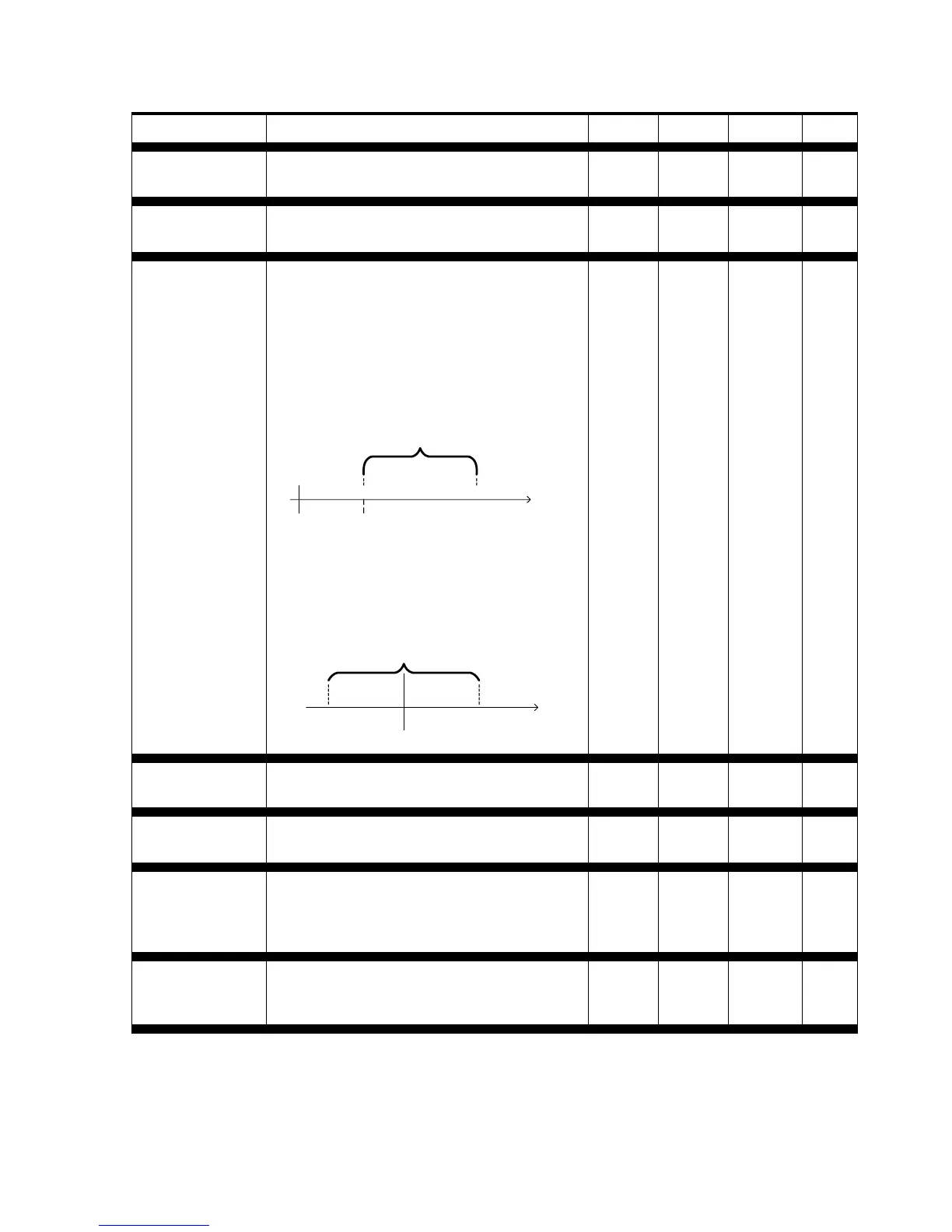
• In proportional mode, the output is at
0% when the demand reaches the
setpoint, and pulses proportionally as
the demand increases, reaching 100%
once the demand reaches the sum of
the setpoint and the proportional
band.
Proportional Band
Setpoint
Output = 0%
Output = 100%
Demand
0%
• In differential mode, the output
alternates between ON and OFF
whenever the demand passes through
a differential band centered on the
setpoint.
Setpoint
Differential
ON
OFF
Demand
7.4) Prop The proportional band used when the digital
output Ctrl Mode is set to Proportional.
5 99 50 %
7.5) Diff The differential band used when the digital
output Ctrl Mode is set to Differential.
8 99 40 %
7.6) Rev Act When reverse acting is selected, the output
action will be inverted versus the output
state. (If the output is indicating 100%, the
contact will be open instead of closed.)
-- OFF-
7.7) Override This option lets you manually override the
digital output or set it back to automatic
control.
0 100 AUTO %
13


 To Next Page