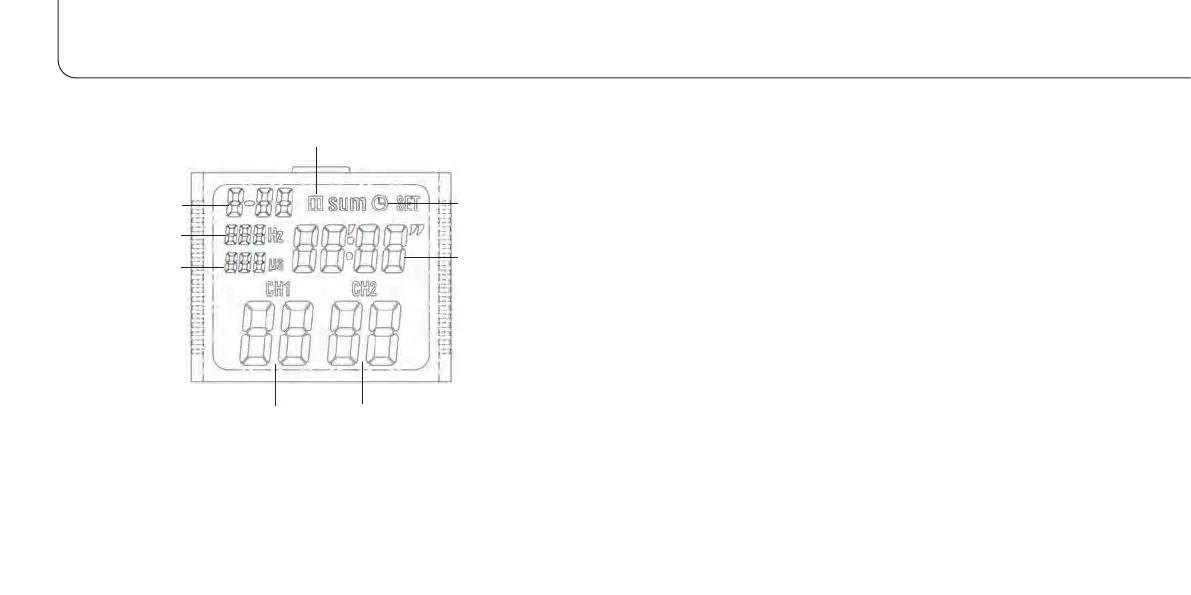
DISPLAY GUIDE PROGRAM SELECTION...
60
When the unit is switched on, all readouts are active for a short ti-
me before the unit switches to standby (wait) mode.
Preset programs P-01 to P-11 and memory function
1. After attaching the electrodes, press the "ON/OFF" button to
switch on the unit.
2. Keep pressing the “Program” button until one of the preset pro-
grams (P-01 to P-11) is shown on the display.
3. Press the “Set” button. The time will flash on the display, “ “
for minutes and “ `` “ for seconds. Use the “+” or “–“ buttons
to enter the desired treatment duration (20 minutes to 2 hours)
in steps of ten minutes.
4. Press the “Select” button 2 times. The intensity display “CH1”
will start to flash. Use the “+” or “–“ buttons to enter the desi-
red value (from 1 to 50). Setting the intensity will simulta-
neously start the unit. In the top right of the display, the clock
symbol will begin to flash. Press the “Select” button once mo-
re. The intensity display “CH2” will start to flash. Once again,
Program display
Frequency display
Pulse width
display
Intensity,
channel 1
Intensity,
channel 2
Treatment time
Pause
Function check



 To Next Page