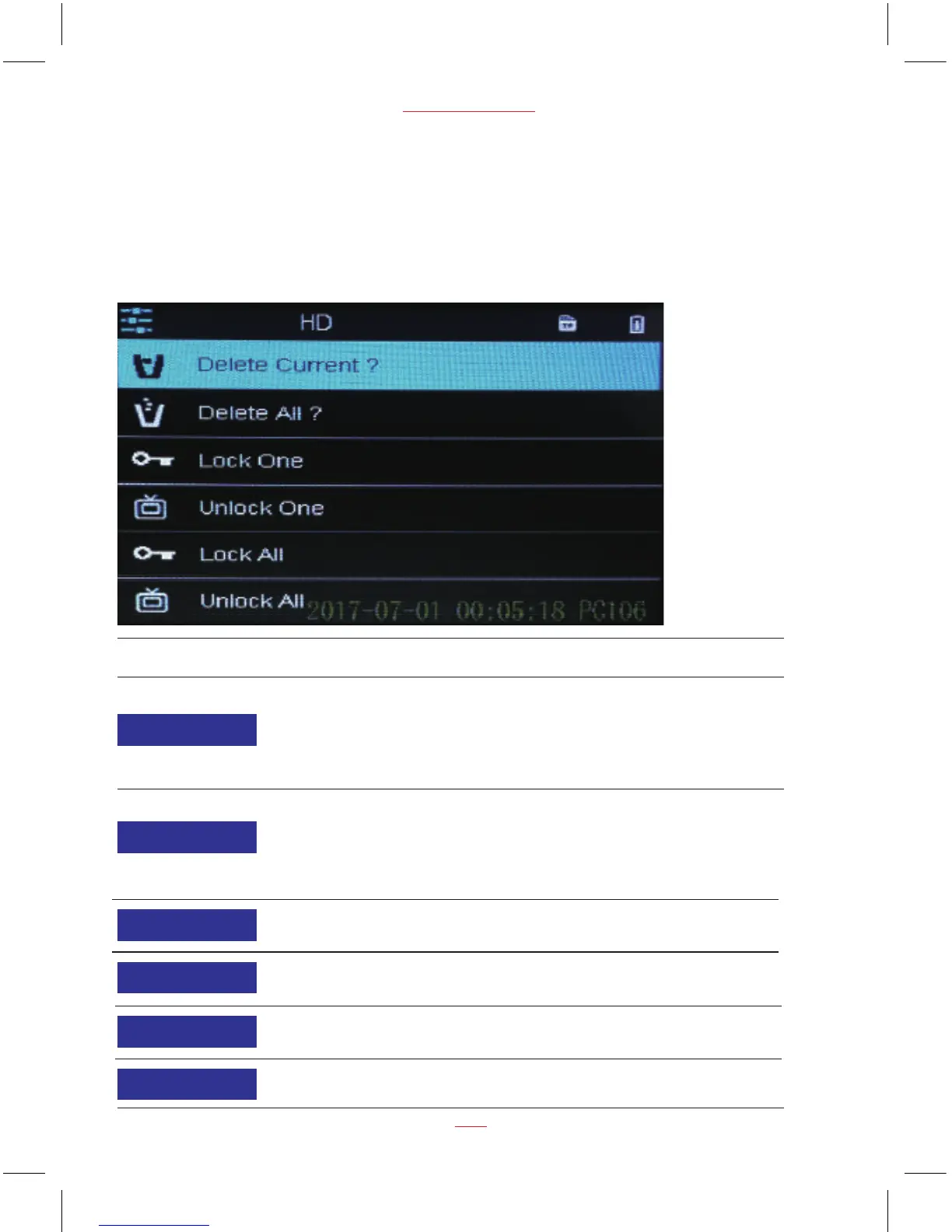
Function List Description
Available Option
Delete Current - This option allows a
single video or photo to be deleted from
the inserted micro SD card per action.
Warning: The protected videos actually
can’t be deleted by this operation.
Note:
15
PC 106 HD Dash Cam
The first file in playback is the last operating video / photo before entering playback
mode. The following files will be the ruled in turn according to operate time.
Playback Menu Options
Delete Current
Lock All
Delete All
Unlock All
Lock One
Unlock One
Cancel / OK
Delete All - This option allows all videos
or photos to be deleted from the inserted
micro SD card per action.
Warning: The protected videos actually
can’t be deleted by this operation.
Cancel / OK
Lock One - This option allows a single
video or photo to be protected.
Cancel / OK
Unlock One - This option allows a single
video or photo to be unprotected.
Cancel / OK
Lock All - This option allows all videos
or photos to be protected.
Cancel / OK
Unlock All - This option allows all videos
or photos to be unprotected.
Cancel / OK


 To Next Page