Preparing for Use
Battery Indicator and Charging
Inserting the SD Card (included)
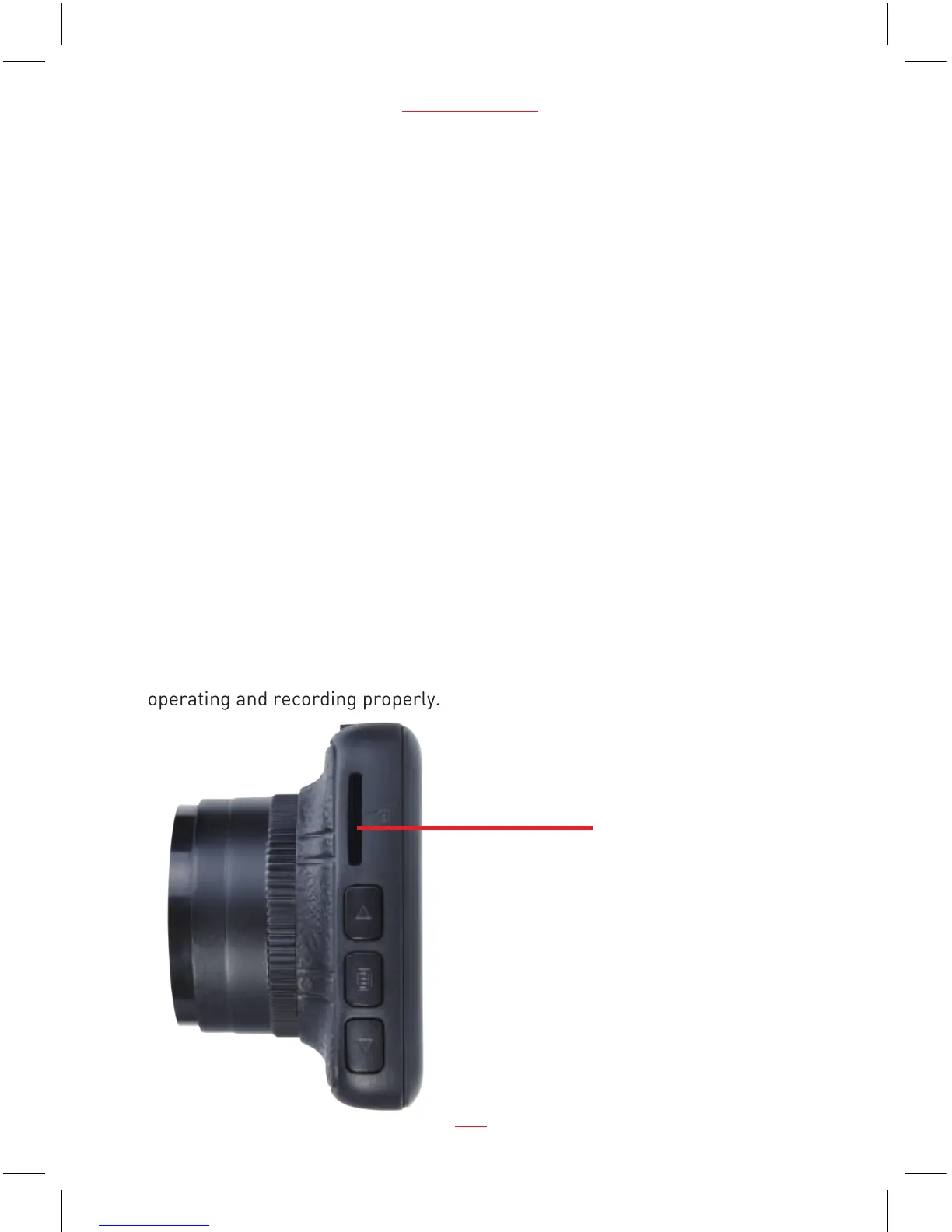
Follow the direction indicated on the dash cam to insert the Micro SD card,
a click sound is heard indicating the Micro SD card is in position.
To remove the Micro SD card, push to eject the Micro SD card out of the slot.
NOTE:
1. Do not remove or insert the Micro SD card when the dash cam is turned on.
This may damage the Micro SD card.
2. Please use a minimum Class 10 or higher rating Micro SD card, maximum
up to 32GB.
3. Please format the micro SD card before the initial use.
4. When removing the Micro SD card, be careful that the card may spring out
and get lost. The Micro SD card slot has this spring-out feature for easy
removal of the card.
Micro SD Card slot
03
PC 106 HD Dash Cam
5. Dash Cam pre-installed a 8GB Class 10 Micro SD card, which has six months
warranty. The warranty date is deemed to be from the date you received your
dash cam.
6.
Please format the micro SD card at least once a month to make sure it is
operating and recording properly.


 To Next Page