25
MARK68AF1001 Rev 2
Service Mode
When the unit is in standby mode, you can enter into the service or maintenance
parameters.
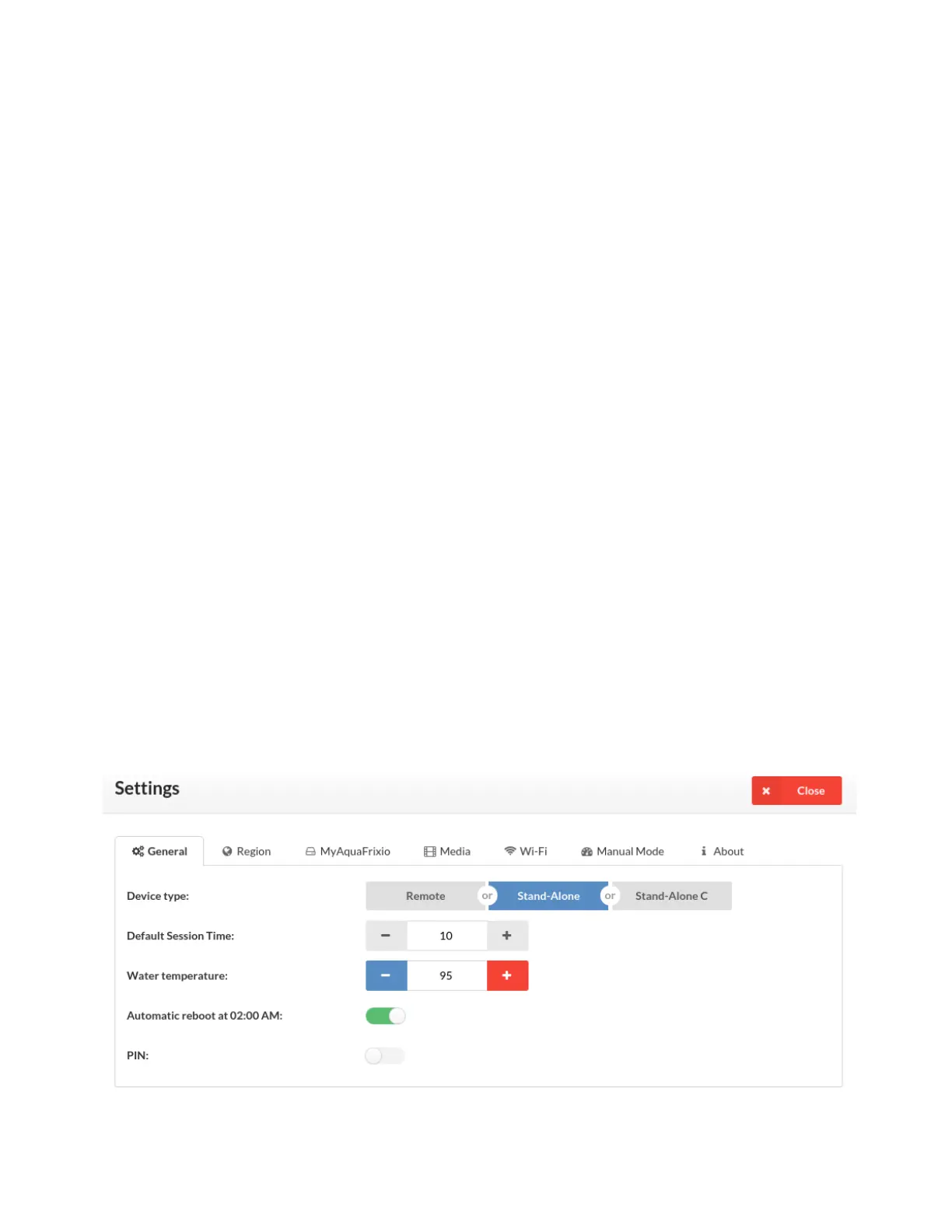
To enter the settings click the top left button in the screen that says, "SETTINGS".
Once in the Settings you can click on the tab you need to change your settings.
• General Tab
• Change to Remote Timer, Stand-Alone or Stand-Alone C Mode. Change the
sessiontime,cooldowntime,watertemperatureandturnonandoQuickStart,
Demo Mode and the general Pin Requirement. You can also change your Pin Code
or password here.
• Region Tab
• Change from Faranheit to Celcius, Change your time zone, Use the 24 hour
clock option, Set the date and time automatically and retrieve the Date and Time
information.
• MyAquaFrixio Tab
• Check for new software updates
• Media Tab
• TurnonandotheStudioandWellnessmusicoption.
• WiFi Tab
• ConnectyourunittotheWinetworkinordertobeconnectedtotheserviceportal
and get the latest updates.
• Manual Mode Tab
• Used for troubleshooting and checking individual components in your unit.
• About Tab
• See your serial number, Software ID code, Massage hours, Session hours and
number of sessions.


 To Next Page