10
93-305-05 Issue 0 © Copyright Protec Fire Detection PLC 2004
5.0 Indications and Controls
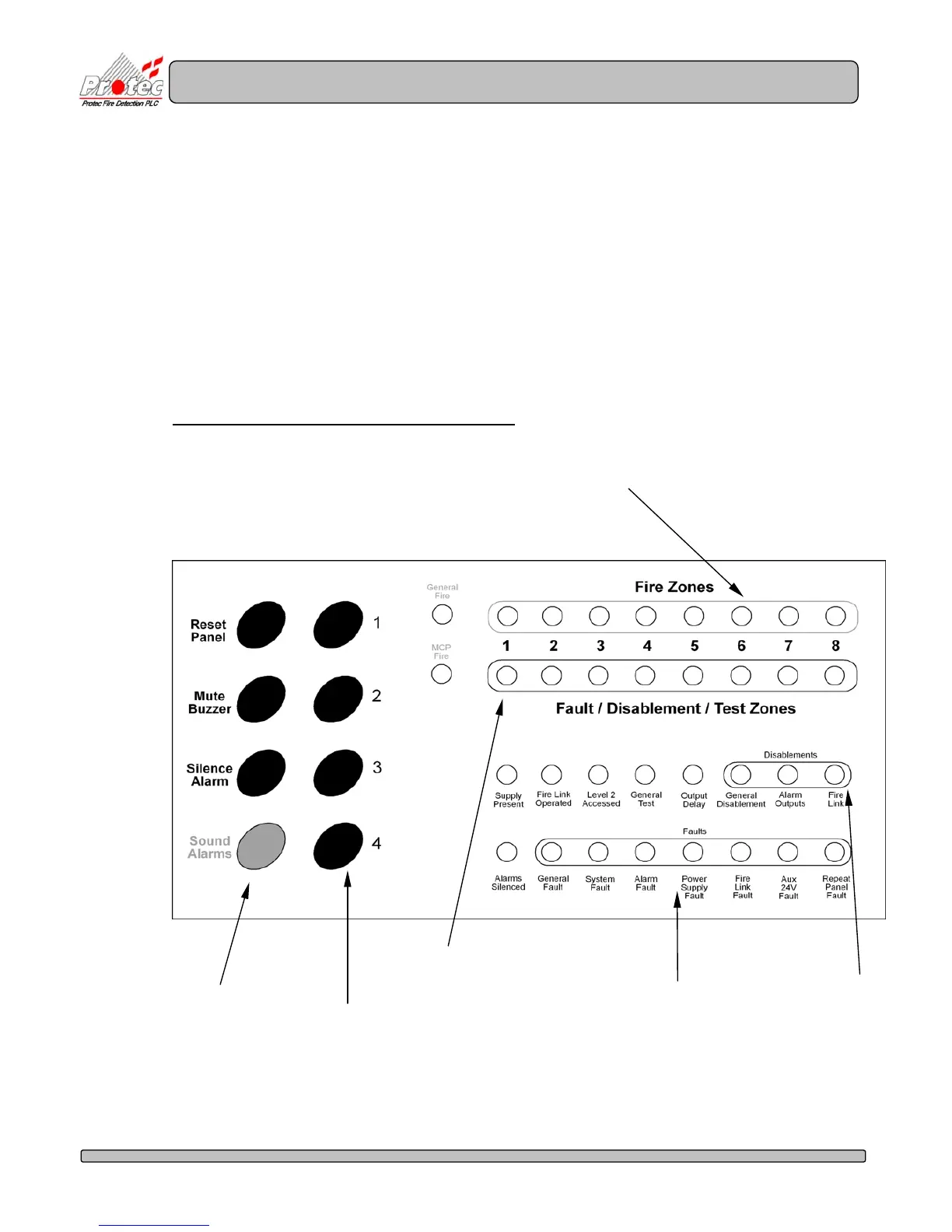
The 3100 has a comprehensive front panel display enabling the state of the 3100 to be
rapidly determined by inspection of the indications.
• Zone fires are displayed on row 1 of the display.
• Zone faults (indicator flashing), Zonal disablements (indicator steady + ‘General
Disablement’ indicator) and zones in test mode (indicator steady + ‘General Test’
indicator) are shown on row 2 of the display.
• System disablements are shown on the right hand side of row 3 of the display.
• System faults are displayed on row 4 of the display.
Figure 5.0 illustrates the front panel indications.
Figure 5.0 3100 Front panel Indications and controls
Zone Fire indications
System disablement
indications
Fault Indications
Zone Fault / Disablement / test
Indications
System control
push buttons
Push buttons used for
a) Code Entry
b) Lamp Test
c) Programming



 To Next Page