10 OPTIMAX
®
Operation
®
Operation
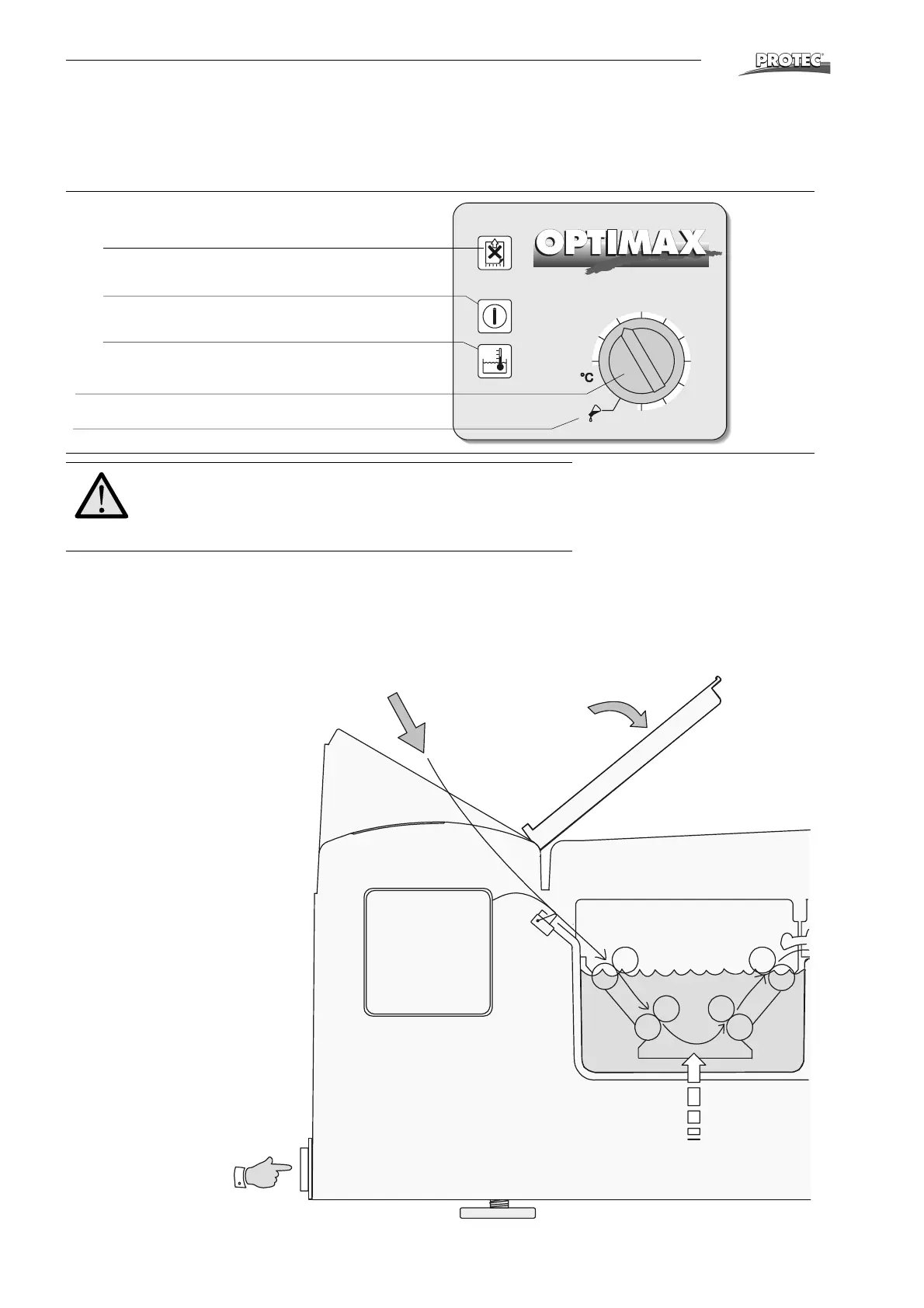
Short overview and control panel
*Only machines with cassette box:
When processing roll films in cassettes, pull approx. 10 cm of film out of the cas-
sette and fold the corners. Place cassette into cassette box and feed film into the
infeed. Notice that on processors with cassette box, the film switch is located in the
middle of the infeed.
LED displays
• Film feed
Wait with the next film until light goes off.
• Power
When power is on the LED lights up.
• Bath temperature
Flashes when temperature is not reached.
Temperature dial
Manual pumping
Important!
Safety function stops film transportation when cover is re-
moved. Therefore keep cover placed on the machine when
processing films.
28
32
33
34
35
36
37
29
30
31
®
Film input Light protection cover
Control panel
Film
switch
Developing
Replenishment Developer
Power switch
Replenishment Developer
*Roll film cassette


 To Next Page