OPTIMAX
®
7
Installation
English
®
3. Connecting the processor
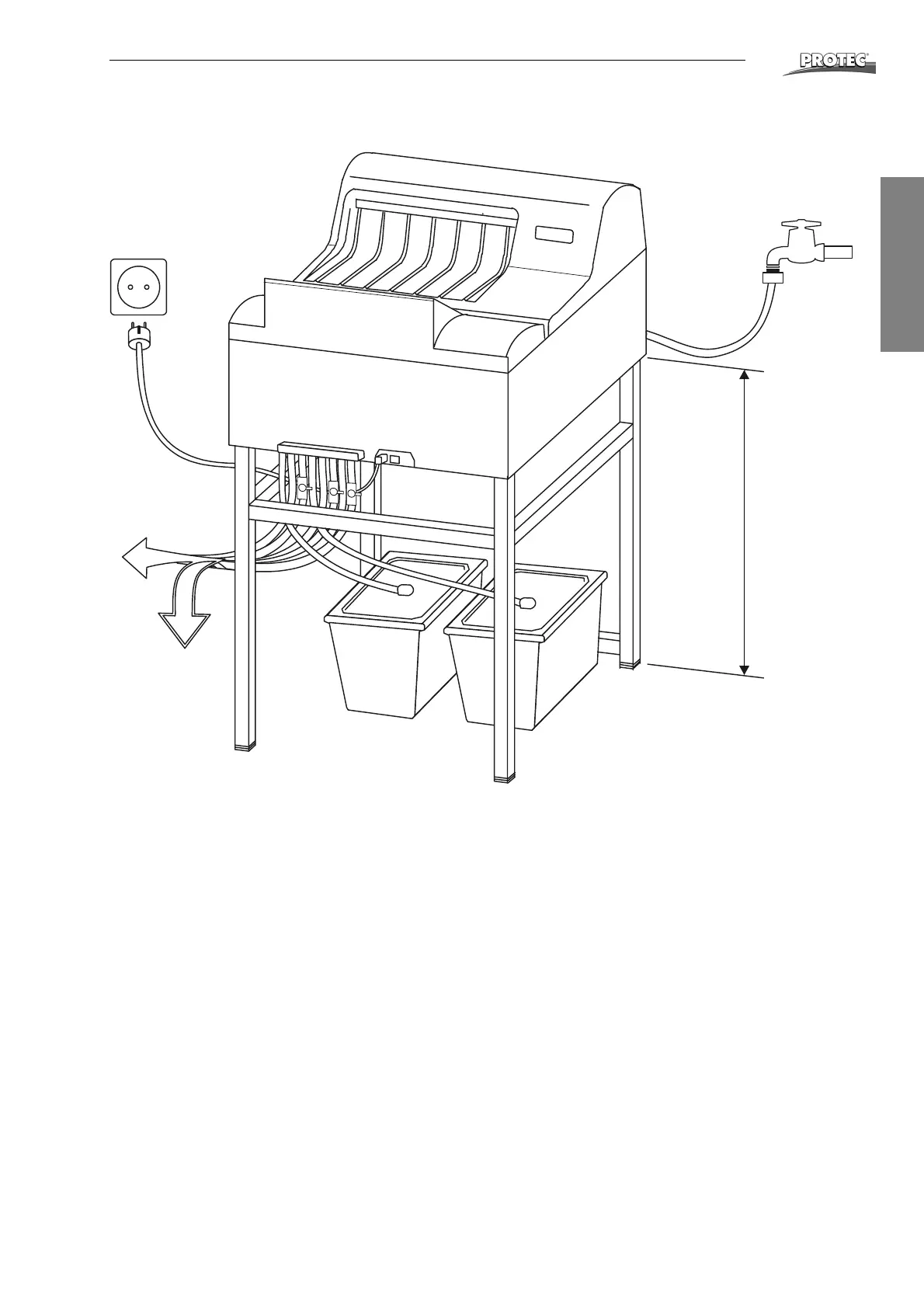
Water connection: Connect the water hose which comes out from the processor’s
back to the fresh water supply.
All other hoses (see diagram page 8): Connect the enclosed hoses according to
color system onto the front of the machine. Put hose clamps (enclosed in accessory
bag) over hose end, before attaching to connection. Warm up hose end (with hot
water or lighter) and push onto the respective connection. Finally push clamp over
hose and connection.
Cut hoses to required length. Then integrate the stop cocks into the three drainage
hoses in such a position, that they are easy to reach.
Connect the suction pipes to the hose ends for the replenishment tanks using hose
clamps. Put suction pipes through cover opening into respective replenishment
tanks and snap them in.
The overflow and drainage hoses from the developer and fixer should be guided
into their respective collecting containers.
The overflow and the drainage of the water can either be guided into the drainage
syphon or into respective collection containers.
Drainage and
collecting
containers
min. 70 cm


 To Next Page