+ +
Setting Up the D/splay
Connecting an Analog TV Signal Source
An analog TV signal may come from a cable
box, satellite receiver, antenna, or similar
device.
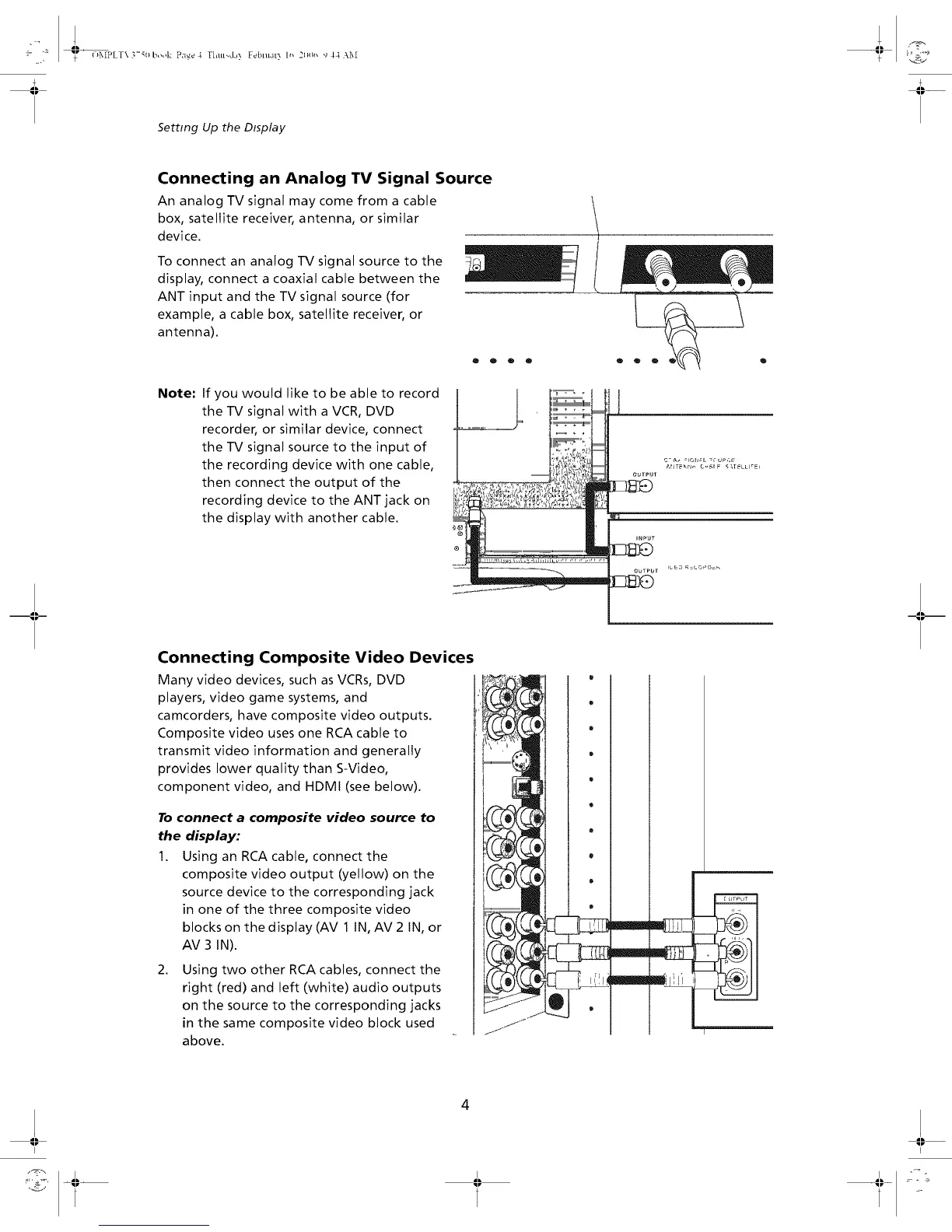
To connect an analog IV signal source to the
display, connect a coaxial cable between the
ANT input and the TV signal source (for
example, a cable box, satellite receiver, or
antenna).
QOOO
Note:
If you would like to be able to record
the TV signal with a VCR, DVD
recorder, or similar device, connect
the TV signal source to the input of
the recording device with one cable,
then connect the output of the
recording device to the ANT jack on
the display with another cable.
Connecting Composite Video Devices
Many video devices, such as VCRs, DVD
players, video game systems, and
camcorders, have composite video outputs.
Composite video uses one RCA cable to
transmit video information and generally
provides lower quality than S-Video,
component video, and HDMI (see below).
To connect a composite video source to
the display:
1. Using an RCA cable, connect the
composite video output (yellow) on the
source device to the corresponding jack
in one of the three composite video
blocks on the display (AV 1 IN, AV 2 IN, or
AV 3 IN).
.
Using two other RCA cables, connect the
right (red) and left (white) audio outputs
on the source to the corresponding jacks
in the same composite video block used
above.
1
m
j j'l!'
t _0}}


 To Next Page