2
= 1+ ( )MPLT\ 3-;I) b,>,4c Pa;e I, Thul.da_ Feblu.u_ l(, 21)H(, *J44 \M _'" _'_
_., - . # -._.y
+ +
Setting Up the D/splay
Connecting HDMI Devices
The highest-quality video devices have HDMI
outputs. An HDMI cable carries audio and
progressive scan video of the highest quality.
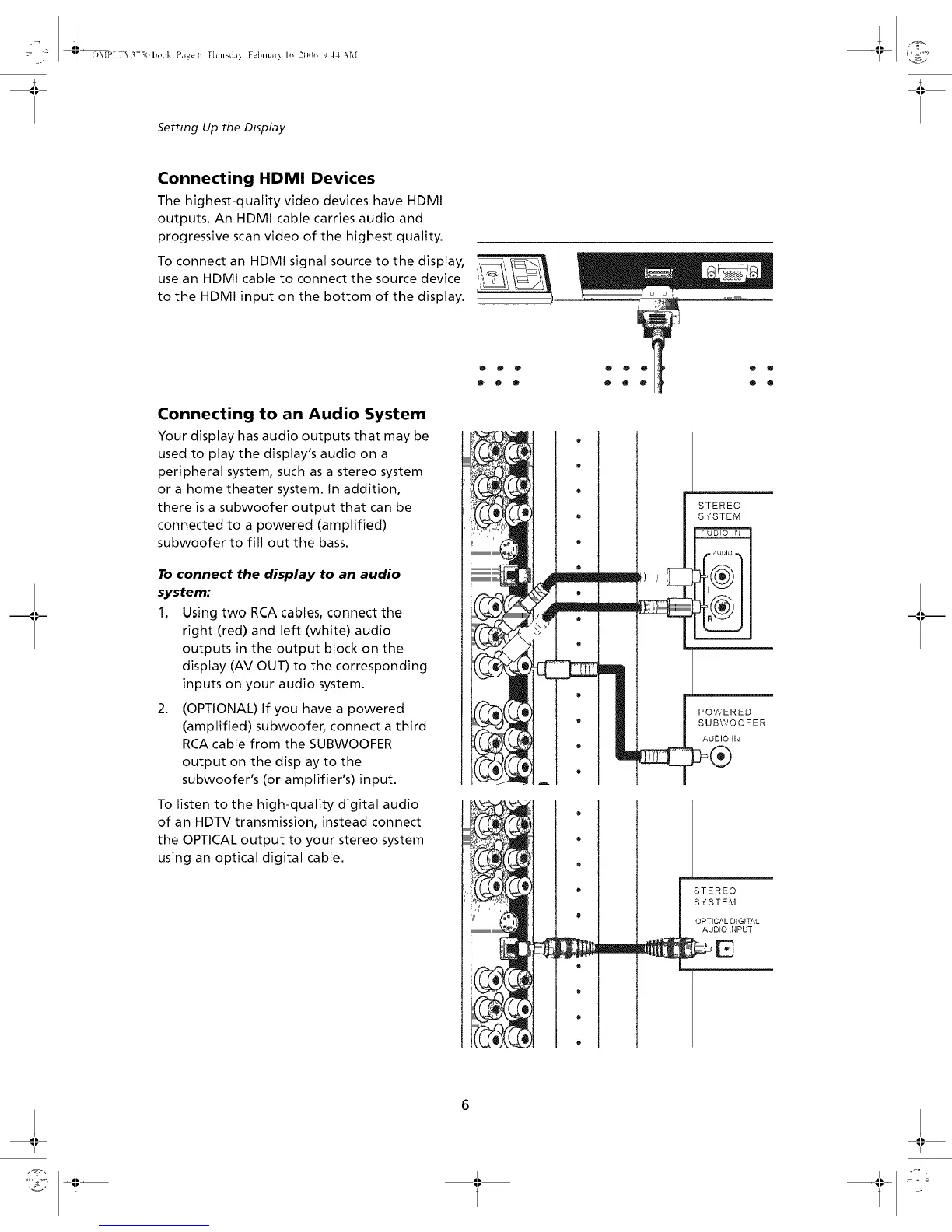
To connect an HDMI signal source to the display,
use an HDMI cable to connect the source device
to the HDMI input on the bottom of the display.
Connecting to an Audio System
Your display has audio outputs that may be
used to play the display's audio on a
peripheral system, such as a stereo system
or a home theater system. In addition,
there is a subwoofer output that can be
connected to a powered (amplified)
subwoofer to fill out the bass.
To connect the display to an audio
system:
1. Using two RCA cables, connect the
right (red) and left (white) audio
outputs in the output block on the
display (AV OUT) to the corresponding
inputs on your audio system.
2. (OPTIONAL) If you have a powered
(amplified) subwoofer, connect a third
RCA cable from the SUBWOOFER
output on the display to the
subwoofer's (or amplifier's) input.
To listen to the high-quality digital audio
of an HDTV transmission, instead connect
the OPTICAL output to your stereo system
using an optical digital cable.
i h ,, _
@ o o
o o o
illlllllllllllllllllllllllllllllllllm_
111111111
illlll_ €% _
,.,- ;?>
illl •
Q
O
®
o
o
R
h
m
STEREO
S _'STEM
POWERED
SUBWOOFER
AUDIO IN
l STEREO
D_PUT
-III_
I;
I
I;
I


 To Next Page