2
= t_ {}MPLTK 3-qtbook Pa;eb Thtu,d.,x Febnt.u, D, 2un_, *J44 \I\[ _'" -'_
_., - - # --d_-y
+ +
Setting Up the D/splay
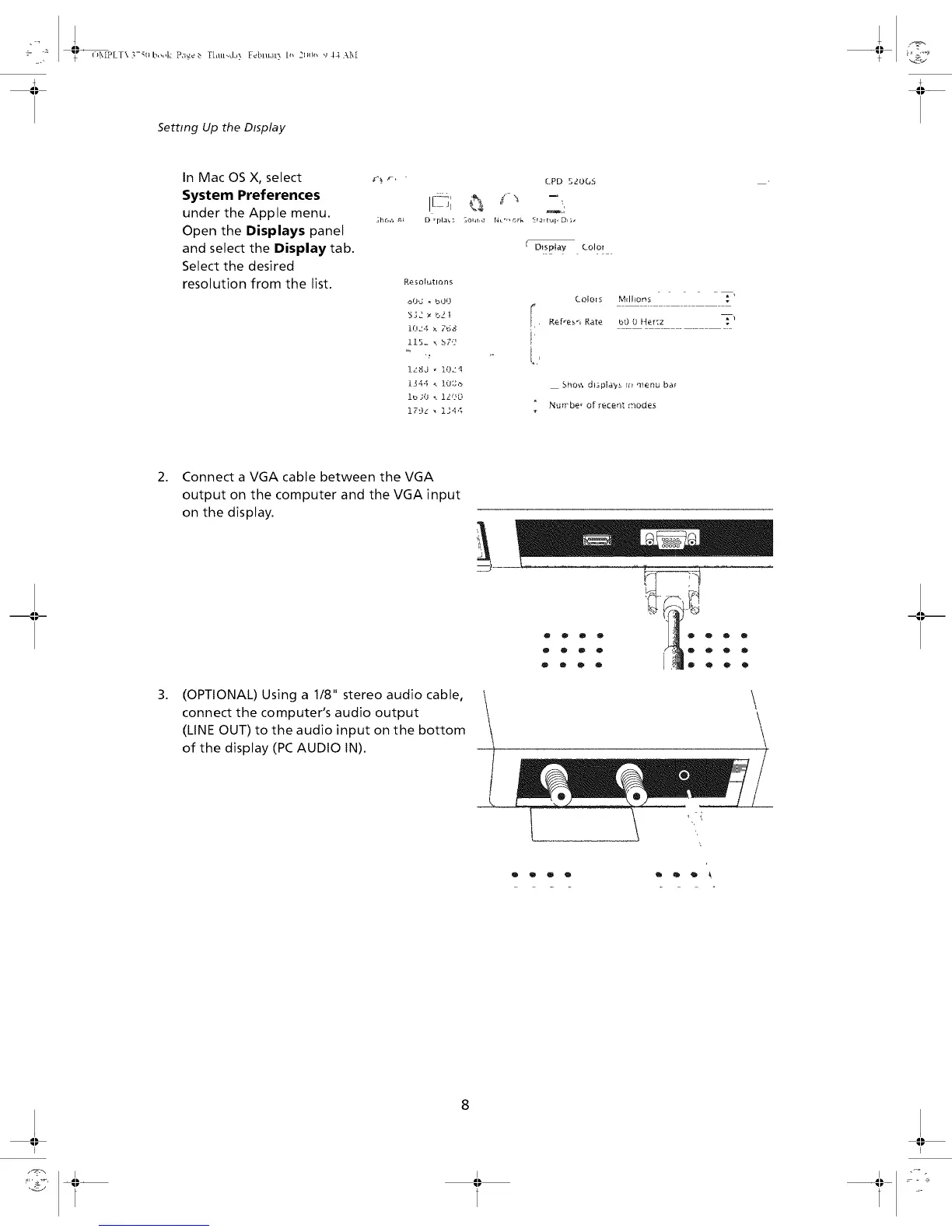
In Mac OS X, select
System Preferences
under the Apple menu.
Open the Displays panel
and select the Display tab.
Select the desired
resolution from the list.
CPD 5dOGS
D rpla'_; _,31_r,_ [4u _'' _rk _r_u_, DI ;_
( D)spta¥ Color
R_sot_tlOrl_
oO'J _ bOO
5]2 _ b2|
Uk"4 _. 7b8
115- _ bZ'f
,.,,,
izSJ _ lOz'_
Ib_O _ ligO
179L _ 1344
Cofo[s Mdhons T,
I', Refresh Rate b0 L}Her:z T_
i,'
Sho',', dlspla,,,x r_ ment_ baF
" Nufrbe _ Of gt_ceqt r';_odes
,
,
Connect a VGA cable between the VGA
output on the computer and the VGA input
on the display.
(OPTIONAL) Using a 1/8" stereo audio cable, \
connect the computer's audio output
(LINE OUT) to the audio input on the bottom
of the display (PC AUDIO IN).
0000
00_0
®000
0 0
o o
O
\
\
\
\
I I


 To Next Page