2
= 1+ ()MPLT\ 3-q)b,>,4c Pa;e 12 Tluu.da_ Febut.u_ l(, 2€)))(, *J 44 \M _'" _'_
_., - . # -.£.y
+ +
Using Your Display for the First Time
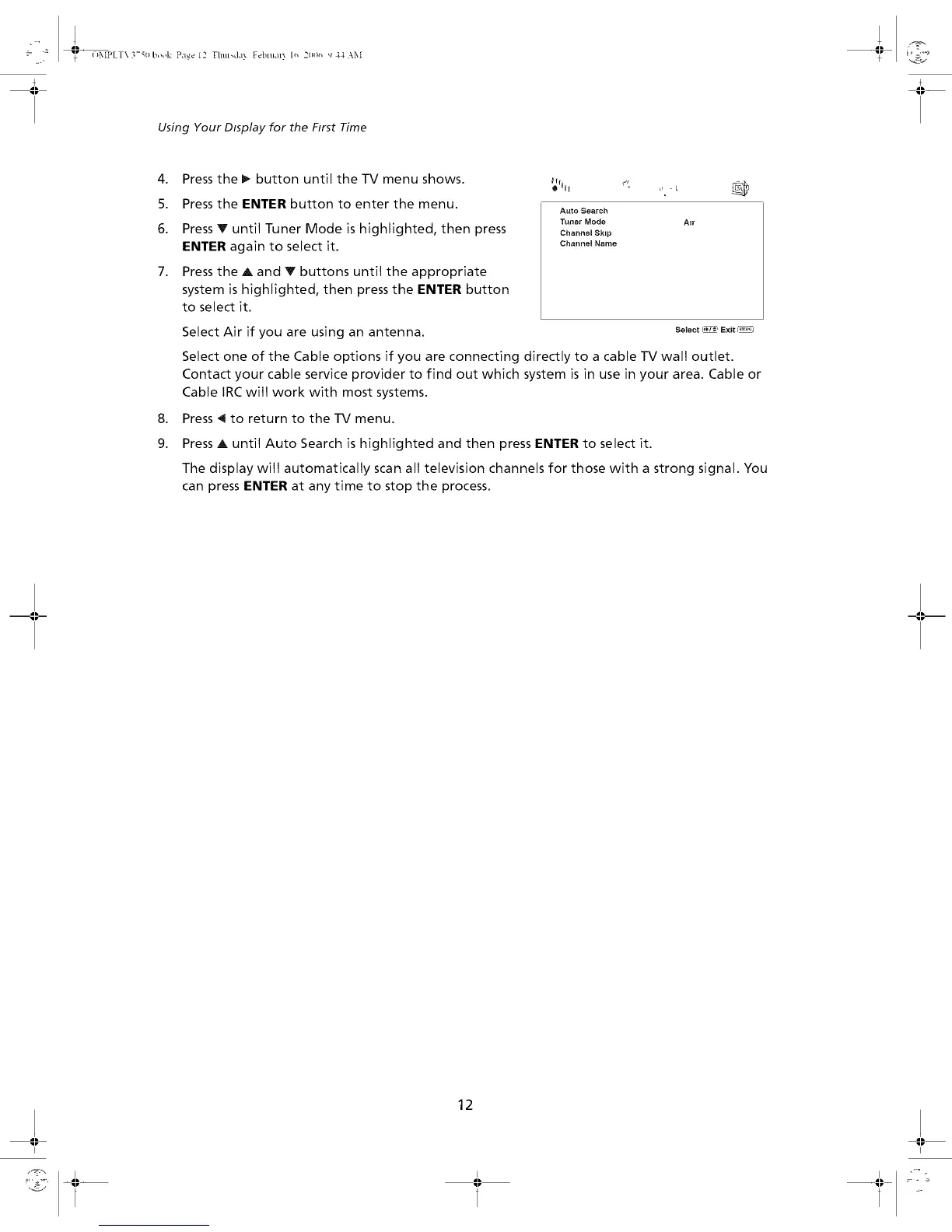
4. Press the _ button until the-iV menu shows.
5. Press the ENTER button to enter the menu.
6. Press V until Tuner Mode is highlighted, then press
ENTER again to select it.
7. Press the A and Y buttons until the appropriate
system is highlighted, then press the ENTER button
to select it.
,
9.
_l_l I _;
iii
Auto Search
Tuner Mode Air
Channel Skl_
Channel Name
Select Air if you are using an antenna, se_°t""_ Ex_t_
Select one of the Cable options if you are connecting directly to a cable TV wall outlet.
Contact your cable service provider to find out which system is in use in your area. Cable or
Cable IRC will work with most systems.
Press ,11to return to the TV menu.
Press A until Auto Search is highlighted and then press ENTER to select it.
The display will automatically scan all television channels for those with a strong signal. You
can press ENTER at any time to stop the process.
-II--
12
I I


 To Next Page