ORiNOCO
®
802.11n Access Points - Software Management Guide 73
c. Trunk Mode: Trunk Mode is configurable on the ethernet interface of the AP device. It
is mainly used to connect a VLAN aware network with an another VLAN aware
network. An interface in the Trunk mode only forwards those tagged frames whose
VLAN ID matches with a VLAN ID that is present in trunk table. All the other frames will
be dropped.
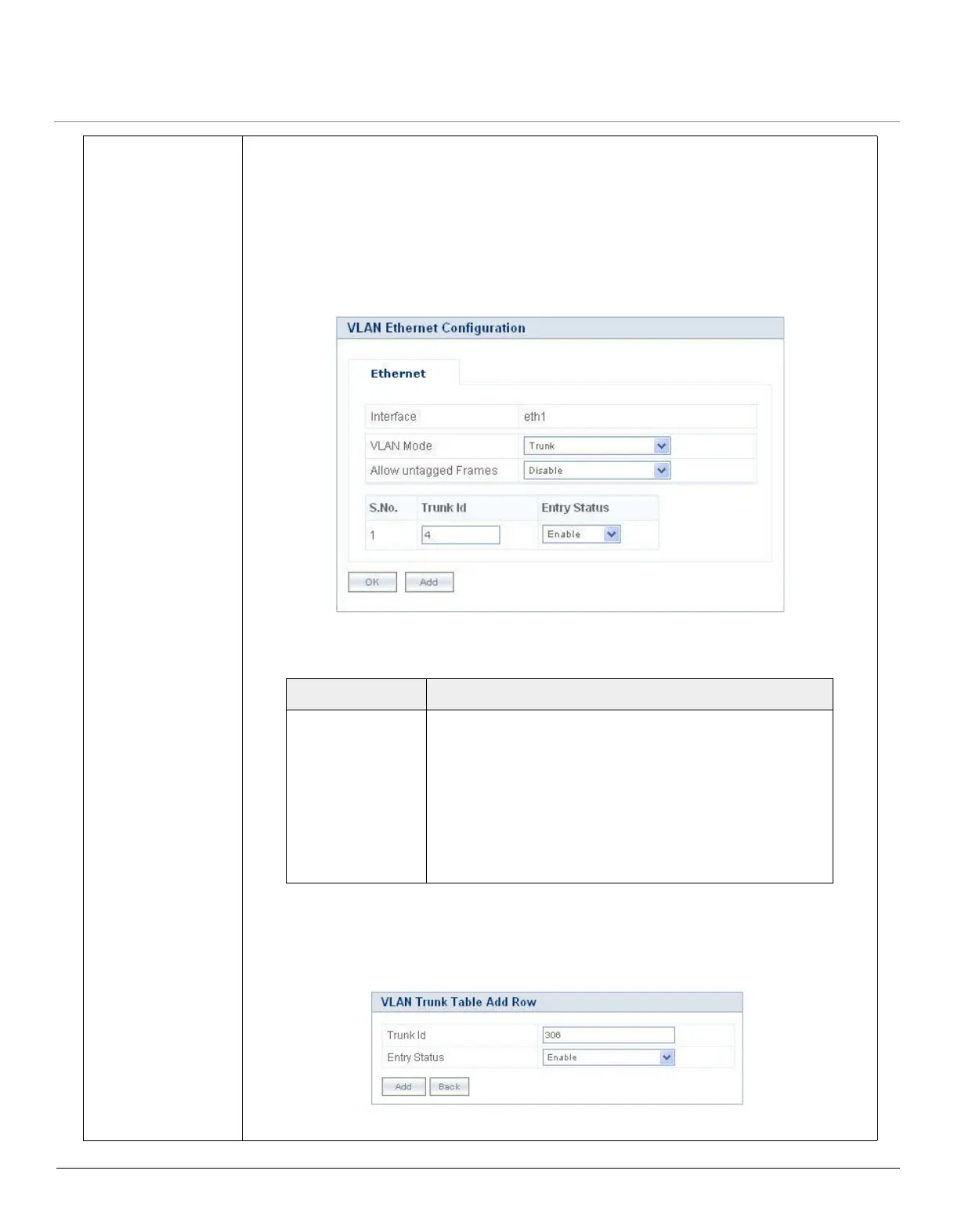
Select Trunk Mode from the VLAN Mode box and click OK. The configuration screen
appears:
Figure 5-34 VLAN Trunk Mode
VLAN Trunk Table
To add new entries, click Add. The VLAN Trunk Table Add Row screen appears:
Figure 5-35 VLAN Trunk Table - Add Row
Configure the following parameters in Trunk Mode:
Click OK and COMMIT, to save the configured parameters.
Parameter Description
Allow Untagged
Frames
To configure, either select Enable or Disable from the
drop down menu.
– If enabled, an interface in trunk mode forwards
both tagged frames whose VLAN ID matches with
one of the VLAN IDs in the trunk table and
untagged frames.
– If disabled, an interface in trunk mode forwards only
tagged frames and drops untagged frames.



 To Next Page
 Loading...








