14.2.1.5 Volume
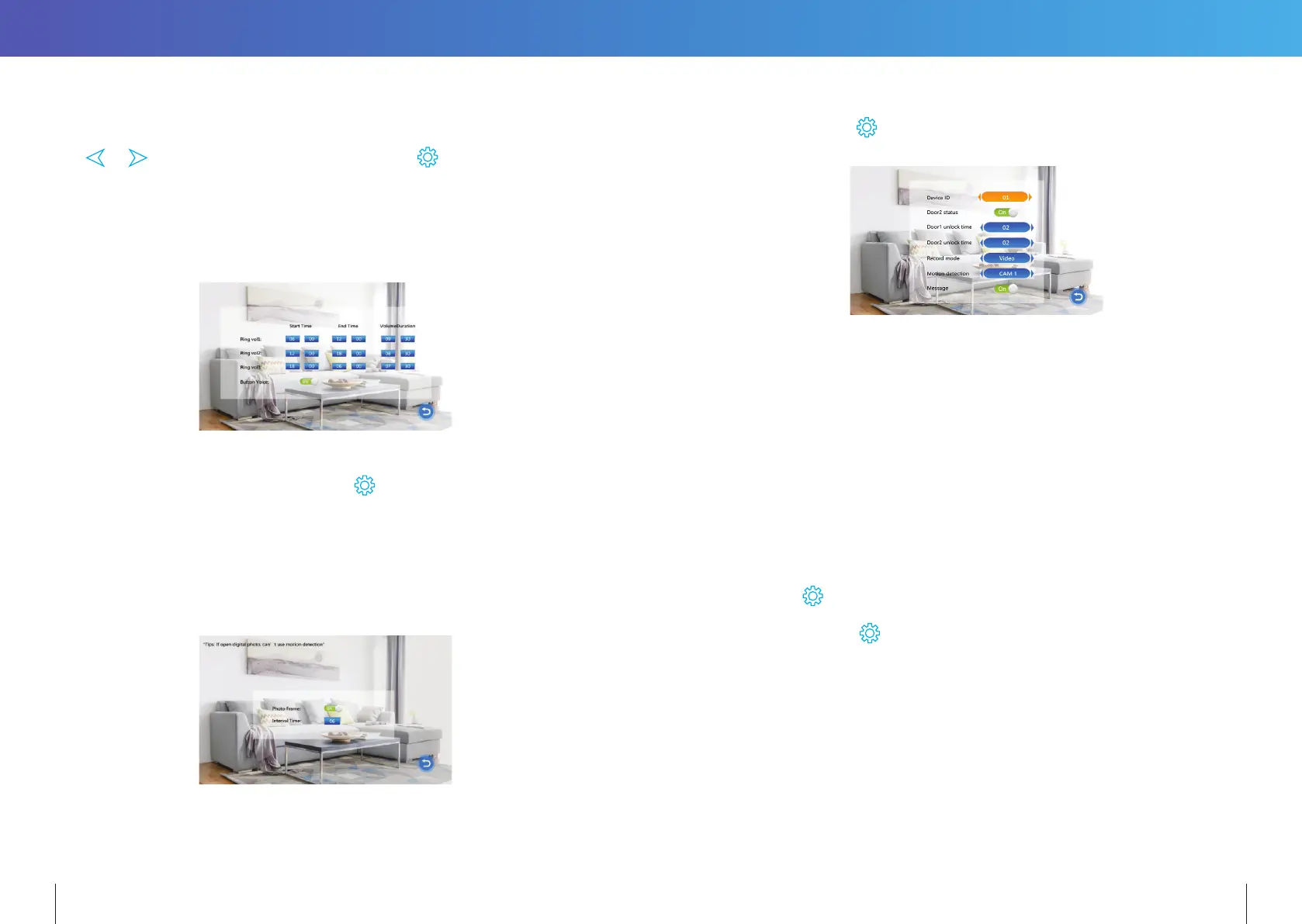
Select “Volume” to adjust the ring volume of the monitor. Users can setup preferred ring
volumes for three dierent times of day. Ring durations can be adjusted from 10s to 45s.
Use
& to navigate or increase and decrease value. to enter.
[Volume1]: The volume level of Ring Vol1 :01-10.
[Volume2]: The volume level of Ring Vol2:01-10.
[Volume3]: The volume level of Ring Vol3:01-10.
[Button Voice]: This turns on/o the confirmation sound when a button is pressed.
14.2.2 DIGITAL PHOTO
In the main menu, select “Photo Frame” and press
to enter the Digital Photo Frame
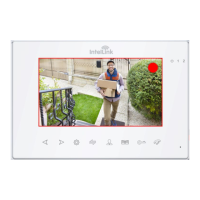
page. If the “Photo Frame” is set to ON, photos in the \USER\Photo folder on the microSD
card will be displayed when in Standby mode. The photos must be in JPG format.
Note: Motion detection will be disabled if the Digital Photo Frame setting is active.
[Photo Frame]: Switches the digital photo frame mode ON or OFF. (Default is OFF)
[Play Time Interval]: Sets the display interval from 0 to 10 seconds.
The default display time is 6 seconds.
*NB: For photo frame, image files must be reduced to 1024(W) x 600(H) pixels
in landscape orientation and no larger than 1MB is size.
14.2.3 MODE SETTING
Select “Mode” and press
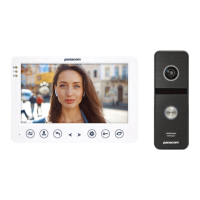
to enter the “Mode” menu. Can set extension number, DOOR2
status, unlock time, recording mode, motion detection, message etc.
[Set machine ID]: Choose an ID number ranging from 01-06. An ID of “01” denotes the
Master Monitor. The other IDs (“02” to “06”) denote Slave Monitors.
[Door2 status]: Enable or disable the preview of Door2.
[Door1 Unlock Time]: Sets Door1 unlock time. After the unlock duration, Door1 will be
locked again. The unlock time can be set from 2 to 10 seconds.
The default value is 5 seconds.
[Door2 Unlock Time]: Sets Door2 unlock time. After the unlock duration, Door2 will be
locked again. The unlock time can be set from 2 to 10 seconds.
The default value is 5 seconds.
[Record mode]: Options for recording Video or taking Snapshots. For “Video”, when
the call button of a Door Station is pressed, the Indoor Monitor with the
MicroSD card will start recording video until the end of the call, or until
is pressed. For “Snapshot”, the monitor with the MicroSD card will
automatically snapshot a photo. More snapshots can be manually taken by
pressing
button.
Note: Recording mode is only available for Door1, Door2.
[Motion Detection]: Options include “Door1”, “Door2”, “CAM1”, “CAM2” and “Disable” .
[Message]: Turn ON or OFF message reminder, default is ON. If a visitor calls, he/she will
be prompted to leave a message if the resident is not at home or fails
to answer the call.
22 23


 To Next Page