
 Need help?
Do you have a question about the Puhui T-962 V2.0 and is the answer not in the manual?
Step-by-step guide for connecting the exhaust pipe to the reflow oven for proper ventilation.
Explains the control panel layout, signal lights, and initial LCD display upon powering on the machine.
Guide on selecting and executing pre-defined temperature curves for soldering operations.
Instructions for manually setting custom temperature profiles without PC connection.
Steps for setting custom temperature profiles using a computer and serial cable connection.
Procedure for setting and executing the thermostatic control function for specific temperature and time.
General instructions on placing items, executing processes, cooling, and re-processing if needed.
Recommendations for improving soldering quality for small boards and handling specific materials.
Guidelines for cleaning the machine's interior and exterior, and proper shutdown procedures.
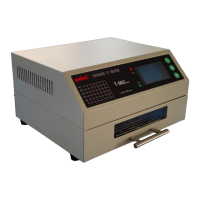
The Mini Smart Single Heating Zone Reflow Oven is a versatile and user-friendly device designed for various soldering and thermal processing tasks. It integrates multiple functions, including reflow soldering, drying, insulation, shaping, rapid cooling, and constant temperature timing, making it suitable for a wide range of applications.
The primary function of this device is reflow soldering, capable of handling both single-sided and double-sided PCBs with various packaging forms such as CHIP, SOP, PLCC, QFP, and BGA. Beyond soldering, it is also widely used for adhesive curing, PCB thermal aging, and general PCB repair work. The machine operates under microcomputer control, which automates the entire soldering process, simplifying operation for the user. It employs a combination of rapid infrared radiation heating and cooling fan stirring to ensure precise and uniform soldering temperatures, which is crucial for achieving high-quality results.
The device offers a selection of eight pre-programmed temperature parameter curves stored in its memory, catering to common soldering requirements. Additionally, it provides the flexibility for users to define and save their own custom temperature parameter curves, allowing for adaptation to specific materials and processes. The integration of vague temperature control technology, combined with a visualized drawer-style workbench, enhances the user's ability to monitor and understand the entire soldering process in real-time. This visual feedback, along with data displayed on the LCD, helps in ensuring optimal conditions and making adjustments as needed. The machine is designed for high reliability and is largely maintenance-free, aiming to provide a satisfactory and trouble-free experience for its users.
Operating the Mini Smart Reflow Oven involves a straightforward process, guided by an intuitive interface. Upon powering on, the LCD displays a main menu with options such as "Execute Temp Curve," "Select Temp Curve," "Thermostat Control," and "TO CHINESE MENU." Users can navigate these options using ▲/▼ buttons and confirm selections with the OK/RETURN button.
For executing a pre-defined temperature curve, the user first selects "Select Temp Curve" and then chooses one of the eight available curves (WAVE 1 through WAVE 8). WAVE 1 to WAVE 6 are pre-set for specific solder types and applications, such as 85Sn/15Pb, 63Sn/37Pb, Sn/Ag3.5, and standard curing of red glue. WAVE 7 and WAVE 8 are designated for user-defined curves. After selecting a curve, the system may automatically switch to an interface allowing the user to save the curve or return to the main menu if no operation is performed for a few seconds. Once a curve is selected, the user returns to the main menu and chooses "Execute Temp Curve" to start the process.
The device also supports self-setting of temperature curves, either independently or by connecting to a PC. For independent self-setting, the user selects WAVE 7 or WAVE 8 from the "Select Temp Curve" menu. An editing interface appears, allowing the user to adjust temperature values at different time points using the ▲/▼ buttons. Each time point interval is 5 seconds. After setting a temperature value, pressing OK/RETURN automatically moves to the next time point. The settable time range for self-set curves is 0-480 seconds, and the temperature range is 40-280°C. The software includes a temperature protection function that prevents setting excessively high temperature increases between consecutive time points. Once all temperature values are set, the new curve is automatically saved.
For PC-connected self-setting, the machine is linked to a computer via a serial cable. The user opens an Excel form titled "temperature data" which displays time and temperature lines. The maximum temperature is limited to 280°C, and the temperature increase rate should not exceed 3°C/s. Users can modify temperature values in unmarked cells. After modifications, clicking on a blank space or pressing "Enter" refreshes the data and generates a new temperature curve, updating the data in the WAVE 7 or WAVE 8 tables. This data is then copied into the "SerialCom" software's send area. After selecting the correct COM port and opening it, clicking "Send" transmits the data to the machine. A successful transmission is indicated by a pop-up window and an audible prompt from the machine. After sending, the serial cable is unplugged, and the machine is restarted to load the new curve.
The "Thermostat Control" function allows for maintaining a constant temperature for a specified duration. Users select this option, then set the desired temperature (40-280°C) and time (300-9999 seconds) using the ▲/▼ buttons. Once set, pressing OK/RETURN executes the thermostatic control. The machine will automatically stop and beep when the process is complete. This function can be interrupted at any time by pressing OK/RETURN to return to the main menu.
For general operation, the item to be processed is placed on the flat surface within the drawer, which is then closed. The desired function is selected, and the OK/RETURN button is pressed to initiate the process. The LCD displays execution time, set temperature, measured temperature, and an actual temperature curve, allowing for real-time monitoring. The process is automatic, but user supervision is possible through the front window. The machine may alarm if the measured temperature deviates significantly from the set temperature. The process can be stopped manually at any time. Upon completion, the fan automatically cools the machine. If results are not as expected, the process can be repeated.
To enhance soldering quality for small boards or BGA balls, it is suggested to place a 10x10cm PCB board underneath the item. In low temperature or high humidity environments, preheating the machine by running a heating curve without any items is recommended. The machine is not suitable for soldering chips with strong reflective metal encapsulation or plastic inserts that cannot withstand temperatures below 250°C. For accurate temperature measurement, a standard thermometer with an external probe should be tightly fixed directly above the PCB, placed in the drawer, and pushed into the machine for testing. This method provides a temperature reading that closely reflects the actual conditions during processing.
The Mini Smart Reflow Oven incorporates features to ensure its longevity and stable performance. It has an inner cavity cleaning function: after several uses, it is recommended to run a heating curve without any components inside. This process helps to evaporate residual solvents and solder, keeping the inner cavity clean and maintaining the overall stability of the machine's performance.
Before shutting down the machine, it is crucial to ensure that it has cooled down sufficiently. This practice helps to prolong the service life of the machine's components. Regular cleaning of the observation window located at the front of the machine is also advised to maintain clear visibility of the soldering process.
For safety, users must ensure the machine is reliably grounded. When the machine is not in use for an extended period, it should be disconnected from the mains power supply. The thermal insulation material of the machine is strictly protected, and users are cautioned against disassembling the machine without proper protection. In cases where the pictures or software operations in the manual may differ from the actual product due to technological innovation or product upgrades, the real product's appearance and functionality shall prevail. For further detailed information and technical support, users can visit the manufacturer's website.
 General
| Model | T-962 V2.0 |
|---|---|
| Type | Infrared IC Heater |
| Heating Method | Infrared heating |
| Control Method | Microcomputer control |
| Effective Soldering Area | 180mm x 235mm |
| Temperature Uniformity | ±5°C |
| Power Supply | AC 220V |
| Cycle Time | 5-8 min |
| Voltage | 220V |
| Frequency | 50Hz |
| Heating Rate | 2-3°C/sec |
| Capacity | Unknown |

 To Next Page