EXECUTE TEMPERATURE CURVE
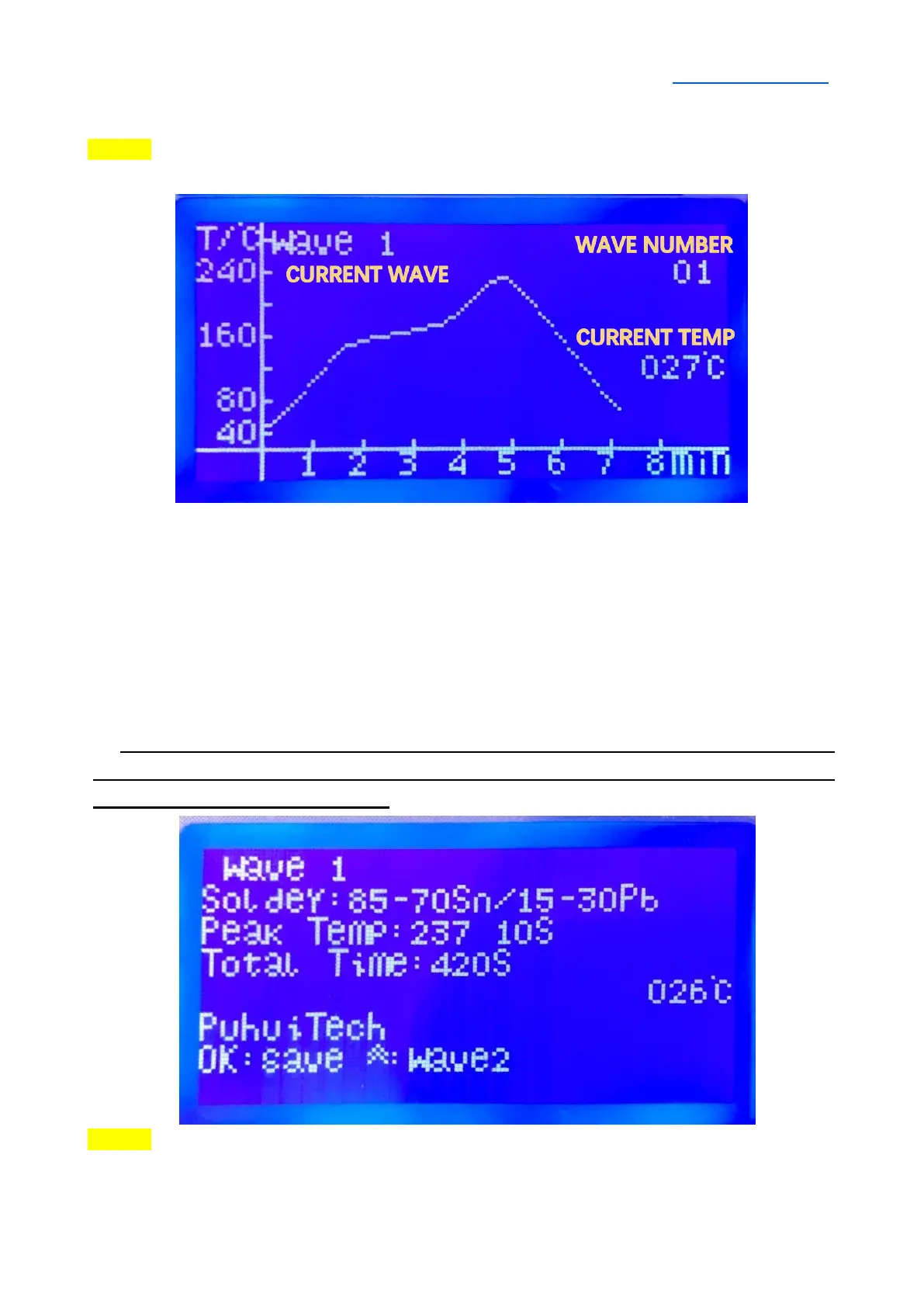
STPE 1 Press▲/▼Button to “Select Temp Curve”, then press OK/RETURN Button, the
LCD will show as below:
The initial curve is WAVE 1, press ▲ Button to switch to WAVE 2~WAVE 8.
WAVE 1 for 85Sn/15Pb 70Sn/30Pb;
WAVE 2 for 63Sn/37Pb 60Sn/40Pb;
WAVE 3 for Sn/Ag3.5
;
Sn/Cu.75 Sn/Ag4.0/Cu.5;
WAVE 4 for Sn/Ag2.5/Cu.8/Sb.5
;
Sn/Bi3.0/Ag3.0;
WAVE 5 for Standard Curing of Red Glue, Heraeus PD955M;
WAVE 6 for PCB rework etc.
WAVE 7 and WAVE 8 are user-defined curve.
SPECIAL NOTE: The system will automatically switch to the following interface,
if there is no any operation for 2~3 seconds. Press OK/RETURN Button to save the
curve or back to the main menu.
STEP 2 After selecting curve, press OK/RETURN Button to return to the main menu.
Select “Execute Temp Curve”, then press OK/RETURN Button to execute.


 To Next Page