11
Too much pressure and speed can cause tube set damage.
Key Pad Operation
Speed Control
Push the button ONCE for low (500 ml per minute),TWICE
for medium (750 ml per minute), and THREE TIMES for
highspeed (1,000 ml per minute)
Forward Flush
Press the button ONCE for 30 seconds, TWICE for 60sec-
onds and THREE TIMES for 90 seconds
Stop
Press to stop all pump action and cancel any cycle
Impact
Press for clogged devices. Press the button ONCE for two
(2)minutes, TWICE for four (4) minutes, and THREE TIMES
for six (6)minutes.
FlexiPump™ Independent
Flushing System In-service
1. Properly dilute the enzymatic detergent* and place the down tube into the cleaning solution. *We highly
recommend PureChannel™ Flush Instrument Channel Cleaner & Foam
2. Connect up to three channeled devices at once - the tip of the tube set has the same luer fitting you
would find on a syringe; this allows you to connect almost any instrument. We also offer other connection
accessories to facilitate attaching additional types of instrument components.
3. Push forward flush to start. Watch for solution coming out of the devices.
To maximize the fluid pressure: cap off unused leads one by one. Gray end caps come with each tube set. Capping
of 2 of the 3 leads will create almost 50 psi of pressure in the remaining lead. REMEMBER: High pressure does not
result in good cleaning. Good cleaning is copious amounts of cleaning solutions with the appropriate cleaner.
CAUTION: Running the pump on high can create aerosols and deliver too much pressure to delicate devices. Use only
for appropriate channels.
Robotics: You can flush up to two ports at once, using our XL Slip Tip accessory. Attach the two leads to the slip tips,
and plug into the ports. Cap off the unused lead on the tube set so all fluid gets directly to the robotic device.
Decontaminating tube sets: Important to decontaminate after every shift change, with a water-based ready to use
solution***. Pump the solution into the tube set and allow 5 minutes of contact time. When done, pump water through
to rinse. ***We highly recommend the validated ProSpray™ Surface Disinfectant.
Replace tube sets every thirty days. Please see log sheet.
PHONE 877.718.6868 WEB www.pure-processing.com
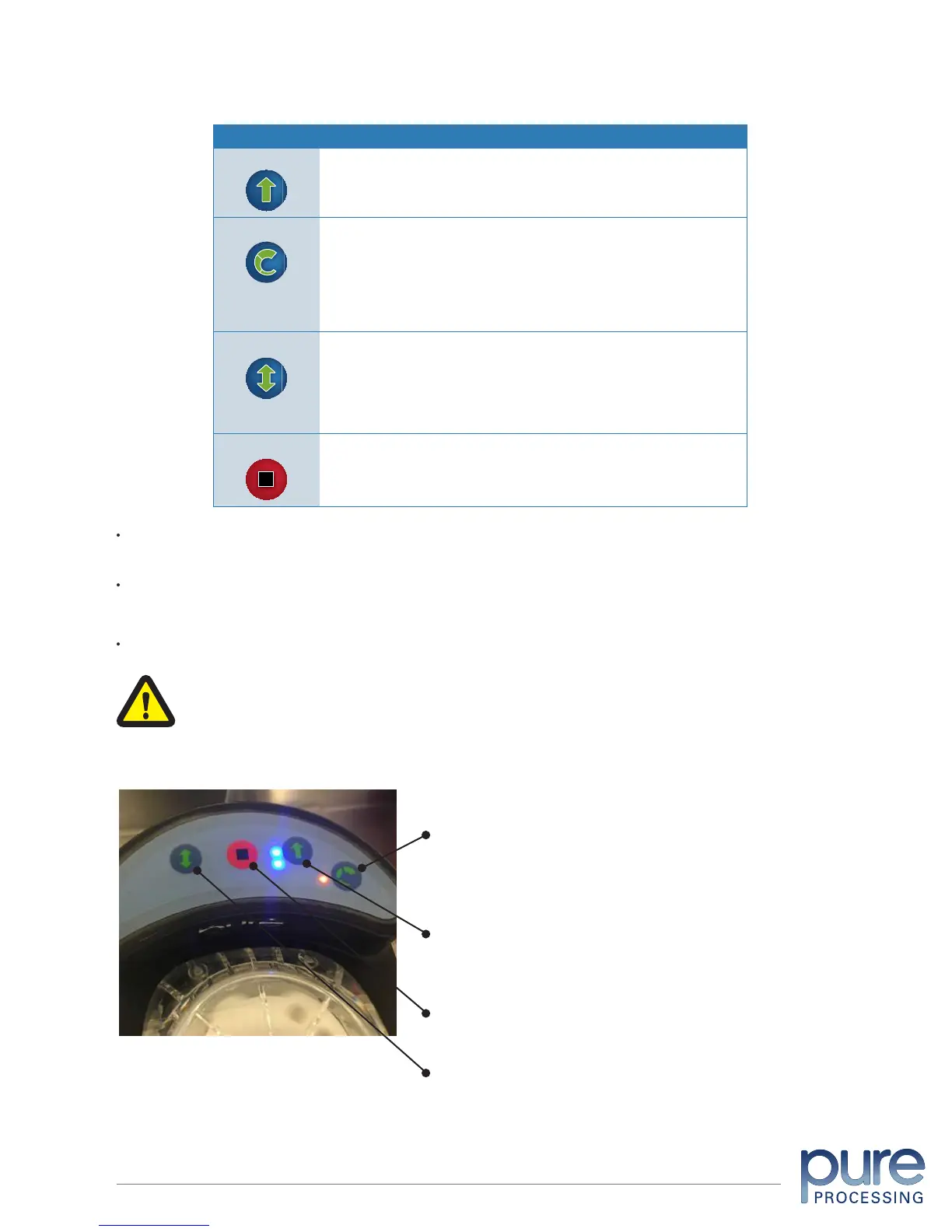
Most frequently used button; time controlled:
• 1 LED light- 30 seconds
• 2 LED lights- 60 seconds
• 3 LED lights- 90 seconds
Stops the flushing
It’s important to control the volume without too much pressure:
• 1 LED light- Low- for small devices 1-2 mm diameter, such as suction tips and eye instruments
(500 ml** per min.)
• 2 LED lights- Medium- medium devices 2-3 mm diameter (750 ml** per min.)
• 3 LED lights- High- large devices, 4 mm and larger diameter, such as laparoscopic, robotic, or
orthopedic lumens (1000 ml** per min.)
**Milliliters flushed is the total volume. Example: if three devices are flushed at the same time on
high speed – each device flushes 333 ml per minute.
Used on devices that have material clog or impact. The impact cycle will create a push and pull
pressure- moving in a forward direction, and then stopping to reverse and create suction. This feature
will allow the clog to soften up and allow you to push a brush through.
Time controlled:
• 1 LED light: 2 minutes
• 2 LED lights: 4 minutes
• 3 LED lights: 6 minutes
Forward Flush
Speed/Volume
Impact Cycle
Stop
KEY PAD FUNCTIONS
The Forward flush cycle is used for flushing channels. There are three options for this cycle: 30 seconds,
60 seconds and 90 seconds.
The Impact cycle is used ONLY for devices that are clogged. The FlexiPump tube set must be
decontaminated after each Impact Cycle run.
The Speed Indicator shows one, two or three lights, to indicate the pump speed selected.
FlexiPump™ Independent Flushing System User Manual
© Pure Processing, LLC. 2017. All rights reserved.


 To Next Page