
 Need help?
Do you have a question about the PUSR USR-M300 and is the answer not in the manual?
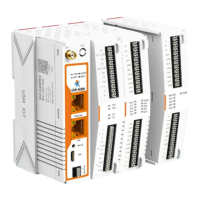
High-performance and scalable edge IoT gateway with data calculation, reading/writing, and protocol support.
Dual-core processor, Python support, LTE/Ethernet redundancy, serial ports, IO interface, industrial protocols.
Preparation and diagram for connecting power adapter, network cable, PC, and router to the M300.
Instructions on powering on, connecting PC via LAN, and accessing the gateway through a web browser.
Describes the main tabs of the web interface: Overview, Network, Edge Computing, System Management, and Python Application.
Allows users to select internet connectivity priority and configure PING detection settings.
Displays cellular information like signal strength and IP address, and allows APN configuration.
Explains how to change the work mode of Ethernet Port 1, typically from WAN to LAN, to enable two Ethernet ports.
Allows setting WAN port parameters like network mode, DNS mode, and MTU for internet connectivity.
Covers setting basic LAN port information, including IP address, netmask, and DHCP service for connected devices.
Enables viewing the routing table and adding static routes for network traffic management.
Allows switching between default edge gateway mode and Graphical Programming mode for application development.
Explains how to preset extendable IO modules to match their hardware sequence for proper operation.
Provides detailed information and status for the device's IO modules, including DI, DO, and AI interfaces.
Explains the Data Point Table as the core database for edge computing, essential for data acquisition, reporting, and control.
Discusses the gateway's support for mutual conversion between various industrial protocols like Modbus and OPC UA.
Covers the gateway's functions including serial port, communication, data query, reporting, and linkage control.
Allows users to set the time zone, configure manual time, or set up an NTP server for accurate time synchronization.
Enables users to view, check, and download system log information for troubleshooting and monitoring.
Encompasses system configuration management, firmware upgrades, user management, and reboot functions.
Facilitates connecting to the PUSR cloud platform for equipment maintenance and private deployment.
Notes support for LBS location and mentions that GPS functionality is under development.
 General
| Model | USR-M300 |
|---|---|
| Category | Gateway |
| Processor | ARM Cortex-M4 |
| Ethernet Ports | 1 |
| Serial Interface | RS232/RS485 |
| Serial Ports | 2 |
| Wi-Fi | 802.11b/g/n |
| Cellular | 4G LTE |
| Power Supply | DC |
| Ethernet Interface | 10/100 Mbps |
| Operating Temperature | -40°C to 85°C |

 To Next Page