7
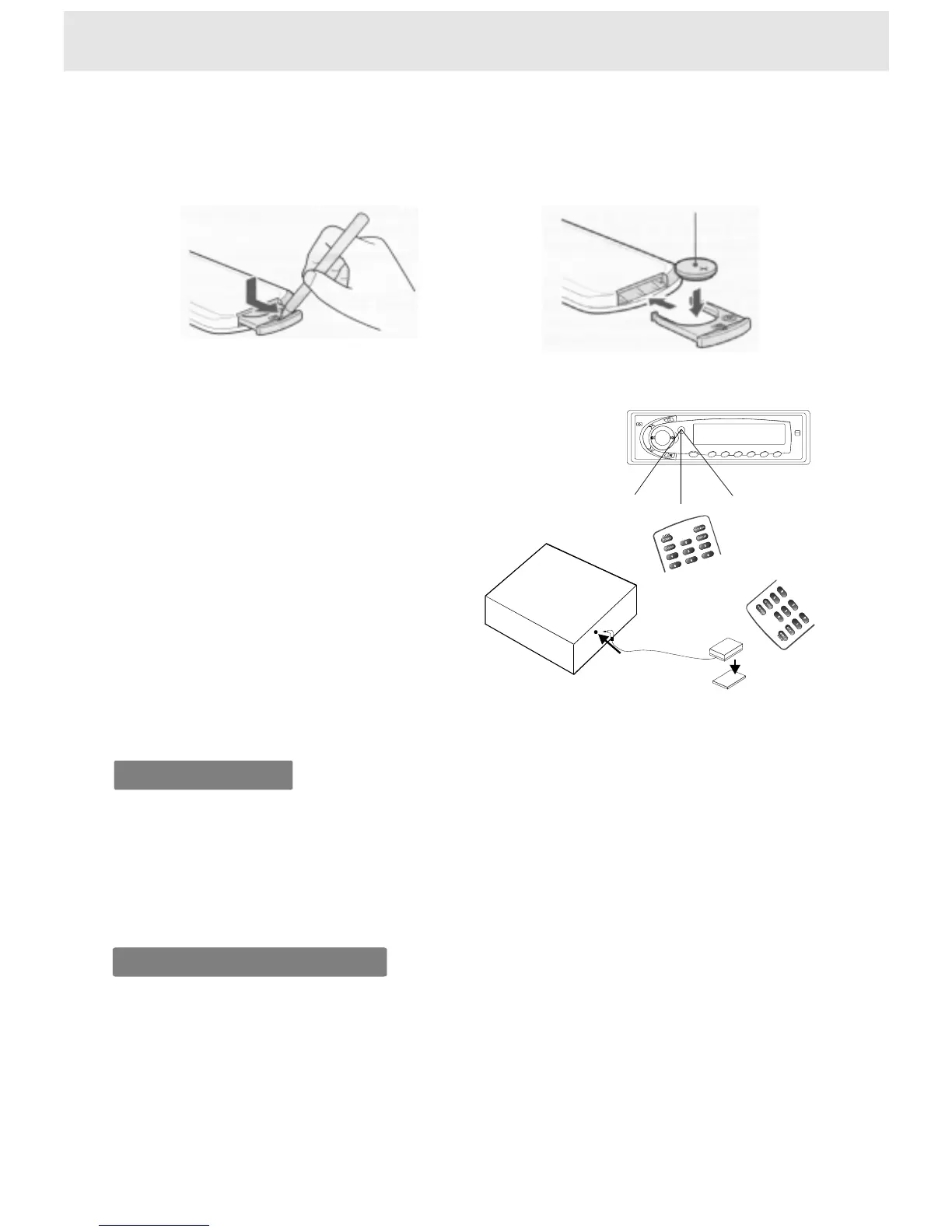
Whenusingremotecontrol
Preparingtheremotecontrol
1)Openthecover,
pullthecoverasillustrated
2)Insertcell(3V),Closethecover
InsertthebatteriesintotheremotecontrolsoyoucanuseittooperatetheDVDvideoplayer.
DonotexposetheremotesensoroftheDVDplayertoastronglightsourcesuchasdirect
sunlightorotherillumination.Ifyoudoso,youmaynotbeabletooperatetheDVDplayervia
theremotecontrol.
Makesuretomatchthe+and-onthelithiumbuttoncell(3V,CR2025)tothemarksinsidethe
cellcompartment.
Operatingwiththeremotecontrol
1)Thissectionshowsyouhowtousethe
remotecontrol.Pointtheremotecontrol
attheremotesensorandpressthebuttons.
Theremoterange:about4mfromthefront
oftheremotesensor.
(Is)offaxis:morethan30ineachdirection
ofthefrontoftheremotesensor.
2)Remotesensorandremotecontroleyejack
Connecttheremotecontroleyejacktothe
remotesensorunit.
L
Notusedwhenusingtheremotesensor
ontheremotecontroleyejack.
Double-sidetape
Remotesensor
DVDplayer
Remoteeyejack
Withabout4m
Notesonbattery
Notesontheremotecontrol
Tooperatetheremotecontrolcorrectly,followtheinstructionsbelow.
Donotinsertcellintotheremotecontrolinthewrongdirection.
Donotcharge,heat,open,orshort-circuitthecell.Donotthrowcellintoafire.
Iftheremotecontroldoesnotfunctioncorrectlyoriftheoperatingrangebecomesreduced,
replaceallcellwithnewone.
DirecttheremotecontrolattheremotesensoroftheDVDplayer.
Donotdroporgivetheremotecontrolashock.
Donotleavetheremotecontrolnearanextremelyhotorhumidplace.
Donotspillwaterorputanythingwetontheremotecontrol.
Donotdisassembletheremotecontrol.


 To Next Page