19
Advancedplayback
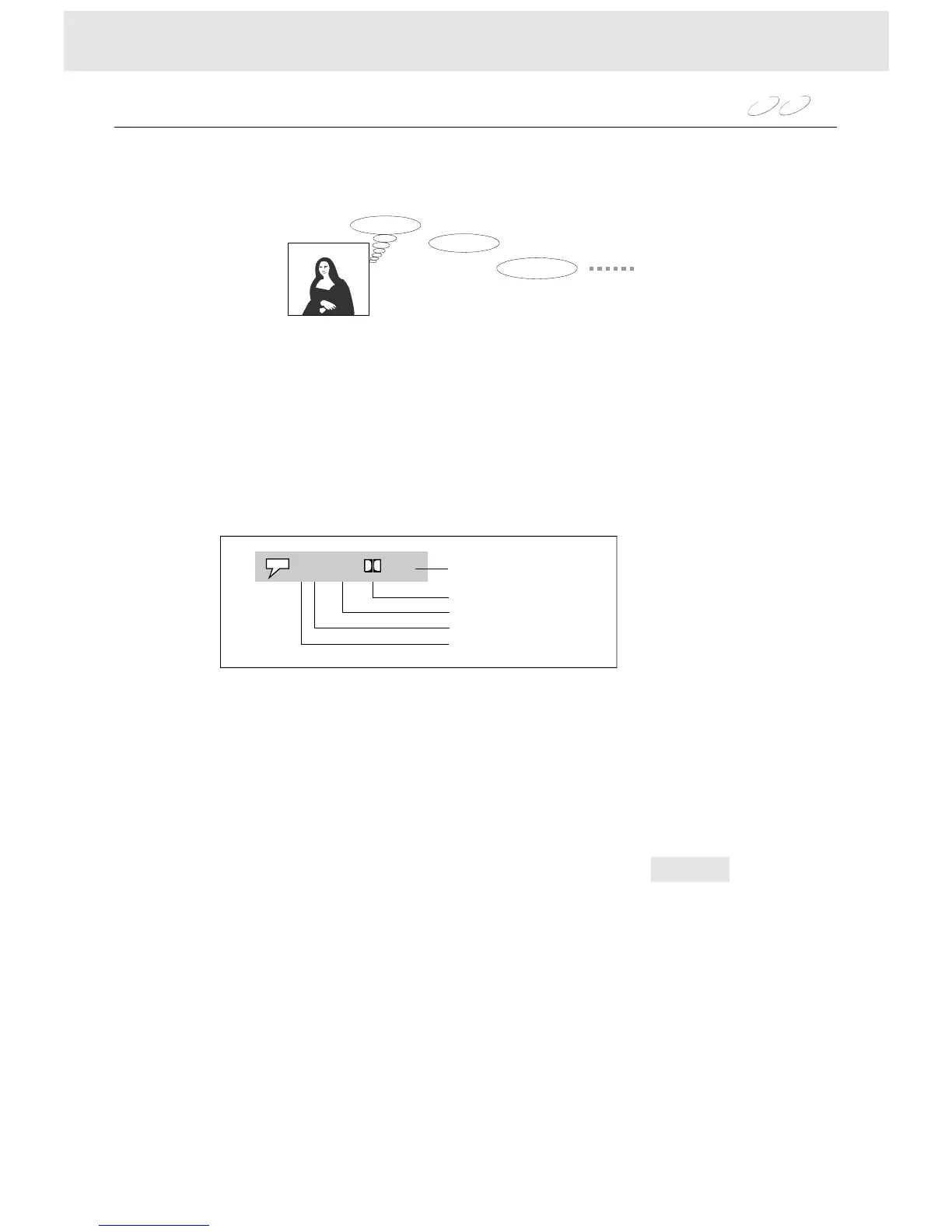
Youcanselectapreferredlanguagefromthoseincludedonthedisc.
1WhileplayingpressAUDIO,thecurrentaudiosettingappears.
2EachtimeyoupresstheAUDIO,theaudiosettingincludedontheDVDvideodiscchanges.
Selectingaplaybackaudiosetting
Buenosdias!
Goodmorning!
Bonjour!
!
WiththeAUDIObuttonandtheinstructionsappearonthescreen,youcanchangetheAUDIOMode.
PresstheAUDIObutton,thesettingappearsonthescreen:
StereoL/RMode
L/RmodehighlightedpressENTERtochangetheaudiochannel.
L/Rmodechangesasfollowing:Stereo,Left,Right,Mix.
,
DVD
VCD
FORDVDDISCS
FORVCDDISCS
WhenplayingthediscsintheDolbydigitalandDTSsystem,pleaseselecttheAUDIOmodeinDolby.
IfyouselectDTS,besuretousethecoaxialcableandconnecttoDTSequippedamplifier.
Pleaseseepage9.
Currentaudionumber
1/4Eng2Ch
Totalaudionumber
Language
Recordingsystem
Audiochannel


 To Next Page