Need help?
Do you have a question about the Pyle PLRMR23BTW and is the answer not in the manual?
General safety guidelines for reducing fire, electric shock, and interference risks during operation.
Safety precautions regarding lithium battery cell leakage, disposal, and child safety.
Warnings against inserting foreign objects into receiver openings to prevent damage.
Caution against discharging the vehicle battery by prolonged receiver use with the engine off.
Steps to complete electrical connections and ensure they are correct before installation.
Describes the required dashboard opening size for unit installation.
Detailed steps for physically installing the ship/car receiver into the dashboard.
Visual guide for connecting wires to the receiver, including speaker and power connections.
Instructions on how to detach the main unit from its mounting sleeve.
Instructions for powering the unit on and off using the front panel or remote control.
How to control the audio volume using the knob or remote control buttons.
Navigating and adjusting various audio settings like Bass, Treble, Balance, and EQ.
Step-by-step guide to setting the current time on the unit's display.
Switching between RADIO, Bluetooth, USB, SD CARD, and AUX-IN input modes.
Functions for toggling mute on/off and activating loudness for enhanced bass.
Selecting different EQ settings like OFF, ROCK, POP, CLASS, and FLAT.
Procedure for resetting all parameters to factory default settings when issues arise.
Switching between USA and Europe frequency bands for radio reception.
How to change radio bands (FM1, FM2, FM3, AM1, AM2) and store preset stations.
Using manual tuning and auto seek tuning to find radio stations.
Storing and recalling radio stations using preset buttons and automatic store function.
Selecting LOCAL/DX and STEREO/MONO modes to optimize radio signal reception.
Instructions for inserting USB devices and micro SD cards, and how to eject them.
Using buttons for play, pause, next/previous track, fast forward/backward.
Activating introduction scan, repeat track, and random playback modes.
Navigating through tracks and folders using 5/-10 and 6/+10 buttons.
Method for directly selecting a music file by track number in MP3 format.
Steps to pair and connect a Bluetooth-enabled mobile phone for hands-free use.
Instructions for making, answering, rejecting, and ending calls via Bluetooth.
Redialing last number and switching audio between the system and mobile phone.
Playing music from a paired mobile device through the car audio system.
Instructions for removing the protective insulating sheet to enable remote control function.
Guide on how to replace the lithium battery cell in the remote control.
Tips for optimal remote control operation, including angle and distance.
Overview of button names and their corresponding functions on the remote control.
Details on chassis dimensions, power requirements, and maximum power output.
Frequency ranges, sensitivity, and IF frequency for FM and AM radio.
Supported audio formats, pre-amp output, frequency response, and S/N ratio.
Supported Bluetooth profiles and frequency range.
Common problems like engine switch, cable connections, blown fuse, volume, and skips.
Troubleshooting for radio noise, antenna connection, and preset station reset.
Resolving no sound with USB/SD cards or damaged media/files.
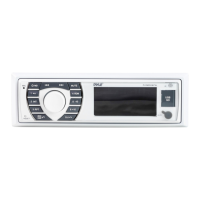
 General
| Brand | Pyle |
|---|---|
| Model | PLRMR23BTW |
| Category | Car Receiver |
| Language | English |

 To Next Page