Need help?
Do you have a question about the Pyle PLR14MPF and is the answer not in the manual?
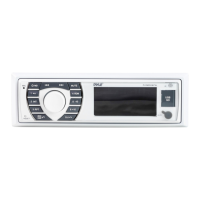
Front panel layout detailing all buttons, knobs, and indicators for device operation.
Controls for adjusting audio volume, tone, and balance settings.
Components for radio tuning, band selection, and status indicators.
Slots and buttons for USB, SD/MMC card playback and mode selection.
Instructions for turning the device on/off and adjusting the volume level.
Steps for selecting radio bands (FM/AM) and tuning stations.
Guide for playing music from USB or SD/MMC cards.
How to skip tracks (NEXT/FF) and rewind (BACK/REW) during playback.
Instructions for pausing and resuming media playback.
Procedure for switching between U-disk and SD/MMC card playback.
Guidance on replacing the fuse with the correct specification.
Technical details including frequency range, sensitivity, and SNR for AM/FM.
Power voltage, speaker impedance, power output, and physical dimensions.
List and diagram of parts required for installation, including knobs, nuts, and washers.
Illustration showing how components are assembled and mounted to the dashboard.
Solutions for when the power indicator light does not illuminate.
Troubleshooting steps for lack of sound or unclear audio output.
Resolving issues related to mono audio playback instead of stereo.
 General
| Bluetooth | Yes |
|---|---|
| USB Port | Yes |
| Aux Input | Yes |
| SD Card Slot | Yes |
| Display | LCD |
| Single DIN | Yes |
| MP3 Playback | Yes |
| Built-in Microphone | Yes |
| Remote Control | Yes |
| WMA Playback | Yes |
| Tuner | FM Radio |


 To Next Page