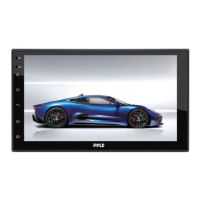
This document describes the PLINTBL7 7-inch Double DIN Car Stereo Receiver with Wireless BT, a multimedia player designed for in-car entertainment and navigation. The device runs on an Android platform, allowing users to download and install various applications in addition to the standard ones provided. It features a 1080P HD touch screen, supports rearview cameras, and includes dual USB ports.
Function Description
The PLINTBL7 serves as a comprehensive car stereo receiver, integrating multiple functionalities for an enhanced driving experience. Its core functions include:
- Navigation: The unit comes with pre-installed navigation software. Users can set a default map if multiple maps are available and access the navigation interface directly from the main screen. If map data is not present on the memory card, the system will prompt for download and direct the user to the map management interface. Map download and management features allow users to select city map data, pause/cancel downloads, and update applications.
- Audio Playback:
- Local Music: The device can play music files stored on an SD card or via a USB interface. The music player includes controls for folder navigation, sound settings, loop playback, previous/next track, and play/pause.
- Online Music: When connected to the internet, the unit can stream online music.
- Radio: An AM/FM tuner is integrated, allowing users to search for radio stations both forwards and backwards, tune manually, and store up to 40 effective platforms for each FM/AM band. It also includes DX and local search options, and audio settings for radio playback.
- Video Playback: The unit supports 1080P HD video playback from an SD card or USB interface. The video player allows switching between different storage locations (All/SD/U Disk/File Browser) and automatically resumes playback of the last played video file. Controls include menu access, last/next track, play/pause, and full screen mode.
- Wireless BT (Bluetooth®): The device supports Wireless BT 4.0+ for hands-free communication and audio streaming. Users can connect their smartphones to make and receive calls, access contacts, and manage call logs. The BT interface displays connected devices and prompts for connection if no device is paired. Settings include device name, PIN, auto-connect, and auto-answer.
- Equalizer (EQ): A 10-band equalizer allows for precise audio customization, with adjustable sliders for frequencies from 32Hz to 16kHz. It includes presets like Rock, Custom, Classic, Jazz, and Pop, as well as a sound field adjustment feature to position the sound source within the vehicle. Users can also restore default sound settings.
- Phone Link APP: This feature enables mirroring of Android/iOS devices, allowing the car stereo to display content from the smartphone. Detailed operation instructions for Phone Link are available on the unit itself.
- Third-Party Apps: Being an Android-based system, the unit supports the installation of various third-party applications such as Google Maps and YouTube. Users are advised to contact the app provider for specific operation instructions or compatibility issues.
- Rearview Camera Support: The device supports a rearview camera, which automatically displays the camera feed on the screen when the vehicle is in reverse. The "PARK" wire needs to be connected to the parking brake for video playback, and the "BACK UP CAMERA" wire to the reverse tail light for the camera feed.
- Steering Wheel Control: The unit can be integrated with the vehicle's original steering wheel controls (for non-bus control systems where keys provide voltage input). A learning function allows users to map specific steering wheel buttons to various functions on the stereo.
- Calendar: Displays the current day, month, and year, with navigation arrows to view past or future months. Selected dates are highlighted.
- Clock: Provides time display and allows for time setting, including automatic updates via GPS or network, manual adjustment, and 24-hour system toggle.
- Calculator: A basic calculator application is included.
Usage Features
The PLINTBL7 is designed for intuitive use with its touch screen interface and physical buttons.
- User Interface: The main interface displays essential information like time and date, along with quick access icons for navigation, radio, music, and settings. Swiping up or down reveals more applications.
- Front Panel and Buttons:
- RST (Reset): A pin-hole reset button to trigger a unit reset (hold for 20 seconds).
- Power Button: Hold to power up the unit.
- Home Button: Returns to the main interface.
- Return Button: Navigates back to the previous screen.
- Volume Up/Down: Physical buttons for adjusting media volume.
- Turning Power On: The unit powers on when the engine key is in the "ACC" or "ON" position, or by pressing and holding the power button for 3 seconds. The status bar at the top of the screen provides additional options when swiped down.
- Brightness Setting: Users can adjust the screen brightness using "+" or "-" icons.
- Volume Settings: Media and call volumes can be adjusted directly via a slider.
- GPS Monitoring: Provides related GPS information and allows restarting GPS.
- Desktop Wallpaper: Users can customize the desktop background by selecting from "wallpaper," "dynamic wallpaper," or "gallery" options.
- WLAN (Wi-Fi Settings): The unit supports Wi-Fi connectivity. Users can switch Wi-Fi on/off, search for available networks, enter passwords, and connect.
- Dual USB: The device includes dual USB ports for connecting external storage devices or other peripherals.
Maintenance Features
The device includes several features to help maintain its performance and address common issues.
- Memory Clean: A function to clear memory, which helps improve system speed and responsiveness.
- Reset Options:
- Reset Network: Resets all network settings, including WLAN, Mobile Data Network, and Wireless BT.
- Restore Factory Settings: Restores the system to its default factory settings and clears all user data from the device's memory.
- Troubleshooting Guide: The manual provides solutions for common problems such as:
- Unit not powering up: Advices checking 12V+ to red and yellow wires, and proper ground on the black wire.
- Video not playing: Suggests connecting the "PARK" wire to the parking brake for grounding.
- Rearview camera not displaying: Recommends connecting the "BACK UP CAMERA" wire to the reverse tail light 12V+ and ensuring the camera is sending a video signal.
- Steering wheel control setup: Explains that Key 1 and Key 2 wires need to be connected to the vehicle's steering wheel column.
- Time not saved after reboot: Suggests checking if the yellow memory wire is attached to a 12V+ constant power source and turning off GPS auto-update.
- GPS reception issues: Advises checking antenna connection, mounting, and placement to avoid interference.
- BT microphone not working: Recommends checking for obstructions, proximity to the mic, phone connection quality, call recipient's speaker volume, and background noise.
- Wireless BT setup issues: Suggests checking BT compatibility (4.0+), trying to pair with alternate devices, and clearing device history.
- Video file playback issues: Advises ensuring SD card compatibility and checking/converting video file formats.
- Touch Screen Calibration: A calibration menu is available for optimizing touchscreen performance. Users are guided to press the center of an "X" as it moves through numbered circles on the screen. If an error is detected, the process may restart.
The PLINTBL7 is designed to be a versatile and user-friendly car stereo, offering a wide array of features for modern vehicle integration.

 Need help?
 General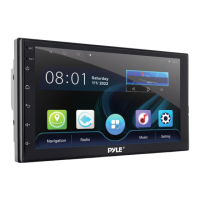

 To Next Page