Need help?
Do you have a question about the Pyle PLINDVTB7 and is the answer not in the manual?
Safety precautions and installation recommendations before starting unit setup.
Overview of the unit's physical buttons and their functions for easy access.
Step-by-step guide to powering the unit on and off for operation.
Accessing and using the navigation software and map download features.
Playing music files from local storage like SD cards or USB drives.
Accessing and playing music streams via an internet connection.
Playing video files from storage, supporting 1080P HD resolution.
Viewing and navigating through dates and months on the device.
Tuning into FM/AM radio stations and managing presets.
Connecting and managing Bluetooth devices for audio and calls.
Adjusting audio equalizer settings with 32 bands for fine-tuning.
Instructions for connecting and using the Phone Link application.
Configuring steering wheel controls for integrated operation.
Customizing audio parameters like EQ, bass, treble, and speaker position.
Cleaning up system memory to improve performance speed.
Setting custom wallpapers and dynamic backgrounds for the device.
Options for resetting network settings or restoring factory defaults.
Configuring automatic or manual date and time settings.
Details on front and rear camera functionality for recording and parking.
How the G-sensor detects impacts and protects footage from overwriting.
Continuous monitoring and recording when the vehicle is parked.
Solutions for common problems like power, video, GPS, and time settings.
Information on the availability and possibility of firmware updates.
Advice on compatible video file formats and SD card usage for playback.
Procedure to calibrate the touchscreen for accurate input and responsiveness.
Identification of connectors on the unit's back panel for various functions.
Pinout details for the 20-pin connector for audio and accessory functions.
Pinout details for the 12-pin connector for rear camera and power.
Pinout details for the 8-pin connector for IR, CAN bus, and other signals.
Pinout details for the 4-pin connector for USB and accessory connections.
Pinout details for the 6-pin connector for USB and accessory connections.
Pinout details for the 10-pin connector for TPMS, IR, CAM, and antenna signals.
Diagram and table detailing the power cable connections and speaker outputs.
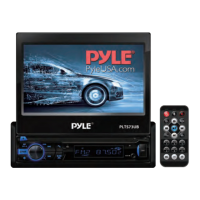
This document describes the Pyle PLINDV7B7, a 7-inch adjustable single DIN car stereo receiver with wireless Bluetooth, Wi-Fi, GPS, AM/FM radio, a 1080P HD touch screen, multimedia player, mirror link for Android/iOS phones, and front/rear DVR recorder. It also features dual USB ports, 2GB RAM, and 32GB ROM.
The unit operates on an Android platform, allowing users to download and install various applications in addition to the pre-installed ones. However, it's important to note that not all third-party apps may be compatible with this platform. For any compatibility issues or operation instructions for third-party apps, users are advised to contact the app provider directly.
Before installation, it is crucial to disconnect the battery terminal to prevent short circuits. The installation guide advises consulting a vehicle dealership before making any modifications to the car's body and using the included screws for installation to avoid damage or accidents. The unit should not be installed in areas where it might obstruct the steering wheel, gearshift lever, safety devices like airbags, or visibility.
To power on the unit, the engine key should be turned to the "ACC" or "ON" position, and the power button should be pressed and held for 3 seconds. When the engine key is turned off, the unit's Status Bar will also turn off. A reset port is available for troubleshooting, requiring a pin to be inserted and held for 20 seconds to trigger a unit reset.
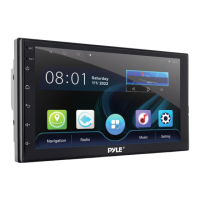
The main interface provides access to various functions such as Radio, Phone, All Apps list, Navigation, and Settings. Users can swipe up or down to access more applications.
The navigation feature allows users to enter the navigation interface by clicking "navigation" on the main screen. If map data is not present on the memory card, the system will prompt for download and enter the map management interface. Users can download city map data, manage downloads (pause, cancel, update), and return to the previous level interface.
For local music playback, users can click "music" on the main interface. This function is active when an SD card or USB device with media files is connected. The music player includes controls for folder access, sound settings, loop playback, previous/next song, and pause/play.
Video playback is accessed through the "Video Player" interface, supporting 1080P HD video. Similar to music, this feature requires an SD card or USB interface with corresponding media files. The system automatically plays the last video file when the player is opened. Video player controls include menu access, last track, play/pause, next song, and full screen.
The radio function is accessed by clicking "radio" on the main interface. The FM/AM band can store up to 40 effective platforms. Features include searching channels backward or forward, switching between FM1/FM2 bands, searching for radio stations, forward/backward tuning, locating and DX, and audio settings.
The wireless Bluetooth feature is accessed via the "Bluetooth®" icon. If no Bluetooth device is connected, the interface will prompt "Please connect HFP" when attempting to dial. The interface displays contacts, allows for dialing, and shows call status. Device settings for Bluetooth include setting device name, PIN, auto-connect, and auto-answer.
The DSP 32-band equalizer allows for detailed audio adjustments, including UltraBass, MediumBass, Mediant, Middle Treble, Treble, and Ultra Treble. Users can adjust frequencies and Q-factors, and select from preset scenes like Custom and Emperor.
The Phone Link APP enables mirroring for Android/iOS phones, with detailed instructions available on the unit itself. The unit also supports third-party apps like Google Maps and YouTube, but users should contact the app provider for specific operation instructions or compatibility issues.
Steering wheel learning allows users to program the unit to respond to their car's steering wheel controls. This involves pressing a key on the steering wheel, accessing the docking function on the screen, and then pressing the corresponding function button on the steering wheel. A reset option is available to clear saved keys. This feature is compatible with non-bus control steering wheels that use voltage input.
Brightness and volume settings can be adjusted directly from the interface. GPS monitoring provides related GPS information and allows for a GPS restart. Sound settings include adjusting subwoofer, bass, midrange, and treble levels, selecting sound modes (Rock, Custom, Classic, Jazz, Pop), and adjusting speaker positions. A "default" icon restores sound settings to the system's default state.
Memory clean helps speed up the system by clearing memory. Users can customize the desktop wallpaper from "wallpaper" or "dynamic wallpaper" options.
The unit includes reset options: "Reset Network" clears all network settings (WLAN, Mobile Data Network, Wireless BT), and "Restore factory settings" reverts the system to factory defaults and clears all user data.
Time setting can be automatic via network or GPS, or manually adjusted. The 24-hour system can also be enabled or disabled.
The unit supports dual HD DVR cameras (front and rear), providing parking assistance and acting as DVR cameras. These cameras cover both front and rear angles, monitoring roads simultaneously. Videos from both cameras are stored on the memory card.
A built-in Gravity Sensor (G-sensor) automatically detects sudden shakes or collisions, locking footage to prevent overwriting during cycle recording. This ensures accident scenes are preserved. Cycle recording automatically overwrites the oldest files when the memory disc is full, eliminating concerns about memory capacity.
The 24-Hours Parking Monitor feature monitors the car's surroundings when parked. If an impact triggers the G-sensor, the front and rear cameras will automatically turn on, record a short video, lock and save it, then turn off.
The manual provides solutions for common issues:
For optimal touchscreen performance, the unit offers a "Touch Screen Calibration Menu." Users will see an "X" appear in numbered circles on the screen. They must continuously press the center of the "X" as it moves through each circle. If an error is detected, the process may restart.
 General
| Brand | Pyle |
|---|---|
| Model | PLINDVTB7 |
| Category | Car Receiver |
| Screen Size | 7 inches |
| Resolution | 800 x 480 pixels |
| Touchscreen | Yes |
| Bluetooth | Yes |
| USB Port | Yes |
| SD Card Slot | Yes |
| AUX Input | Yes |
| AM/FM Radio | Yes |
| DVD Player | Yes |
| Built-in Microphone | Yes |
| Remote Control | Yes |
| Backup Camera Input | Yes |
| Video Output | RCA |
| Audio Output | RCA |
| Display Type | LCD |
| Audio Formats Supported | MP3, WMA |
| Video Formats Supported | MP4, AVI |

 To Next Page