11
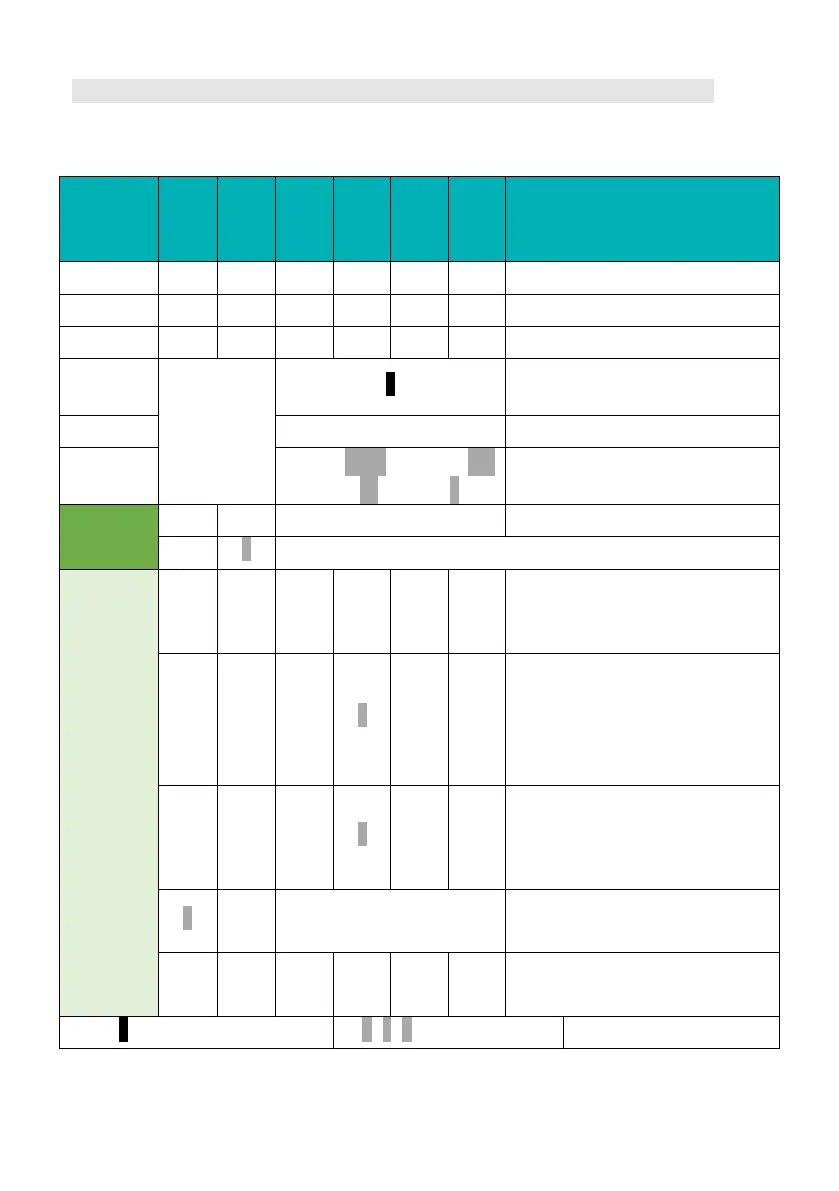
LED Status Indicators
It`s important to check the detailed alarm/protection definitions according to
the following table for trouble-shooting and maintenance service.
Turn off
● ● ● ● ● ●
All LED lighting until battery is Off.
Power off - - - - - -
Turn on
Flash once.
Idle
●
Only current SOC status LED slowly
flashes.
Charge
●
Only current SOC status LED solid.
Discharge
100-76%●●●● → 75-51%●●●
→ 50-26%
→ 25-0%
Residual SOC LEDs flash per second.
Alarm
-
Show SOC Alarm: high current.
-
Low SOC (SOC ≤ 5% or single cell voltage ≤ 2.9 V).
Protection
●
●
Charge MOS OFF.
Possible reason:
charging over current; Over Voltage.
●
●
Discharge MOS OFF.
Possible reason:
discharging over current;
Low Voltage; Short circuit;
Reverse polarity.
●
● ●
Charge and discharge MOS all OFF.
Possible reason:
Over/Low Temperature;
MOS Over Temperature; BMS error.
●
Show SOC
Internal communication error,
Address assignment error.
● ●
:
MOSFAIL; FUSE broken.
: flash 1.5s off/0.5s on
/
/
: flash 1s off/1s on
/
/
: constant lighting



 To Next Page