ALM RUN Capacity LED Descriptions
● ●
Shut down OFF OFF OFF All off
Normal OFF Blink 1 OFF standby
Alarm Blink 3 OFF OFF Low voltage
Normal OFF Light
Alarm Blink 3 Light
Normal OFF Blink 3
Alarm Blink 3 Blink 3
Battery
status
Protection /
Alarm /
Normal
All lights stay on simultaneously
for one second
Power-on Normal ON ON ON
Protection triggered,
charging stops
Protection triggered,
discharging stops
Protection Light OFF OFF
Protection Light OFF OFF
Base on capacity
Base on capacity
Charging
Discharge
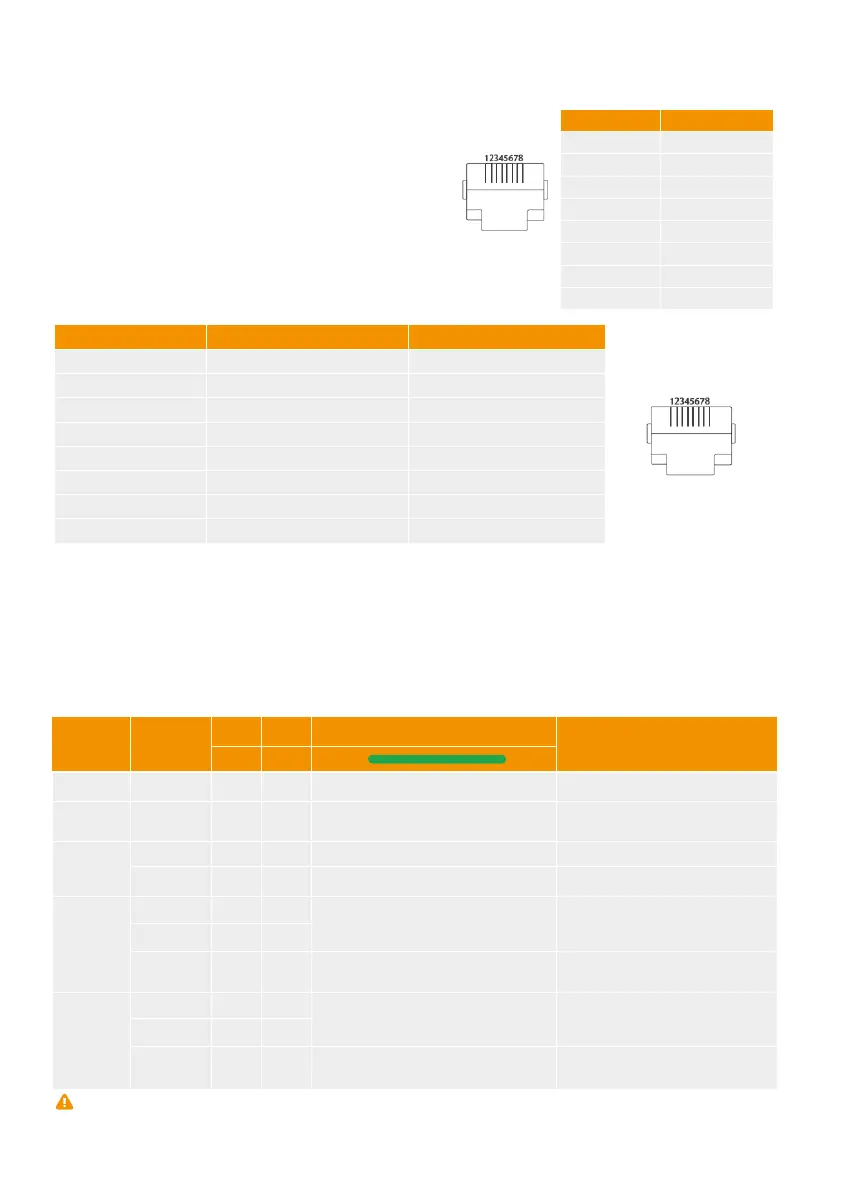
Default baud rate of RS-232C ports: 115200bps.
6.1 RS232 port
6.2 RS485 port and CAN port.
7 Troubleshooting
Table 6-2 RS485 and CAN Connector Pin Assignments
Table 6-1 RS232 Connector Pin Assignments
Default baud rate of RS-485 port: 9600bps
Default baud rate of CAN port: 500K
Please refer to the troubleshooting methods mentioned below. Please read the “Table 7-1 LED indica-
tion” of this manual before troubleshooting to avoid false operations.
For example, the blinking or constant red light of the ALM alarm on the front panel does not necessarily
indicate a faulty battery. In most cases, the "alarm" indication signifies normal operation and requires no
troubleshooting. Furthermore, if the battery indicates "protection," it will resume normal operation
automatically once the "protection" status is released.
Table 7-1 LED indications
Note: The blinking descriptions: Blink 1“0.3s on/3.7s off”; Blink 2 “0.5s on /0.5s off”;Blink 3“0.5s on / 1.5s off”;
Blink 4“0.7s on / 9.3s off”
1
2
3 RXD
4 GND
5
6 TXD
7
8
1 RS485B
2 RS485A
3 GND
4 CANH
5 CANL
6 GND
7 RS485A
8 RS485B
Pin number RS-232C port
Pin number Serial CAN
Standby
15



 To Next Page