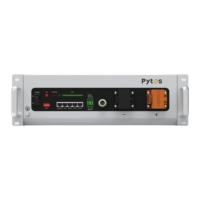
2.2 Components
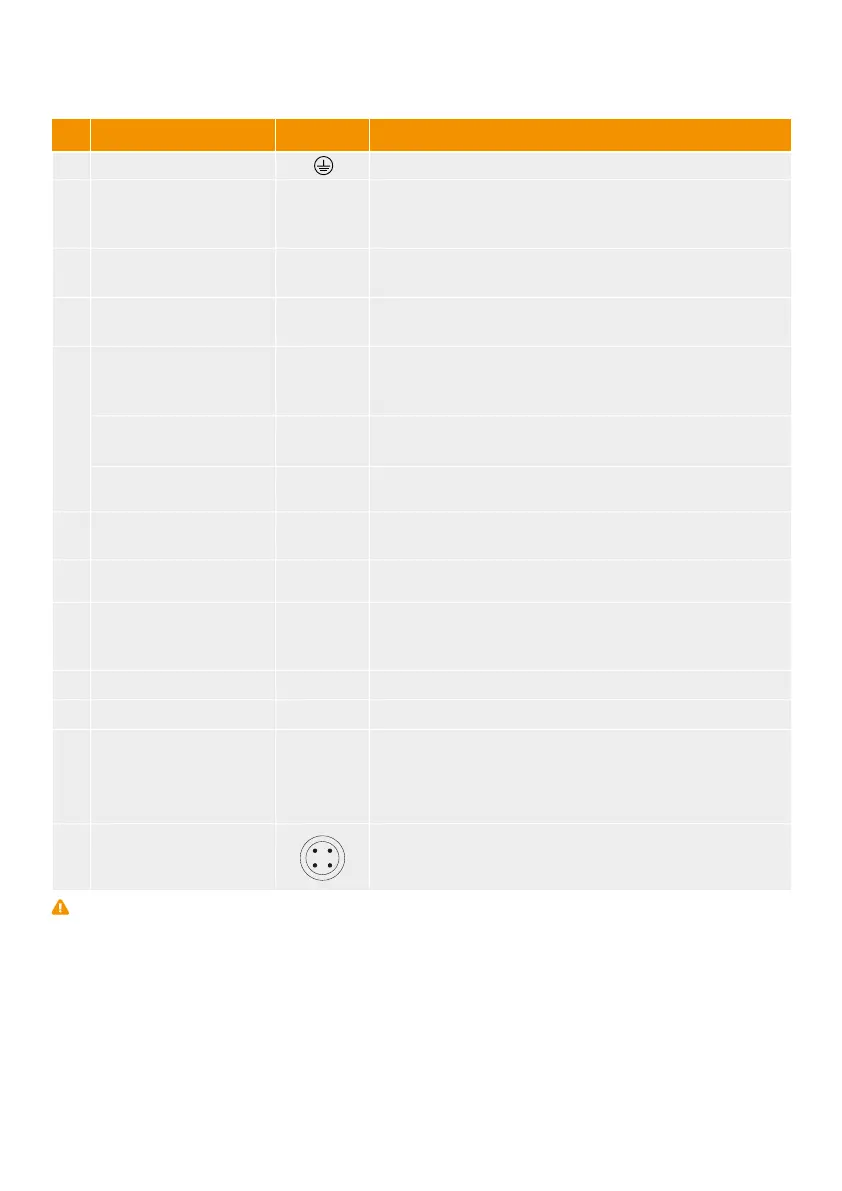
No. Name Label Functions description
1 Ground Connection for ground cable
2 Power button POWER
3 Soft start switch SW
4 DIP Switch ADD
Running Light RUN
Alarm Indicator ALM
SOC indicator SOC
6 CAN
7 RS485
9 Negative Power Terminal “-” Negative input and output interface
10 Positive Power Terminal “+” Positive input and output interface
When switched to "ON", the system can be activated by
the "SW" key or external power supply; when switched to
"OFF", the system is off.
When the on/off button is "ON", press and hold this button
for 1 second to enter the startup or sleep mode.
Set according to inverter brand, see checking list
Green light. The light flashes when Standby. The light is
constantly on when charging. The light blinks when
discharging.
Red light. The light flashes when Alarming. The light is
continuously on when protected.
Light bar shows current remaining capacity.
1 way input and 3 ways output dry contact signal.
Real-time monitoring of battery status and remote upgrade
RJ45 ports, connect Port 1 of the previous battery to Port
0 of the next one. The Port 0 of the master battery is
vacant.
External CAN
communication port
Cascade
communication port
Dry Contact
LoT port
IN1-/IN1+
COM2/NO2
COM3/NO3
COM4/NO4
External RS-485
communication port
Warning: 6,7,8,9,10,11,12is DVC-A circuit, they shall not be connected to DVC-B/C circuit when installed, or hazard shock
will occur.
5
RJ45 port, follows CAN protocol, for outputting battery
information.
RJ45 port, follows RS485 protocol, for outputting battery
information.
Prot 1/0
8
11
12
9



 To Next Page