27
This button exits zoom mode.
4.5.5 PTZ Control
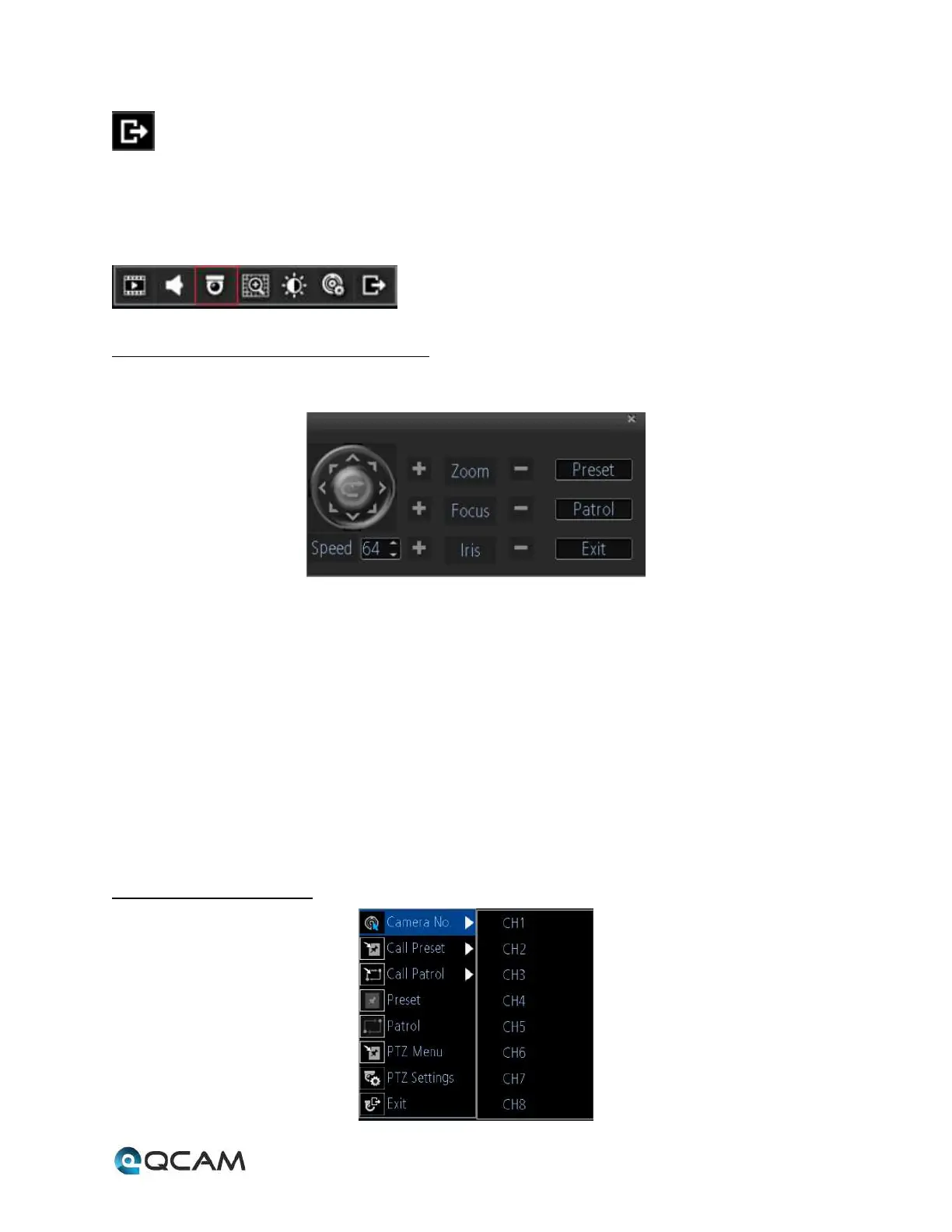
Clicking the PTZ icon on the live-view toolbar will bring up the PTZ control panel:
4.5.5.1 PTZ Presets, Patrols, and Patterns
The controls on the PTZ panel are shown below:
1. Directional Pad/Auto-scan Buttons: Controls the movement and direction of the PTZ. The center button is
used to start PTZ auto-scanning.
2. Speed: Adjusts the movement speed of the PTZ.
3. Zoom: Used to zoom in and out with the PTZ.
4. Focus: Used to adjust the focus of the PTZ.
5. Iris: Used to open or close the iris of the camera.
6. Preset: A preset is a position that the camera is in which is saved to memory to be retrieved later. Choose this
button to enter the preset configuration menu.
7. Patrol: Initiates patrol mode. You’ll need to define a series of preset points for the camera to patrol between.
Choose this button to enter the patrol configuration menu.
8. Exit: Closes the PTZ controls.
4.5.5.2 PTZ Context Menu



 To Next Page